The short version. I removed an analytics plugin because it was loading Google’s tag on a site whose cookie policy promises that nothing loads until the visitor gives analytics consent. Removing the plugin deleted its files. It did not delete its configuration.
Four days later the plugin was installed again. Seven seconds after activation it was serving the tag again — no login to Google, no consent screen, no OAuth round trip. It read the settings the first deletion had left behind and armed itself.
For 85 hours and 27 minutes my privacy policy said “the Google script is never requested” while the homepage requested it. And the thing that dates the incident is not a plugin file. It is an access log I only thought to read afterwards.
A cookie policy is a claim about network traffic
That is the whole idea and it is what makes this class of failure worth writing down. A privacy page is not a statement of intent. It is a set of assertions about which hosts a browser contacts and when, and every one of them can be checked with a single request.
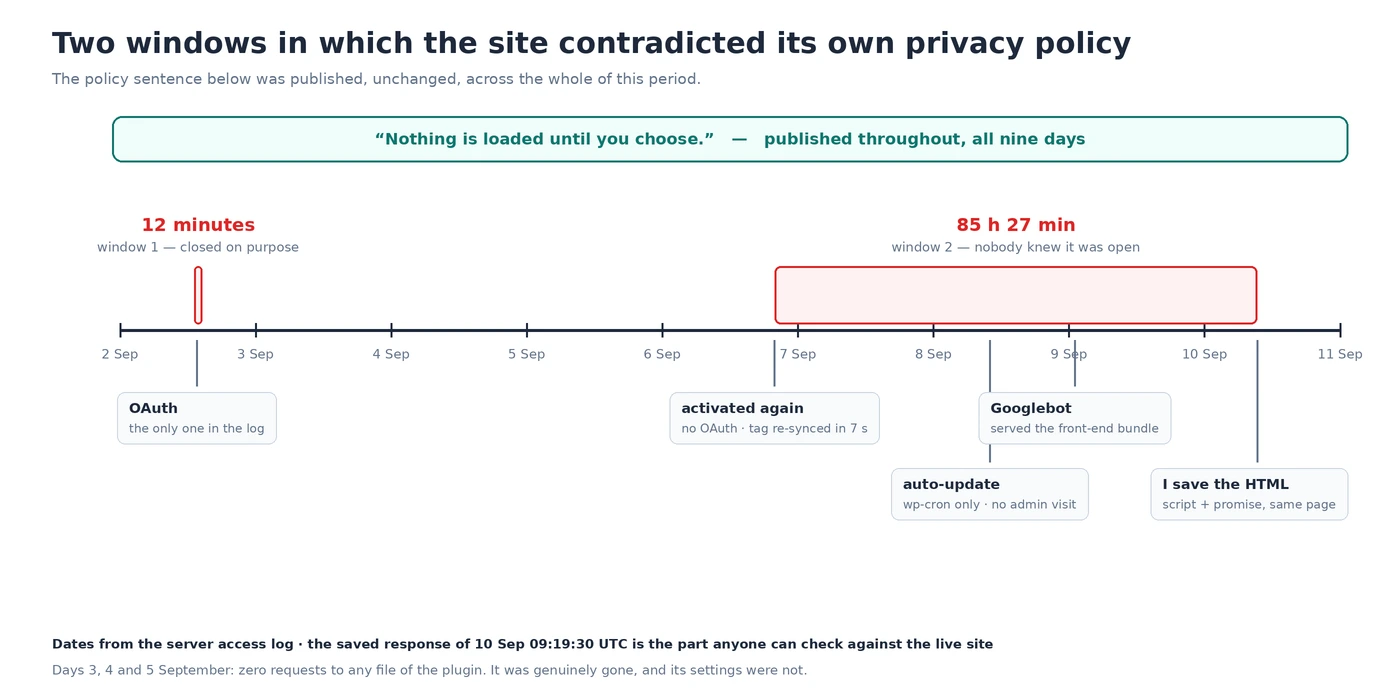
Here is what this site publishes, and has published throughout. From the cookie policy: “until you do, no Analytics cookie is written and no Google script is loaded at all”, and, twice, “Nothing is loaded until you choose.” From the privacy policy: “Decline and the Google script is never requested, so nothing about your visit reaches Google.”
Those are falsifiable. And the same cookie policy contains the sentence that convicts it, which I wrote months ago and meant sincerely:
“A cookie policy that describes cookies a site does not set is as wrong as one that omits the cookies it does.”
The file that contains both halves
On 10 September at 09:19:30 UTC I saved the HTML this site served to a client with no cookies. That one file contains, on the same page:
<script id="google_gtagjs-js" src="https://www.googletagmanager.com/gtag/js?id=GT-P3JCGS3J">

"Nothing is loaded until you choose."
The promise and its violation, in the same response, to the same reader. Nothing about that request was special: no cookie jar, no logged-in session, no headers a visitor would not send.
This is the part anybody can check on their own site right now, and it takes one command. Request your own homepage the way a first-time visitor does, and count what it reaches for before anyone has clicked anything:
curl -s https://yourdomain/ | grep -oE '<script[^>]*src="https://[^"]*"' | sort -uThen read your own cookie policy and see whether the two agree. If your policy says a consent banner gates the trackers, every third-party host in that list is either a contradiction or an exception you have not written down. On this site the list is now empty, which is what the policy has been claiming the whole time.
What actually happened, in order
The reconstruction below comes from the server’s own access log. I want to be plain about that: the timestamps are from a private log, not something a reader can verify. What is public and checkable is the saved response above and the current behaviour of the site.
| When (UTC) | What | How I know |
|---|---|---|
| 2 Sep 13:36:53 | Plugin activated | plugins.php?action=activate in the access log |
| 2 Sep 13:37:35 | Google account connected | The single oauth2callback request in the entire log |
| 2 Sep 13:39–13:51 | Tag served to visitors, then removed | Front-end bundle requested, then 404 at 13:51:41 |
| 3–5 Sep | Genuinely absent | Zero requests to any of its files, three days running |
| 6 Sep 19:52:19 | Activated again | Second and last action=activate in the log |
| 6 Sep 19:52:26 | Google tag re-synced — seven seconds later | googleTagLastSyncedAtMs in its own settings |
| 8 Sep 09:57:35 | Automatic update rewrites its files | wp-cron.php and a loopback scrape, no admin visit |
| 9 Sep 01:00:04 | Googlebot served the front-end bundle | Access log, 66.249.73.101 |
| 10 Sep 09:19:30 | I save the response above | The file, still on disk |
| 10 Sep 09:40:09 | Deactivated | recently_activated, still in the database |
Two windows, not one. The first lasted twelve minutes and I closed it deliberately. The second lasted 85 hours and I did not know it was open.
The seven seconds that matter
Reinstalling an analytics plugin should not be enough to start tracking. It needs an account connected and a property chosen, and both of those are deliberate acts with screens attached.
None of that happened on 6 September. The only OAuth callback in the entire log is from 2 September. On the sixth there is an activation at 19:52:19, and by 19:52:26 the plugin had re-synced its Google tag and was already answering requests for Analytics reports with real data.
It did not need to ask because it did not need to remember. The configuration had never left. A database dump I took on 6 September — while the plugin was deleted and its directory gone — still contains googlesitekit_analytics-4_settings, and the backup from the first removal shows that record holding useSnippet: true along with the measurement ID and the tag ID.
Deleting the plugin removed the code that reads the setting. It did not remove the setting. When the code came back, the setting was waiting, and it said yes, emit the tag.
What deletion actually leaves
When I finally removed it properly, I went looking for what stayed. Twelve rows, and the detail that matters is the third column:
SELECT option_name, autoload, LENGTH(option_value)
FROM wp_options WHERE option_name LIKE 'googlesitekit%';
Twelve options, every one of them set to autoload, totalling 4,127 bytes of stored value. Autoloaded options are read into memory on every request to the site, so those bytes were being loaded for every visitor, for a plugin that no longer existed. One of the twelve was named googlesitekit_credentials.
I am not going to tell you that is a breach, because I did not decrypt it and I do not know what state those credentials were in. What I will say is that credential-shaped data belonging to a deleted plugin should not be loading on every page view, and the only reason I found it is that I went looking after the fact.
This is not a scandal about one plugin. WordPress runs an uninstall routine only if the plugin registers one and the deletion path invokes it, and plenty of plugins do not clean up settings on purpose, precisely so your configuration survives a reinstall. That is a reasonable design decision with a consequence nobody writes on the box: uninstalling is not the same as removing, and the difference is invisible until something re-reads what stayed.
What the documentation actually promises
None of this is undocumented behaviour. It is documented behaviour that nobody assembles into a sentence, so here are the four pieces, quoted rather than summarised.
Uninstalling is opt-in, and the docs describe how, not what happens if you skip it
The WordPress plugin handbook says of the uninstall file: “This magic file is run automatically when the users deletes the plugin.” It explains that uninstalling is where you “clear out any plugin options and/or settings specific to the plugin”.
What the page does not say — because it is written for plugin authors, not site owners — is what becomes of those options when a plugin ships no uninstall routine. The answer is that they stay, and the site owner is never told either way.
Autoload means “on every request”, in as many words
The $autoload parameter of add_option() is documented as “Whether to load the option when WordPress starts up”, and wp_load_alloptions() as the function that “Loads and caches all autoloaded options”.
So the twelve rows were not dormant records in a table. They were being read into memory at the start of every page load, by a WordPress that had no idea the code which put them there was gone.
A prefetch hint is a real request, just a small one
MDN describes dns-prefetch as “a hint to browsers that the user is likely to need resources from the target resource’s origin, and therefore the browser can likely improve the user experience by preemptively performing DNS resolution for that origin”.
Preemptively. That is the entire point of it, and it is why a leftover prefetch to a tag host is worth a line in a privacy page rather than a shrug: something leaves the visitor’s machine on account of a host they have not agreed to contact.
The date I got wrong, twice
My first reconstruction of this said the plugin arrived on 8 September at 09:57. I got that from the modification time of its directory, which is the obvious place to look and the wrong one.
A directory’s timestamp records the last time files were written into it. On 8 September at 09:57 the only requests to this site were wp-cron.php and a loopback scrape from 127.0.0.1 — no administrator visited anything. The plugin had automatic updates enabled, and still appears in auto_update_plugins today. What I had dated was WordPress rewriting the directory during an unattended update, two days after the activation I was trying to find.
That mistake cost me nothing because I checked it before publishing, which is the only reason I am able to write this paragraph instead of a correction. It is the same failure as measuring a cache with a URL nobody else requests and as explaining a directive without reading the function that handles it: one artefact, read confidently, standing in for evidence it cannot provide.
What I changed, and what it cost
The repair was small. Turning off the plugin’s snippet setting took the external script out of the page entirely: no Google script requested, and its own front-end bundle gone from the HTML. Deleting the plugin removed a leftover dns-prefetch to the tag host — which loads nothing and sets no cookie, but does hand every visitor’s resolver a lookup for Google. Deleting the twelve options took the 4,127 bytes out of every request.
The site is back to its own consent code, which builds the script element only after someone accepts, and back to six plugins, which is a rule here for reasons this incident illustrates better than I could have argued in the abstract.
What it cost was the assumption underneath. I had treated the policy pages as something you write once and keep true by not touching them. They are not. They are assertions about a system that changes when plugins update themselves, when someone reactivates something, and when settings outlive the code that wrote them.
Update, 21 September 2026
Re-checked ten days on, because the point of all this is that a fix is a claim that can quietly stop being true. The wp_options table now holds no row whose name begins with googlesitekit, and the site still runs six plugins. The twelve leftover options have not returned, and nothing has re-added them.
Analytics consent, plugins and leftover settings: frequently asked questions
Does deleting a WordPress plugin delete its settings?
Usually not. A plugin’s options are removed only if it ships an uninstall routine and that routine runs during deletion. Many plugins deliberately keep settings so that reinstalling restores your configuration, which is convenient and means a deleted plugin can leave behind everything needed to resume.
How do I find leftover options from a removed plugin?
Query wp_options for the plugin’s name prefix and look at the autoload column. Anything autoloaded is read on every request whether or not the code that uses it still exists. Back them up before deleting: you are removing configuration, not junk, and a backup is the difference between tidying and losing something.
Can a plugin start tracking again after being reinstalled?
If its settings survived, yes, and without asking. That is what happened here: activation at 19:52:19, tag re-synced at 19:52:26, no authentication step in between because the account link had never been revoked at the site end.
How do I check whether my consent banner is actually working?
Request your homepage with no cookies and list the third-party script sources in the response. A consent banner that gates trackers should produce a list with no analytics or advertising hosts in it. If a host appears there, it is being contacted before anyone has chosen anything, regardless of what the banner does afterwards.
Is a dns-prefetch hint a privacy problem?
It is a smaller one than a script, and not nothing. It loads no code and sets no cookie, but it does cause the visitor’s resolver to look up that host, which is a signal leaving the browser before any consent. If your policy says nothing is requested until the visitor accepts, a prefetch hint is worth removing on accuracy grounds alone.
Should I trust a plugin’s own dashboard to tell me what it is loading?
No, and not because plugins lie. A dashboard reports what it believes it is configured to do. The response your server sends is what visitors actually receive, and those two can disagree for a long time without anything appearing to be wrong.
The general shape of this
Nothing here was a bug. The plugin did what it was configured to do, the configuration was preserved because preserving it is a feature, the update ran because updates were switched on, and the policy pages said what they had always said. Every component behaved correctly and the result was a site contradicting its own privacy policy for three and a half days.
What is missing is anyone whose job it was to notice. A published claim about network behaviour has no test attached to it, no alert, and nothing in any dashboard that goes red when it stops being true. The only thing that catches it is somebody making the request a stranger makes and reading what comes back.
Everything above is checkable on your own site with one command, and the response I quote was saved rather than remembered. If you want that check made against a page of yours, with the requests written out so you can repeat them without me, that is what the free check is for, and the ongoing version of exactly this reading is part of the work I do for money.