The short version. My outgoing mail was failing authentication. Two of the tools I reached for to diagnose it ship inside the same package as the thing they diagnose, and both of them reported something false — in opposite directions.
One prints a malformed header for a signature it computed perfectly, but only in its default invocation: 177 base64 characters where 172 is correct, with the final group repeated. The other, opendkim-testkey, prints “key not secure” for every key you ever give it, including keys in properly signed zones, because the build has no DNSSEC support compiled in at all.
Everything below was re-measured from scratch on the day this was published, and the commands are printed. The package is opendkim-2.11.0-0.36.el9.
Why this matters more than a tool bug
A diagnostic that lies costs more than no diagnostic. If it reports a fault that is not there you go and fix something that was working; if it blesses something broken you stop looking. Both happened here, in the same afternoon, on the same domain.
The underlying job was ordinary. This domain publishes DMARC with p=reject, its DKIM key had been generated but never published in DNS, and its SPF did not list the server actually sending the mail. Those are real faults with real fixes. The work I do is largely finding faults like that, so the part worth writing down is not the repair. It is that the instruments disagreed with reality, and I nearly wrote the wrong explanation twice.
The signing tool prints its own output wrong
opendkim-testmsg exists to sign a message so you can look at the result. Feed it a message on standard input and it returns the message with a DKIM-Signature header prepended. Here is the tail of one, with the header extracted at its real boundary rather than by eye:
b=kWhSmZgEjxX4KR9pXOsN30x8wBiHyUwRKj3vdgrzVEXkWDXwxHtWmheCHuaFQbUpu
  7yb8y5ESbcueRtpZlJb+vgCWU6SYdYRWdXaK92YeZFgxDVMe2M25wXZ4uPvuICjcns
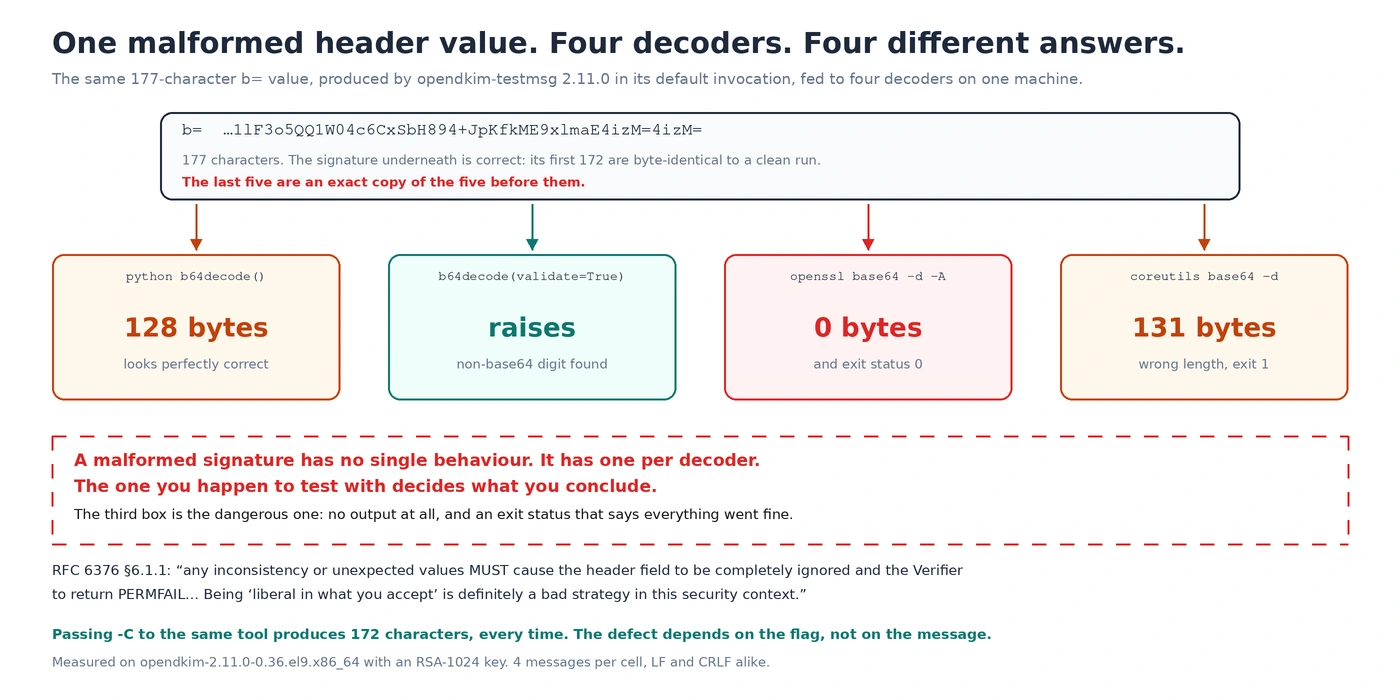
  1lF3o5QQ1W04c6CxSbH894+JpKfkME9xlmaE4izM=4izM=
Read the last nine characters. 4izM= appears twice. The key here is RSA-1024, so the signature is 128 bytes, which is 172 base64 characters. That value is 177, and the extra five are an exact copy of the five before them.
My first instinct was that I had captured the value badly, because a greedy pattern will happily run past the end of a folded header. So the number above comes from walking the header to its real end — the first line that does not begin with whitespace — rather than from a regular expression over the whole message.
It is not the message. It is the flag.
Six different messages produced six identical-shaped failures, which ruled out anything about the content. What it turned out to depend on is the invocation:
| Line endings in the input | Invocation | Length of b= | Final group repeated |
|---|---|---|---|
| LF | default | 177 | yes |
| LF | -C | 172 | no |
| CRLF | default | 177 | yes |
| CRLF | -C | 172 | no |
Four messages per cell. -C is documented as “preserve CRLFs”. Without it — which is how the tool is invoked in every example I have seen, including my own — the output is malformed regardless of what you feed it.
The signature is fine. The header is not.
This distinction matters, and getting it wrong would have been an unfair accusation. Same message, same key, same second — the t= timestamp is identical in both runs — and the first 172 characters of the two b= values are byte for byte the same. Decode each to its 128 bytes and hash them: identical SHA-256. The five extra characters are a copy of the signature’s own last five.
So the RSA is correct and the tool is not producing bad cryptography. It computes the signature properly and then prints the header wrong, which is a smaller fault with the same practical consequence, because what leaves the machine is the header.
The extra characters are not five. They are one per fold.
Five looked arbitrary until I tried other key sizes. It is not arbitrary at all:
| Key size | Header lines | Folds | Length of b= | Correct length | Excess |
|---|---|---|---|---|---|
| RSA-1024 | 6 | 5 | 177 | 172 | 5 |
| RSA-2048 | 9 | 8 | 352 | 344 | 8 |
| RSA-4096 | 14 | 13 | 697 | 684 | 13 |
Three throwaway keys, generated for this. In all three the excess equals the number of folds in the header exactly — one stray character per line break.
That is consistent with carriage returns being stripped in place without the printed length being adjusted afterwards: remove one byte per fold, print the original length, and the tail picks up that many bytes of whatever was already in the buffer — which here is the end of the value itself. I have not read the source to confirm it, so treat the mechanism as the shape the numbers make rather than as a diagnosis of the code.
What the standard says about that value
RFC 6376 is unusually direct here. The b= tag, in section 3.5, permits exactly one liberty: “Whitespace is ignored in this value and MUST be ignored when reassembling the original signature.” Whitespace, and nothing else. The ABNF for base64string is in section 2.10, and it places the = padding at the end — not in the middle with more characters after it.
And on what a verifier should do with anything unexpected, section 6.1.1:
“Implementers MUST meticulously validate the format and values in the DKIM-Signature header field; any inconsistency or unexpected values MUST cause the header field to be completely ignored and the Verifier to return PERMFAIL (signature syntax error). Being ‘liberal in what you accept’ is definitely a bad strategy in this security context.”
A conforming verifier must reject that header outright. Which raises the obvious question, and it has an answer I did not expect.
What happens next depends on who decodes it
I fed the same 177-character string to four base64 decoders that are sitting on this server already. They do not agree about anything:
| Decoder | Result | Exit status |
|---|---|---|
Python base64.b64decode() | 128 bytes — looks perfectly correct | success |
Python b64decode(validate=True) | error: non-base64 digit found | raises |
openssl base64 -d -A | 0 bytes — nothing at all | 0, success |
coreutils base64 -d | 131 bytes — wrong length, no error text | 1 |
One string, four outcomes: correct, an exception, silence, and garbage. Note the third row: openssl produces nothing and reports success, which is the worst combination available. PHP’s strip_tags() fails in that same third row: it deleted three quarters of a post here over a single character, with no error, no warning and no exception.
That table is the actual lesson, and it is bigger than one package. A malformed signature does not have a single behaviour. It has as many behaviours as there are things that might read it, and the one you happen to test with decides what you conclude. If I had checked with Python’s default decoder and stopped, I would have written that the signature was fine.
The opendkim-testkey warning that is a constant
The other tool is opendkim-testkey, which checks that the key published in DNS matches the private key on disk. On this domain it says:
opendkim-testkey: checking key 'default._domainkey.visibleorigin.com'
opendkim-testkey: key not secure
opendkim-testkey: key OK
Two consecutive lines, one alarming and one reassuring. I spent longer than I would like deciding which to believe, and then wrote an explanation that was wrong: that the tool’s resolver was not validating DNSSEC. That is not it either.
The record is signed and validated. dig +dnssec returns the ad flag and an RRSIG over it, and the resolver this machine actually uses sets ad too. So I pointed the tool at three different records:
| Record | Zone signed? | What the tool printed |
|---|---|---|
default._domainkey.visibleorigin.com | yes, DS published | key not secure, then key OK |
google._domainkey.hubspot.com | yes, DS published | key not secure, then keys do not match |
k1._domainkey.mailchimp.com | no DS at all | key not secure, then keys do not match |
Same private key in all three runs, so the second line differs as it should. The first line does not differ, and cannot: a signed zone, another signed zone and an unsigned zone all produce it.
The reason is in the binary rather than in DNS. ldd on the tool shows it linked against libresolv and nothing else — no libunbound, no libldns. opendkim -V lists its active code options as QUERY_CACHE, USE_DB, USE_LDAP, USE_LUA and USE_ODBX; USE_UNBOUND is absent, and the string does not appear in the binary at all. The package that would provide it is not installed.
The DNSSEC path was never compiled into this build, so that line can only ever say one thing. It is not a warning about your key. It is a description of the tool, printed in the grammar of a finding about your domain.
Ruling myself out first
Before accusing a tool of anything I had to eliminate the likelier explanation, which is that I was measuring badly. That is not modesty; it is that I had already done exactly that ten minutes earlier.
My first look at the signature used a regular expression over the whole message, and folded headers make that a trap: the pattern ran past the end of the header and swallowed the beginning of the next one, producing a tail that looked even more corrupt than the real thing. Had I published from that reading, the numbers would have been wrong and the conclusion accidentally right, which is the worst way to be correct.
So the measurement was redone by walking the header to its structural end — the first line that does not start with whitespace — and only then counting. Six messages, then a grid of line endings against invocation flags, then the same string through four decoders. The claim survived a better measurement, which is the only reason it is here.
This is not a general recommendation to distrust yourself into paralysis. It is narrower: before publishing that a tool is wrong, make the measurement one degree more careful than the one that produced the suspicion. Most suspicions do not survive that, and the ones that do are worth writing down.
The fix that would have half-worked
The third instrument that could have misled me was my own reasoning, and it nearly did.
The SPF record did not list this server, so mail from it was getting softfail. The obvious repair is to add the server’s address. Adding the IPv4 address alone would have tested clean from everywhere I would have thought to test, and still failed at the recipient that mattered.
This machine has a global IPv6 address, Postfix here runs inet_protocols = all with smtp_address_preference = any, which means it chooses a family per recipient — and Gmail’s mail exchangers publish AAAA records. Mail to Gmail can leave over IPv6, from an address a v4-only SPF record does not authorize.
That also brings a second requirement into play. Google’s sender guidelines state that “the public IP address of a sending SMTP server must have a corresponding PTR record that resolves to a hostname”, and that “the same hostname must also have an A (for IPv4) or AAAA (for IPv6) record that resolves to the same public IP address”. So before recommending the IPv6 address I checked that its reverse lookup closes the circle: the PTR gives a hostname, and that hostname’s AAAA comes back to the same address. It does.
The published record ended up as both families plus the two services that already send for this domain. ip4: and ip6: mechanisms cost zero DNS lookups, so the whole record consumes two of the ten the specification allows, both from the include: terms.
Email authentication tools: frequently asked questions
Why does opendkim-testkey say “key not secure”?
On builds without DNSSEC support compiled in, it says that about every key regardless of the zone. Check whether your binary has it: opendkim -V should list USE_UNBOUND among its active code options, and ldd should show libunbound or libldns. If neither is there, the line carries no information and the one to read is the next one.
Is “key OK” enough to conclude DKIM is working?
It tells you the published key matches the private key, which is necessary and not sufficient. It says nothing about whether the milter is signing, whether the selector in the signature matches the one you published, or whether the receiver accepts the result. For that, send a real message through the path that signs it and read what a receiver says about it.
Why does opendkim-testmsg refuse my message?
It requires From: and Date:, which is exactly the minimum RFC 5322 requires of any message: “the only required header fields are the origination date field and the originator address field(s)”. It is right to refuse. The problem is that it reports dkim_chunk(): Syntax error, which sends you to look at your DKIM configuration rather than at your missing header. Message-ID: is not required, by the standard or by the tool.
Should I trust a signature produced by opendkim-testmsg?
Not from its default invocation, on this version. Pass -C and check that the b= value is the length your key size implies: 172 base64 characters for a 1024-bit key, 344 for 2048-bit. If it is longer, look at the end of it.
Do I need both ip4 and ip6 in SPF?
If your server has a global IPv6 address and your mail transfer agent is allowed to use it, yes. Check what your MTA will do rather than assuming: on Postfix, postconf -h inet_protocols smtp_address_preference answers it in one line. Both mechanisms cost zero DNS lookups against the limit of ten.
How do I check email authentication end to end?
Send a message through the path that actually signs it — not through a relay that signs differently — to a service that replies with a report, and read the report rather than your own tools. The three lines that matter are the SPF result, the DKIM result and the reverse-DNS check, and they are independent of each other.
The general shape of this
Every tool here was doing something reasonable. One preserves line endings when told to, and mangles a value when not. One reports the DNSSEC status it is capable of computing, which on this build is none. Neither is malicious and neither is even, strictly, broken: they are answering questions slightly different from the ones I was asking, and the answers arrive in the vocabulary of the question I thought I asked.
The habit that would have saved the time is not scepticism about tools in general, which is exhausting and mostly unhelpful. It is narrower: when a diagnostic tells you something surprising, find out what it can and cannot know before you act on it. Three minutes with ldd and opendkim -V would have retired “key not secure” permanently, and I ran them last instead of first.
The domain now passes all three checks, verified by sending real mail to a service that reports back rather than by asking the local tools again. If you want the same reading taken on a domain of yours, with the requests written out so you can repeat them without me, that is what the free check is for. The neighbouring note on reading a log line in the wrong sense is the same failure in a different layer.