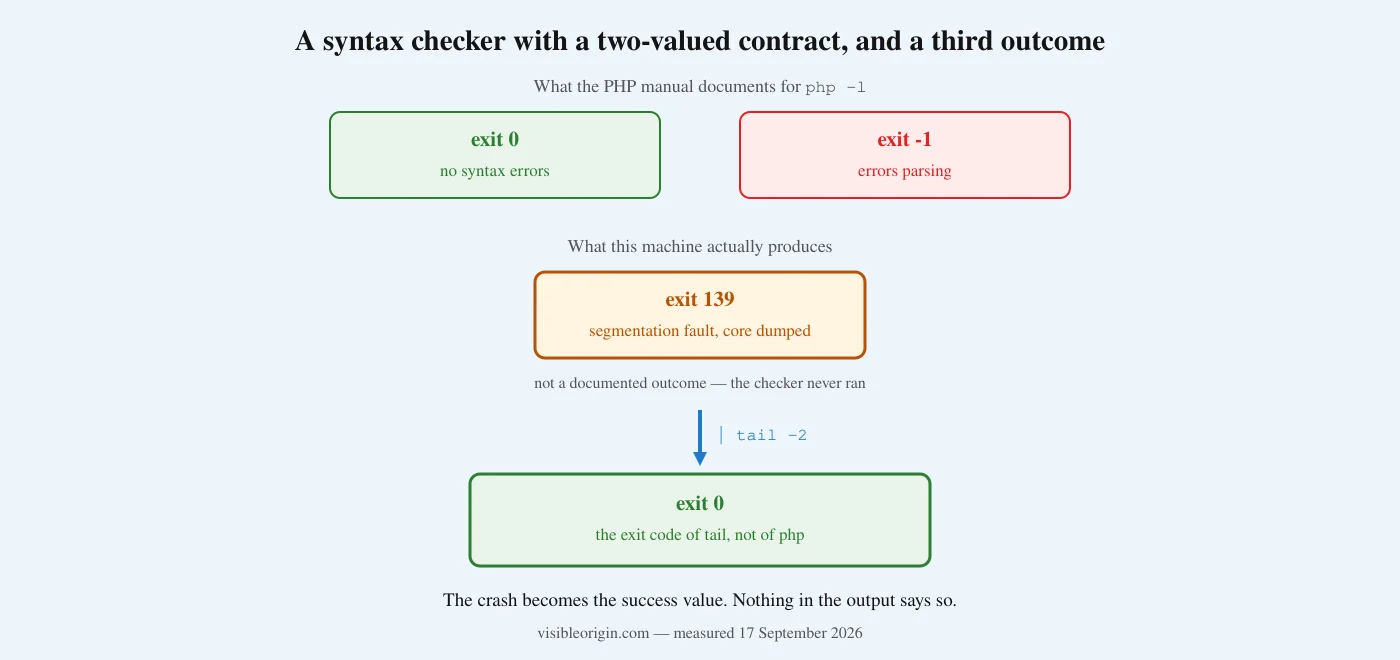
The short version. The syntax check built into PHP crashes on this machine. Not on a difficult file — on <?php echo 1;. It segfaults, dumps core, and exits 139.
The manual documents exactly two outcomes for that command: 0 for clean, -1 for errors. 139 is not one of them. And if you pipe the output anywhere, the shell reports the exit code of whatever you piped into — which is usually 0, the value that means your file is fine.
I nearly recorded a crash as a passing check, on a file I was about to install. Then I nearly published the wrong cause, because my first test moved one setting when the crash needs two.
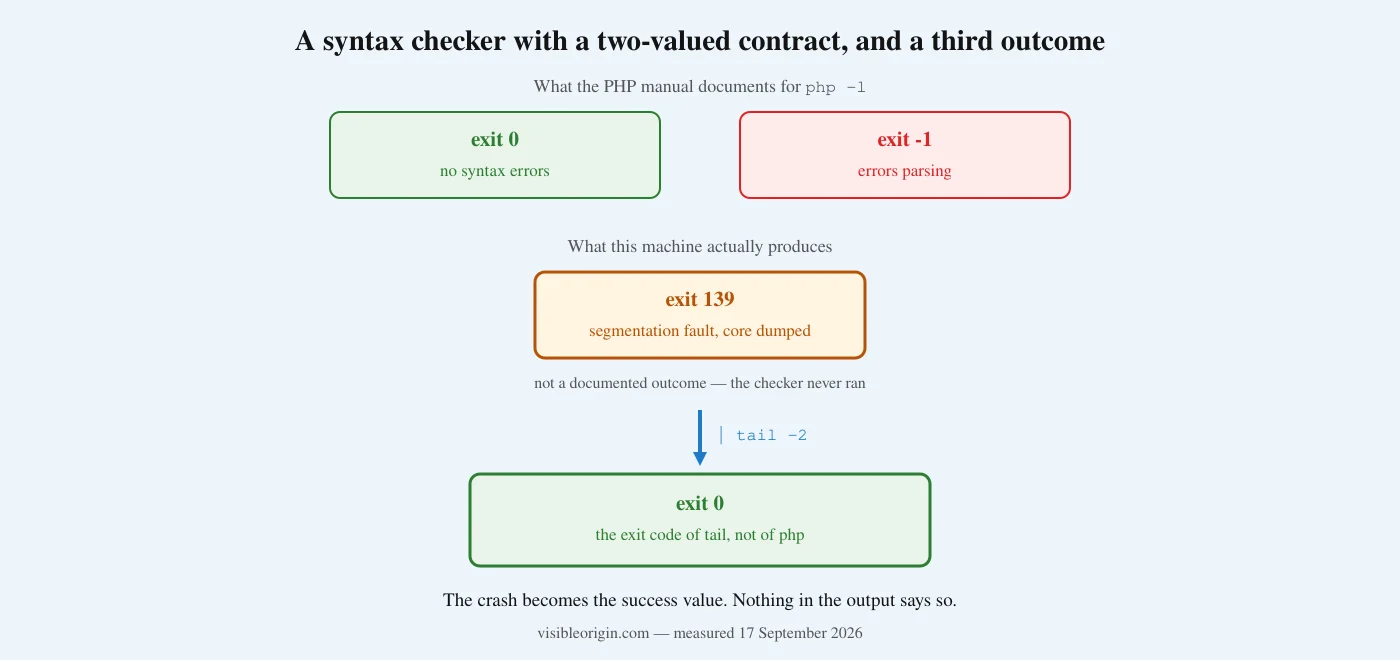
What the syntax check promises
The PHP manual is precise about what -l does: “Syntax check but do not execute the given PHP code… On success, the text No syntax errors detected in <filename> is written to standard output… If any failures are found in the specified files, the shell return code is set to -1, otherwise the shell return code is set to 0.”
Two outcomes, both defined, both reported in the exit code. That is a good contract, and it is the reason the command is the default first step in every “validate before you install” routine, including mine.
There is a smaller gap before we get to the big one. That documented -1 is not what a shell receives, because exit statuses are a single unsigned byte. Feed the checker a genuinely broken file and the number that comes back is 255:
$ printf '<?php\nfunction f( {\n' > roto.php
$ php -l roto.php ; echo $?
PHP Parse error:  syntax error, unexpected token "{", expecting variable
Errors parsing roto.php
255
Harmless in practice — anything non-zero means failure — but the documented value and the observed value already differ before anything goes wrong.
What the contract does not cover is the checker failing to run. There is no exit code for that, because the manual does not anticipate it, and nothing in the output distinguishes it. A crash produces no Errors parsing line. It produces no line at all.
What actually happens here
I found this while validating a small plugin I had written, using the PHP that serves this site:
$ /usr/local/lsws/lsphp82/bin/php -l vo-security-txt.php
Segmentation fault (core dumped)
$ echo $?
139
My first assumption was that my file was broken, which is the assumption the tool invites. It was not. The same binary runs the same file without complaint. It crashes only in check mode, and it crashes on anything:
$ echo '<?php echo 1;' > t.php
$ /usr/local/lsws/lsphp82/bin/php -l t.php
Segmentation fault (core dumped)
A file that cannot be wrong crashes the thing that checks whether files are wrong. At that point the interesting question stops being “what is in my file” and becomes “what has my validation been doing for the last three weeks”.
The setting that causes it, and the test I got wrong first
This box has seven PHP builds. Running the same one-line file through each of them separates the crash cleanly:
| Build | opcache.enable | opcache.enable_cli | php -l |
|---|---|---|---|
| 7.4 | 1 | 1 | exit 0 |
| 8.0 | 1 | 1 | exit 0 |
| 8.1 | 1 | 1 | 139 |
| 8.2 | 1 | 1 | 139 |
| 8.3 | 0 | 0 | exit 0 |
| 8.4 | 1 | 1 | 139 |
| 8.5 | 1 | 1 | 139 |
Same file, same command, seven interpreters. Measured 17 September 2026.
Read that table quickly and 8.3 looks immune. That is what I concluded, and I was wrong for about four minutes. I tested it by forcing the one setting that looked responsible:
$ lsphp83 -d opcache.enable_cli=1 -l t.php
No syntax errors detected in t.php
Clean. Which would have meant the crash was a property of certain versions, and that 8.3 was safe by nature. The test was incomplete and the conclusion it supported was false. On 8.3, opcache.enable is also off, and enable_cli does nothing on its own. Moving both:
$ lsphp83 -d opcache.enable=1 -d opcache.enable_cli=1 -l t.php
Segmentation fault (core dumped)
So 8.3 is not immune. It is protected, by a configuration that differs from its siblings. The full matrix on any of the affected builds is unambiguous: with either setting off the check passes, and only with both on does it crash. The version boundary is real too — 7.4 and 8.0 survive both settings forced on.
Worth knowing: the manual gives opcache.enable_cli a default of 0, and describes it in one line — “Enables the opcode cache for the CLI version of PHP.” The crash therefore requires a non-default configuration, which five of the seven builds here happen to have.
Finding out what your server actually runs, as opposed to what its documentation and its dashboards say it runs, is the first thing the free check does, with every command written out so you can repeat it. Getting a stack to agree with its own configuration is the technical SEO and server work.
The part that makes this worth writing
A crash is an inconvenience. A crash that reports success is a different category, and this one does, through a habit almost everyone has:
$ php -l t.php | tail -2
$ echo $?
0
This is not a quirk of one shell. POSIX defines it, in section 2.9.2, Pipelines: “The exit status of a pipeline shall be the exit status of the last command in the pipeline.” That last command is tail, and tail succeeded — it had nothing to read, and having nothing to read is not an error. The crash is laundered into the exact value that means “no syntax errors”, and the rule doing the laundering is the correct, specified behavior.
The obvious fix is PIPESTATUS, the array Bash fills with the status of every stage. It works, and it has a trap of its own that I walked into while checking this. The array is rebuilt by the next command you run — including the echo you use to look at it:
$ php -l roto.php | sed -n '1p' >/dev/null
$ codigos=("${PIPESTATUS[@]}")     # copied on the very next line
$ echo "${codigos[*]}"
255 0

$ php -l roto.php | sed -n '1p' >/dev/null
$ echo "checking..."               # this echo overwrites it
$ echo "${PIPESTATUS[*]}"
0
The remedy for a false pass, read one line too late, produces a false pass. Copy the array on the immediately following line, or skip it entirely and stop piping:
php -l fichero.php >/dev/null 2>&1 || { echo "syntax check failed"; exit 1; }That form has no array to stale, no last-command-in-pipeline rule to remember, and it fails on 139 exactly as it fails on 255 — which is what you want, because both mean “do not install this”.
I did this to myself before I understood the bug. I ran the check through a pipe, saw a zero, and started to write down that the file had validated. It had not been read. Had the file contained a genuine error, I would have installed it with a clean bill of health, and a broken plugin here does not break one page — it breaks every page.
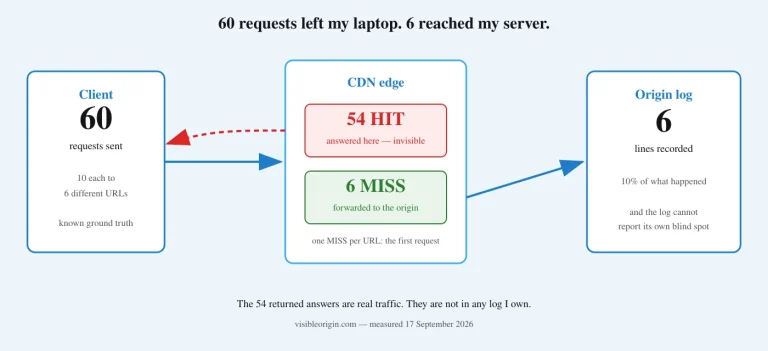
This is the same failure as measuring a site from behind its own cache, which I wrote about after sending 60 requests and finding 6 in my log, and the same as asking one PHP process about a different PHP process. In all three the instrument answered confidently about something other than the thing I was asking.
What to check on your own machine
| Do this | Because |
|---|---|
Capture $? from the command itself, never through a pipe | A pipeline reports the last command’s status, and a crash then reads as success |
If you use PIPESTATUS, copy it on the very next line | The next command rebuilds it — an echo is enough — so a late read shows zeros |
| Test your checker against a file whose answer you already know | A checker that always says “fine” and one that is fine look identical on good input |
Check the interpreter that serves your site, not the one in your PATH | They are frequently different builds with different settings |
| Add a second check that runs the file in isolation | Syntax checking cannot catch output printed outside the PHP tags, which is valid syntax |
| Treat any exit code outside the documented set as “did not run” | 139, 134 and 137 are the process dying, not a verdict about your code |
The second row is the general one. It applies to every validator, not only this command.
The workaround here costs nothing. Break the pair — turn off either setting for command-line runs — and the check works:
$ lsphp82 -d opcache.enable_cli=0 -l vo-security-txt.php
No syntax errors detected in vo-security-txt.php
An opcode cache exists to avoid recompiling the same files on every request. A command-line process that starts, checks one file and exits has no second request to benefit, so disabling it there gives up nothing measurable. It also does not touch the opcode cache used by the web server, which is where the benefit actually lives.
If you validate generated code before deploying it and you have never confirmed that your validator runs, that is a ten-minute check and it is the kind of thing the free check reports with the commands attached. If you would rather someone went through your stack and told you which of your tools are answering about something else, describe what you are running.
Frequently asked questions
Is this a PHP bug or a configuration problem?
Something crashes that should not, so it is a defect somewhere in the interpreter or its opcode cache. But it needs a non-default configuration to appear, and the documented default for opcache.enable_cli is off. On a standard installation you will not see it. I am describing what I measured on this machine, with the commands to reproduce it, rather than making a claim about every PHP build in the world.
Does this affect my website’s performance?
No. This is the command-line interpreter. The opcode cache used to serve pages is a separate setting and a separate process, and nothing here suggests turning that off. If anything, the fix is narrower than people expect: it only changes what happens when PHP is invoked from a shell.
How would I have noticed without looking?
You would not have, and that is the point. The output of a crashed check piped into anything is an empty stream and a zero. Automated pipelines that check the exit code see success. Humans who glance at the terminal see no error message. The only signal is the word “Segmentation” on standard error, and a pipe on standard output does not redirect that — but a script that only inspects the status code never sees it either.
Why did the version table mislead you?
Because one row differed in two settings at once and I only tested one of them. A single-variable test on a two-variable cause produces a clean result and a false conclusion. The fix is mechanical: when a row in your data differs in more than one respect, change them one at a time, and force the values rather than reading them.
Is a syntax check enough before installing generated code?
No, and it was not enough before this bug either. The check confirms the file parses. It cannot tell you that the file prints 700 bytes of prose before its opening tag, because text outside PHP tags is valid. A second check — include the file in isolation and assert that it emits zero bytes — catches that, and it is the check that has actually saved me.
What should I do if I find this on my server?
Turn off the opcode cache for command-line runs, either with a flag on each invocation or in the configuration for the affected builds. It does not require restarting your web server, because it only affects new command-line processes. Then re-run whatever validation you have been trusting, and look at what it says now.
The verdict
The contract said 0 or -1. The machine said 139. A pipe said 0. Everything in that sequence behaved exactly as documented except the one component whose job was to tell me something was wrong.
The lesson is not about PHP. It is that a validator is a measuring instrument, and an instrument that has never been tested against a known-bad input has not been shown to measure anything. I had been running that check for three weeks. It had never once been read.
It is not the only validator I have caught misreporting: both tools that ship with OpenDKIM misreported my keys, in opposite directions.
Sources
- PHP manual, command line options — the definition of
-land its documented return codes of0and-1. - PHP manual, OPcache configuration —
opcache.enable_cli, its default of0, andopcache.enable. - The Open Group Base Specifications, Shell Command Language, section 2.9.2 — the exit status of a pipeline.
- Measurements taken on 17 September 2026 across the seven PHP builds installed on this server, with the commands reproduced above.