The short version. Five rented machines asked my site for exactly the same 272 paths. Not similar lists — identical, down to the order, with the same checksum.
None of those paths exists here. Not one of them has ever returned 200 to anybody. And reading the list end to end, it stops being an attack on my site and becomes something else: a catalogue of the same deployment mistake, made once and then written down forever.
What arrived
Over several weeks, five addresses requested the same inventory. I extracted the set of paths each one asked for, sorted it, and checksummed it. Same checksum, five times.
| Address | Hosted on |
|---|---|
| 8.229.34.85 | Google Cloud |
| 34.90.238.123 | Google Cloud |
| 34.92.143.121 | Google Cloud |
| 35.187.220.113 | Google Cloud |
| 34.230.73.73 | AWS |
Two providers, five rentals. Established by reverse DNS, and both providers publish their address ranges — Google in a JSON list and AWS likewise — so this part is checkable rather than inferred.
The arithmetic, because it is the sort of thing that gets rounded: 272 unique paths. The fingerprint file holds 273 lines, because the site root appears twice — once with GET and once with POST. Setting the root aside leaves 271 paths that are pure probe.
What my server answered
| Response | Count |
|---|---|
| 404 | 1,594 |
| 301 | 927 |
| 503 | 41 |
| 403 | 4 |
| 200 | 0 |
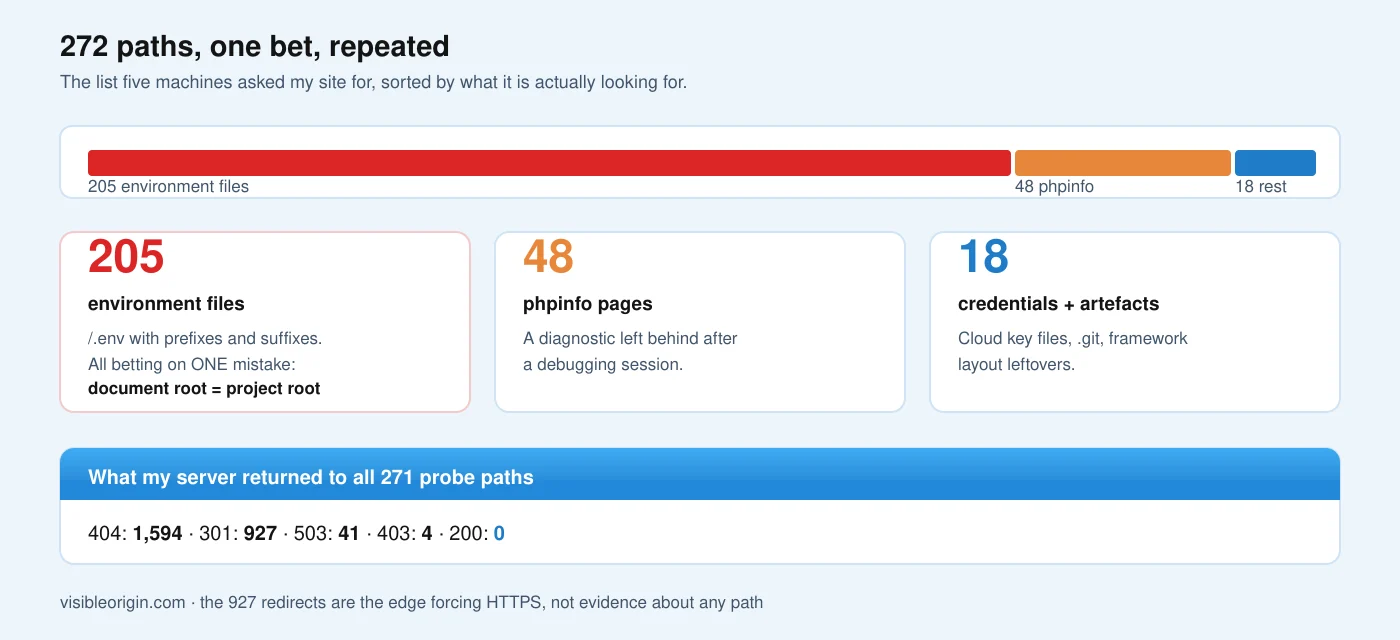
Across all 271 probe paths. None of them has ever returned 200, which is the only code that would establish something is there.
The 927 redirects deserve a word, because they are not evidence of anything. They are the edge sending plain HTTP to HTTPS, which it does for every request regardless of whether the path exists — a trap I fell into once already and would rather not present as a finding twice.
The list is not about me
Here is what changed how I read this. Sorting the 272 paths by what they are looking for produces four families, and the largest one is a single bet repeated two hundred times.
| Family | Paths | What it is betting on |
|---|---|---|
| Environment files | 205 | The document root is the project root |
phpinfo pages | 48 | A diagnostic page left behind |
| Cloud credential files | 14 | A key file committed or copied in |
| Framework artefacts | 4 | A misconfigured web root |
| Site root | 1 | — |
205 + 48 + 14 + 4 + 1 = 272. Classification is exclusive: each path counted once.
Two hundred and five ways to ask the same question
The environment files are not 205 different ideas. They are /.env with prefixes — /api/, /app/, /backend/, /laravel/, /docker/ — and with suffixes: .bak, .old, .save, .swp, .local, .production.
All of them are betting on one specific mistake, and the framework that popularised the file says so in its own deployment guide. Laravel’s documentation instructs that the web server’s document root should be the public directory, and states the consequence of getting it wrong plainly: doing otherwise “will expose many sensitive configuration files to the public Internet”. CakePHP says the same thing about its own layout — point the document root at webroot/.
And the file itself is designed to be secret. The reference implementation is explicit that it “is generally kept out of version control since it can contain sensitive API keys and passwords”.
So 205 of the 272 requests are one hypothesis tested exhaustively: that the operator pointed the server at the project folder instead of its public subfolder. On a correctly deployed site every one of them is guaranteed to fail — which is exactly what my log shows.
The other families are the same shape
The phpinfo pages look for a diagnostic left behind after a debugging session. The manual describes what such a page prints: information about compilation options, extensions, the PHP version and the environment. Symfony warns about the same thing from the other side — outputting phpinfo() contents “will display the values of the environment variables”.
The credential files look for cloud keys sitting where the web server can read them. Google documents that its default-credentials command writes a JSON file containing the credentials, and that a service account key contains a field literally called private_key. AWS documents that its CLI stores credentials in a file named credentials inside a .aws folder.
Each family is a well-documented operational mistake with a well-known filename attached. The scanner is not exploring. It is reciting.
Knowing which of these your own site actually answers — and which of them your server is silently serving because nothing blocks them — is what the free check establishes first, with the requests written out so you can repeat them. Closing them properly at the server rather than at the edge is the Cloudflare security and performance work.
Fingerprinting the repertoire, not the address
The checksum trick is worth keeping because it survives the thing that makes address-based analysis useless: renting a new machine is trivial, and blocking an address buys you until the next one.
The repertoire is harder to change. It is the tool’s wordlist, and changing it means changing the tool. So the identifier that lasts is not who asked but what they asked for, in what set:
| Identifier | Cost to the operator of changing it |
|---|---|
| Source address | Minutes, and a few cents |
| User-agent string | One line of configuration |
| Request timing | A flag |
| The set of paths requested | A different tool |
Sort the paths per source, hash the result, compare. Identical hashes mean one repertoire regardless of how many rentals it arrives from.
That is how five addresses collapsed into one actor here, and it is a two-line measurement rather than a product. It also tells you something a block list cannot: whether the thing hitting you today is the same thing that hit you last month.
These mistakes have catalogue numbers
The useful part of this is that none of it is novel. Every family maps to a classified weakness, which means the fix is known and written down.
| What they probe | Classified as |
|---|---|
| Config files under the web root | CWE-538, files placed where unauthorised actors can reach them |
.bak, .old, .save | CWE-530, a backup stored where it is accessible |
phpinfo output | CWE-497, system-level information exposed |
| Debug endpoints | CWE-215, information exposure through debug code |
/.git/ | CWE-527, a repository exposed to an unauthorised control sphere |
The OWASP testing guide covers the same ground under review of old, backup and unreferenced files.
OWASP’s guidance on old and unreferenced files makes the general point: it is not uncommon to find forgotten files on a web server that nothing links to and that the operator has stopped thinking about.
What this changes about how I read scans
I used to read a list like this as an attack surface report: here is what somebody thinks is worth trying against me. That framing makes you defensive about paths, and it is how you end up writing a rule per path.
Reading it as a catalogue of other people’s deployment mistakes is more useful, because the defence collapses from 272 items into four questions:
Is my document root the project root?
If the answer is no — if the server points at public/ or webroot/ — then 205 of the 272 paths cannot succeed regardless of what any firewall does. The structural fix precedes every rule.
Is there a diagnostic page left over?
48 paths are asking. The answer is a directory listing away and takes ten seconds to check.
Is a credential file inside the served tree?
14 paths are asking. If the answer is yes, no rule is the right response: move the file.
Does the server serve what nothing links to?
Backups, dumps and editor leftovers are invisible to you and perfectly visible to anybody who guesses the name. This is the one that survives a correct deployment, because it is created later, by hand, usually in a hurry.
The method, including where it stops being able to tell you anything, is in how I measure. If you want the four questions answered against your own domain rather than mine, send me one.
Scanner traffic and probe lists: frequently asked questions
Why do five different addresses request identical paths?
Because they run the same tool with the same wordlist. Checksumming the sorted set of paths per address is a cheap way to confirm it: identical checksums mean one repertoire, however many rentals it arrives from.
Does this mean my site is targeted?
Not in any meaningful sense. A list that is identical across sources is being run against large numbers of hosts. Nothing in it is specific to you.
Is it dangerous if they all return 404?
Not by itself. It consumes some resources and clutters your logs. The risk is not the probing — it is the day one of those files genuinely exists, which is a question about your deployment rather than about the scanner.
Should I block these paths?
Blocking is cheap and reduces noise, and it is the wrong first move. If a request for /.env would return something, the problem is that the file is reachable, not that the request arrived. Fix the layout, then block.
How do I check whether I am exposed?
Request the paths yourself and require a 200 before believing anything is there. A 404 means nothing was served; a redirect means nothing at all.
Why does a wordlist include .env.swp and .env~?
Because editors create them. A crashed session or an interrupted edit leaves a copy beside the original, with a name the author never chose and never deletes. The wordlist knows this better than most operators do.
The general shape of this
The scanner is not clever and is not looking at me. It is carrying a list of things that have worked on somebody else, and it will carry that list until those mistakes stop being made, which is to say forever.
What makes it worth an afternoon is the inversion: a probe list is the most honest available summary of how software actually gets deployed, assembled by people with no incentive to be polite about it. Two hundred and five variations on one filename is not a statement about attackers. It is a statement about how often that one mistake is made.
My log says 0 out of 271 on this site. That is not a security achievement — it is what a default installation does. The interesting number is not mine; it is however many hosts have to answer 200 for a list like this to be worth five rentals and several weeks.
Probes like these are also how you test your own defences: I asked for a file that does not exist to find out whether a block rule was doing anything at all.
Counting these requests needs a parser you can trust, and mine was not one at first: it read a Chrome version number as an IP address.