The short version. I spent an afternoon diagnosing OPcache on this site with php -i, wrote up the finding, and sent it to a colleague. Every word of it was about a different program from the one that serves the site.
/usr/bin/php pointed at one PHP build. My virtual host names another. They had opposite OPcache settings, so I published the opposite of the truth — and the tool I used to check is the one place OPcache is switched off by design.
The fix is one grep, and it belongs at the start of any sentence you are about to write about PHP.
Two programs called php
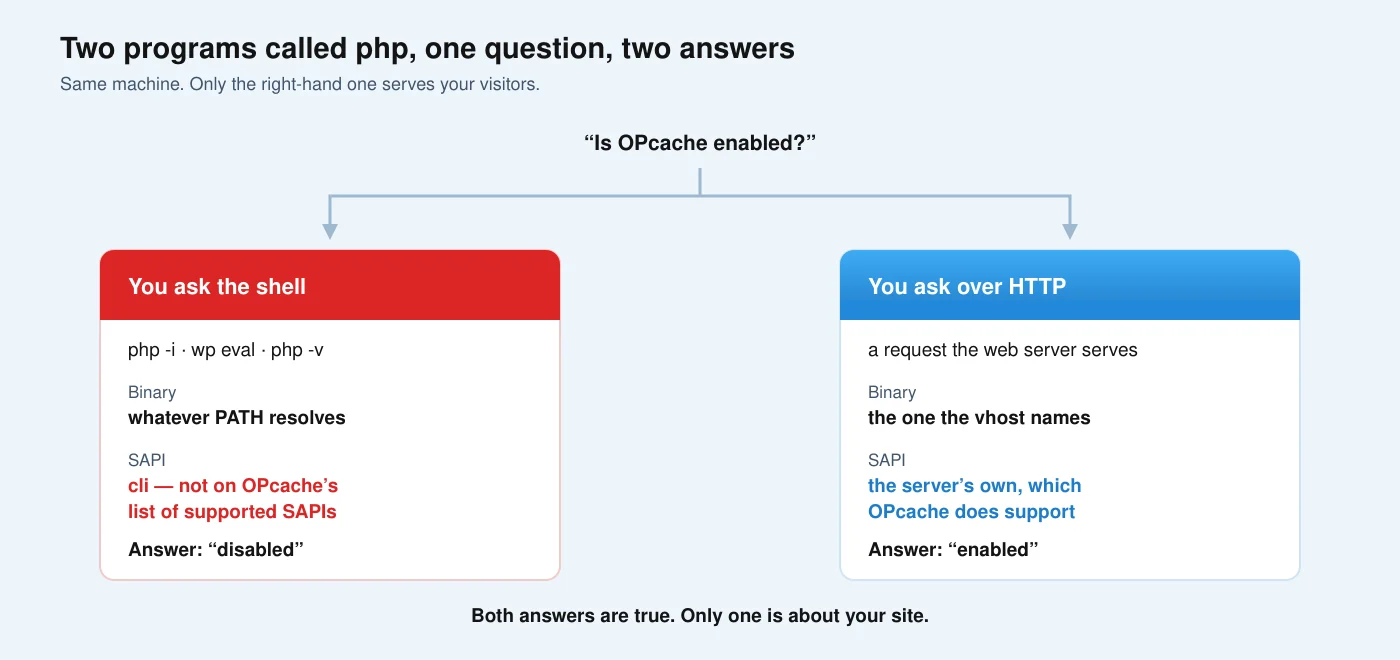
On a server running several PHP versions, php on the command line and the PHP that answers HTTP requests are separate executables with separate configuration. That is not a misconfiguration. It is how the setup is designed to work, and it is easy to forget when you are in a hurry.
Here is what I found once I actually looked, rather than assumed:
| Binary | OPcache | |
|---|---|---|
php -i on this box | the 8.3 build | off |
| What the vhost names | the 8.2 build | on |
Seven PHP builds are installed here. Six have OPcache enabled. The one the command line reaches is the single exception.
I had written that OPcache was disabled on this site. The opposite was true. I had asked the only build on the machine where the answer was no.
Why the vhost decides, and where it says so
In OpenLiteSpeed each virtual host can name its own PHP. The documentation is explicit that this is the point of the feature: “Using a virtual-host-level external lsphp app will give you the ability to change PHP settings for that virtual host or domain instead of using server-level external lsphp apps.” The external app documentation describes it as a deliberate per-site override, and the version-switching guide walks through pointing a host at a different build by changing the Command.
So the authoritative answer to “which PHP serves this site” is not in your shell. It is one line in the vhost configuration:
| Question | Where the answer lives |
|---|---|
| Which binary serves the site? | the path in the vhost’s script handler |
Which php.ini does it read? | the etc/ beside that binary |
| Which extra files load? | the php.d beside that php.ini |
What does php -i describe? | whichever build the PATH resolved, under a different SAPI |
And read the parsed dump the server writes next to each vhost, not only the file you edited: that is what the server understood, which is not always what you wrote.
The part that makes this worse than a wrong path
If the command line simply pointed at a different build, you would get a wrong answer half the time. The specific case of OPcache is worse, because the command line is where OPcache is supposed to be off.
It is disabled by default under CLI
The configuration table in the manual lists opcache.enable with a default of 1 and opcache.enable_cli with a default of 0. So even on a build where OPcache is on for the web, asking from the shell answers for a context where it is off unless somebody deliberately turned it on.
CLI is not even on the supported list
This is the part I did not expect. OPcache carries an internal list of the server APIs it will start under. In ZendAccelerator.c the function accel_find_sapi() holds an array of supported names — apache, fastcgi, cli-server, cgi-fcgi, fpm-fcgi, apache2handler and a few more. Plain cli is not among them.
Asking php -i whether OPcache is running is asking the one context that was never meant to run it. You will get a real answer to a question about a program nobody is serving pages with.
What I got wrong on top of being wrong
The first draft of this note contained a second error, and an adversarial review caught it before it went out. I had written that switching opcache.enable to 0 does nothing useful because the module is still loaded — and therefore that a colleague’s earlier test could never have proven anything.
Half of that is right. Loading and enabling are different directives: the module is brought in with zend_extension, which the manual documents as the way to load OPcache and which is settable only in php.ini. Turning enable off does not remove that line, so the extension does still appear in php -v.
But it does not follow that nothing changes. Reading the accelerator’s startup path, with the cache disabled it returns early and never installs most of its machinery. So the earlier test was weaker than intended, not meaningless. I had taken “the module is still listed” and stretched it into “the module is still doing everything”, which the source does not say.
Two wrong statements in one investigation, both in the direction of a tidier story. That is the pattern worth watching, more than either mistake.
If you want the version that actually serves your site — binary, ini, loaded extensions and the settings that matter — established by request rather than by shell, that is the first thing the free check pins down. Doing it across a stack, with the vhost and the cache layers, is the technical SEO and server work.
The grep that prevents all of it
Before any sentence about PHP on a site, one command:
1. Ask the vhost which binary it uses
Grep the virtual host configuration for the PHP path. Whatever it names is the only build whose settings describe your site. Everything else on the machine is a different program that happens to share a name.
2. Read the ini beside that binary, not the one in your PATH
The manual on configuration files is worth reading once for a detail that catches people out: for server module versions the ini is read once when the web server starts, while for CLI it is read on every invocation. Two builds, two files, two lifetimes.
3. Remember the scan directory, and that later files win
Beyond php.ini there is a directory of additional .ini files, parsed in alphabetical order. A file named with a high number overrides one named with a low number, which is exactly how a setting can be enabled in php.ini, enabled again in one fragment, and switched off in another. php_ini_scanned_files() returns the list that was actually parsed, and php_ini_loaded_file() returns the main file’s path.
4. Confirm over HTTP, not over the shell
Those two functions are the honest check — but only if you call them from a request that the web server serves, so they run under the SAPI and the build your visitors reach. Called from the command line they answer for the command line, which is the whole problem.
I have to be straight about my own limit here: I did not complete that last step. Writing an executable file into a live document root to prove a point is the kind of thing that should be hard, and on this machine it is: my own permissions refused it. So what I have is the configuration read from disk, which is strong evidence and is not the measurement. I have written before about the four ways to ask PHP what it is doing and why three of them are not your site; this is the fourth one, unfinished, and I would rather say so than round it up.
What the wrong answer cost
It is worth being concrete about the damage, because “I read the wrong config” sounds harmless.
On the strength of that reading I told a colleague that OPcache was off on this site, and we spent a stretch of the afternoon on whether it was safe to turn it back on — a question that could not arise, because it was already on. I also produced a measurement of the origin’s response time and described it as “without OPcache”. It was not. That number is still correct as a number and was labelled with the opposite of its actual condition, which makes it worse than no number at all: a future reader would use it as a before/after baseline and get the comparison backwards.
Then there is the decision it nearly drove. There is a config fragment on this machine, dated five weeks ago and labelled as a temporary test, that disables OPcache on one build. Working from the wrong binary, I read that fragment as covering this site. It does not. Had anyone acted on my write-up, they would have been changing a setting on a build that serves nothing, to fix a problem this site did not have.
None of that was caught by a test, a linter or a review. It was caught by someone else asking which binary the vhost named.
PHP versions and vhosts: frequently asked questions
Why does php -v show a different version than my site?
Because they are different binaries. The command line resolves whatever the PATH points at; the site uses the build named in its virtual host. On a server hosting several sites, having several versions installed is normal and intended.
Does opcache.enable=0 unload the extension?
No. The extension is loaded by zend_extension, a separate directive that can only be set in php.ini. With the cache disabled, the accelerator returns early during startup and does not install most of its machinery, but the extension still appears in php -v and in phpinfo().
Is OPcache active when I run a script from the shell?
Almost certainly not. opcache.enable_cli defaults to 0, and plain cli does not appear in the list of SAPIs the accelerator supports.
Which php.ini is my site actually reading?
The one beside the binary the vhost names, plus every file in that build’s scan directory. Have the site tell you over HTTP with php_ini_loaded_file() and php_ini_scanned_files(); asking from the shell answers for the shell.
Two ini files set the same directive. Which wins?
The scan directory is parsed in alphabetical order, so a fragment named with a later prefix overrides an earlier one. This is how a setting can look enabled in three places and still be off.
Can I trust WP-CLI to tell me how my site is configured?
Only about the PHP that WP-CLI itself runs under, which is the command-line build. It is the right tool for talking to the database and to WordPress, and the wrong one for describing the environment your visitors get.
The full method, with the places it stops being able to tell you anything, is in how I measure. If you would rather have the answer for your own stack than the afternoon, send me a domain.
The general shape of this
The mistake was not using the wrong command. It was that the wrong command answered. There was no error, no empty output, nothing to notice: a complete, confident report about a program that serves nothing.
That is the failure mode worth naming, because it has no symptom. A tool that fails loudly gets fixed. A tool that answers a slightly different question than the one you asked gets quoted, written up, and sent to a colleague — which is how mine got as far as it did before anybody checked which binary it had been talking to.
The guard is cheap and it is a habit, not a tool: before writing a sentence about how something is configured, establish which process you are describing. One grep of the vhost would have saved an afternoon and a correction.