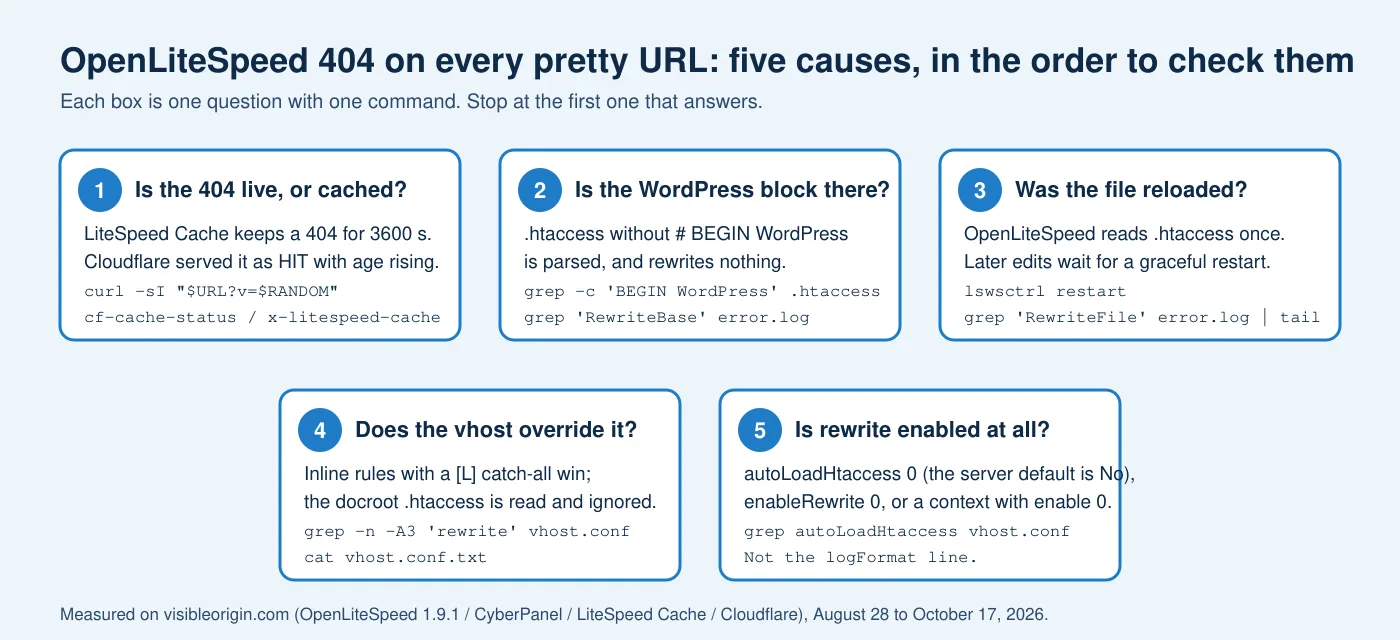
The short version. When every pretty URL on an OpenLiteSpeed site returns 404 while the homepage works, there are five causes worth checking, and an order that finds the right one fastest: a cached 404, a .htaccess without the WordPress block, a file edited but never reloaded, a virtual host whose own rules win, and a rewrite engine that is off at the level that matters. Each OpenLiteSpeed 404 cause below has one command.
I met four of the five on this server, one of them after publishing the wrong cause. The fifth is the OpenLiteSpeed default. The line everyone blames, the unescaped quote in logFormat, is not on the list, and the note that measured why is linked at the end.
Why an OpenLiteSpeed 404 hits every URL but the homepage
WordPress has one PHP entry point. The homepage is /index.php, a real file on disk, and the server finds it without rewriting anything. Every other pretty URL, /about/ or /some-post/, matches nothing on disk and has to be rewritten to /index.php by the rules WordPress writes between # BEGIN WordPress and # END WordPress. In the core source that is save_mod_rewrite_rules() calling insert_with_markers(), both in wp-admin/includes/misc.php, and both are still there in the WordPress 7.1 this site runs.
When that rewrite does not happen, the server answers the 404 itself. WordPress never runs, so the 404 page is the server’s plain one, not your theme’s. That is the signature of this whole family: homepage 200, real files 200, every generated URL 404 with a page you do not recognize.
On Apache the question is whether the block is in the file. On OpenLiteSpeed four more things stand between the file and the rewrite: whether a cache in front is still serving yesterday’s 404, when the server read the file, whether the virtual host has rules of its own, and whether the rewrite engine is switched on at the level the request reaches. That is why the order below is not the order most forum answers use.
1. First, make sure the 404 you are looking at is live
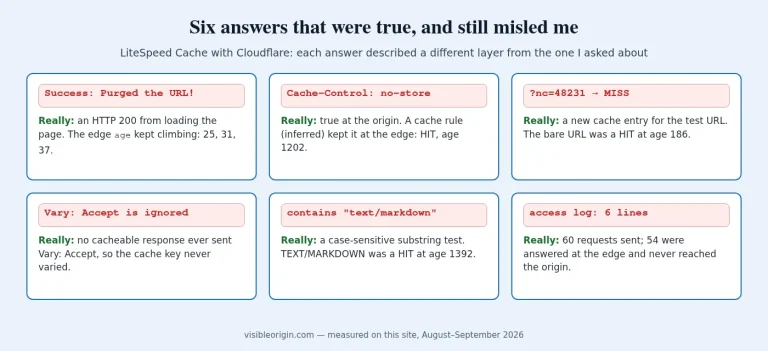
This is the check that makes the other four look like they failed. On October 17, 2026, I asked this site for a path I invented on the spot, three times, through Cloudflare. The first answer was cf-cache-status: MISS. The second and third were HIT, with age at 2 and then 4 seconds. The same response carried two cache headers that disagree with each other:
cache-control: no-cache, must-revalidate, max-age=0, no-store, private
x-litespeed-cache-control: public,max-age=3600
The first line is for browsers. The second is for LiteSpeed Cache, and it is the one that counts at the origin: the plugin’s Default HTTP Status Code Page TTL is 404 3600 on this site, and the documentation gives 403 3600 404 3600 500 3600 as the default. The second request to the origin answered x-litespeed-cache: hit. So after any repair, the server keeps handing out the old 404 for up to an hour, from memory, without consulting the rules you just fixed.
Cloudflare should have stayed out of it: its documentation says a response is not cached when Cache-Control is private, no-store, no-cache or max-age=0, and that a 404 gets three minutes only when no cache header is present. It cached mine because this zone has a Cache Rule whose Edge TTL is set to Ignore cache-control header and use this TTL, which the same documentation describes as “completely ignore any cache-control header on the response.” That rule has misled me before, and it is common on WordPress sites that cache HTML at the edge.
The test that cannot be fooled by either layer is a URL neither has seen. On this site a new query string is a new cache key at both: the fourth request, to the same invented path with ?v=777, came back MISS at Cloudflare and miss at LiteSpeed.
curl -sI "https://example.com/some-post/?v=$RANDOM" \
  | grep -i 'HTTP/\|cf-cache-status\|^age\|x-litespeed-cache'
If that answers 200 while the plain URL answers 404, you have already fixed the server and are looking at a cache. Purge it. On a LiteSpeed Cache site behind Cloudflare the command that reaches both layers is wp litespeed-purge all; the per-URL purge does not reach the edge, and on this site it does not purge anything at all.
2. The .htaccess has no WordPress block
This was the real cause of the OpenLiteSpeed 404 on this server on August 28, 2026, and it hid behind a better story for a week. The .htaccess in the document root was parsed on every reload, which the error log confirmed each time with RewriteFile [/home/visibleorigin.com/public_html/.htaccess] parsed, return 0. What the log never showed before 20:57:01 that evening was the line that only exists when the WordPress block is in the file: RewriteBase [/] parsed. At 20:57:01 it appeared for the first time, and pretty URLs answered 200 from then on. Everything I changed afterward, including the logFormat line at 21:36:07, was thirty-two minutes too late to deserve the credit it got.
WordPress writes the block itself when the file is writable. Re-saving Settings → Permalinks runs save_mod_rewrite_rules(), which replaces whatever sits between the two markers. If the file is not writable, the same screen shows you the block to paste by hand. Two commands tell you where you stand:
grep -c 'BEGIN WordPress' /home/example.com/public_html/.htaccess
grep 'RewriteBase' /usr/local/lsws/logs/error.log | tail -3
A count of 0 is your answer. A count above zero, since WordPress’s own comment line repeats the words, with no RewriteBase line in the log means the file is right and the server has not read this version of it, which is the next check. The log lines are written at INFO level; this server runs logLevel DEBUG, so they are there. At NOTICE or quieter you will not see them and have to rely on the parsed configuration dump described under cause 4.
3. The file is right, but the server read the old one
OpenLiteSpeed does not re-read .htaccess on every request the way Apache does. The manual shipped with the server says of Auto Load from .htaccess: “Autoload rewrite rules contained in a directory’s .htaccess file when first accessing that directory if an HttpContext for that directory using the rewritefile directive does not already exist. Once initially loaded, a graceful restart must be performed for any further changes to that .htaccess file to take effect.”
So a block written by WordPress at 20:50 does nothing until the next restart, and on this server that was the 20:57:01 reload above. The restart is graceful by design: lswsctrl describes its own restart as “gracefully restart web server with zero down time,” and that is the text in the script on this machine, not a paraphrase.
/usr/local/lsws/bin/lswsctrl restart
grep 'RewriteFile\|RewriteBase' /usr/local/lsws/logs/error.log | tail -4
One reading error to avoid, because I made it: RewriteFile [...] parsed, return 0 says the file was read. It does not say the file contained any rules. The line that proves the WordPress block was in it is RewriteBase [/] parsed, and it has to carry a timestamp after your last edit.
Where this stops being a guide. Reading a server’s log against its configuration and saying which layer produced an answer is the technical SEO and server work I do, usually for sites where the 404 is not on every URL but on the ones a crawler asked for. The commands here are the ones I run first.
4. The virtual host has rules of its own, and they win
On a CyberPanel install the virtual host configuration carries the WordPress rules inline, in a rewrite { rules <<<END_rules ... END_rules } block inside vhost.conf, ending in a catch-all RewriteRule ^/?(.*)$ /index.php [L]. The [L] stops processing. While that block exists, the .htaccess in the document root is read, logged as parsed, and never consulted.
I measured that on August 29, 2026, with a rule that should have made the test fail loudly: a RewriteRule .* - [F,L] placed at the top of the docroot .htaccess returned 404, not 403, and the max-age the server sent was the virtual host’s 604800, not the 31557600 from the file’s browser-cache block. The day before, when the virtual host had no inline rules yet, the same file did act, and it was what repaired the permalinks. This is the state of one virtual host, not a law of OpenLiteSpeed, which is exactly why you have to look at yours.
grep -n -A4 'rewrite  {' /usr/local/lsws/conf/vhosts/example.com/vhost.conf
cat /usr/local/lsws/conf/vhosts/example.com/vhost.conf.txt
The second file is the one most people never open. OpenLiteSpeed writes vhost.conf.txt next to each virtual host at startup: the configuration tree as the server parsed it, which is what it is actually running. Compare its modification time with the process start time, and read it as proof of what did load, never of what did not: on this server 8 of 141 directives from the source file do not appear in it. If your rules are in that block, fix them in that block, in the panel or in the file, and restart. Pasting the fix into .htaccess changes nothing you can measure.
5. Rewrite is off at the level that matters
Three switches can leave a correct .htaccess unread. The server-level Auto Load from .htaccess defaults to No; the manual lists “Server-level: No, VH-Level: Inherit Server-level setting” as the default values. Enable Rewrite “can be customized at the virtual host or context level, and is inherited along the directory tree until it is explicitly overridden,” so a context can switch it off for one path. This virtual host has exactly that for /.well-known/acme-challenge, where it is intended: certificate challenges must be served from disk, not handed to WordPress.
A panel usually sets the first two for you. A hand-installed OpenLiteSpeed does not, and the result is a server that ignores the file WordPress just wrote while logging nothing wrong, because nothing is wrong from its point of view. openlitespeed -t will not catch it either: the test mode does not load virtual hosts.
grep -n 'enable\|autoLoadHtaccess' /usr/local/lsws/conf/vhosts/example.com/vhost.confYou want enable 1 and autoLoadHtaccess 1 inside the virtual host’s rewrite block, or inline rules there as in cause 4, and no enable 0 in a context that covers the URLs failing. Then restart, then test with a fresh query string.
The line that is not a cause
If you searched for this problem you have read that the unescaped quote CyberPanel writes into the logFormat line breaks the rewrite engine. I wrote that too, in three reports and a draft, and it is false. The configuration parser in OpenLiteSpeed 1.9.1 has no branch that looks at a quote, a second site on this same machine runs that exact line and serves every pretty URL, and the parsed configuration dump of that site contains the broken line and an intact rewrite block side by side. What the line does break is the access log format, in both the escaped and the unescaped form. The full measurement, with the mistake I made to get there, is its own note.
The five checks on one page
| Order | What you are asking | One command | What settles it |
|---|---|---|---|
| 1 | Is this 404 live or cached? | curl -sI "$URL?v=$RANDOM" | 200 with a new query string means the server is fixed; purge both layers |
| 2 | Is the WordPress block in .htaccess? | grep -c 'BEGIN WordPress' .htaccess | 0 means re-save permalinks, or paste the block |
| 3 | Did the server read this version? | grep 'RewriteBase' error.log | tail | No line after your edit means restart, gracefully |
| 4 | Does the vhost carry its own rules? | cat vhost.conf.txt | Inline rules with [L] win; fix them there |
| 5 | Is rewrite enabled where the request lands? | grep 'enable\|autoLoadHtaccess' vhost.conf | enable 1, autoLoadHtaccess 1, no enable 0 context in the way |
Paths are this server’s: /usr/local/lsws/logs/error.log and /usr/local/lsws/conf/vhosts/<site>/. The logFormat quote is deliberately absent.
Pretty permalinks on OpenLiteSpeed: frequently asked questions
Why does the homepage work when every other URL returns 404?
Because the homepage is a real file, index.php, and the server serves it directly. Every other pretty URL exists only after a rewrite to that file. When the rewrite is missing, the server answers 404 before WordPress runs, which is why the 404 page is the server’s own and not your theme’s.
I edited .htaccess and nothing changed. Why?
OpenLiteSpeed loads a directory’s .htaccess once, the first time the directory is accessed, and the manual states that further changes wait for a graceful restart. Run lswsctrl restart and look for a RewriteBase [/] parsed line with a fresh timestamp in the error log.
I fixed the server and the URL still returns 404. Is the fix wrong?
Not necessarily. On this site a 404 is cached for 3600 seconds by LiteSpeed Cache and served as a HIT by Cloudflare under a Cache Rule that ignores the origin’s no-store. Request the URL with a query string nobody has used, and if that answers 200, purge with wp litespeed-purge all.
Does OpenLiteSpeed honor everything in .htaccess?
No. In the .htaccess files it does read, only mod_rewrite directives take effect. On this server a <IfModule mod_authz_core.c> block protecting a log directory was ignored, and the directory stayed downloadable until the protection was rewritten as RewriteRule .* - [F,L]. A rule that works on Apache can be silently inert here.
Where can I see which rules the server actually loaded?
In vhost.conf.txt, written next to each virtual host’s vhost.conf at startup. It is the configuration as parsed, so it proves what loaded. It omits some directives, so it never proves that something did not load; for that you need the error log at INFO level or more verbose.
Is the unescaped quote in logFormat the cause?
No. It was measured three independent ways and it does not touch the rewrite engine. It does break the combined format of the access log, which is a different problem with a different symptom.
The general shape of this
All five causes of an OpenLiteSpeed 404 produce the same two numbers, 200 and 404, and four of them produce them while logging nothing that looks like an error. The server read a file, the file was valid, the rules were applied in order, the cache did its job. Each layer answered truthfully about itself, and the question I was asking was about a different layer. The order above is the order of how cheaply each layer can be made to contradict you: a fresh query string costs nothing, a restart costs a few seconds, and reading vhost.conf.txt costs one command, which is less than the week I spent believing the wrong cause.
Every command here ran against this server, and the timestamps are from its error log. If one of them returns something other than what I said it does, that is worth an email. And if a crawler is getting a 404 from your site that your browser does not see, the free check requests your homepage as five named crawlers and sends back what each one got, with the requests written out so you can repeat them without me.
Sources
- OpenLiteSpeed 1.9.1, Rewrite_Help.html: the manual shipped with the server, including the Auto Load from .htaccess and Enable Rewrite descriptions quoted above.
- WordPress core, wp-admin/includes/misc.php:
save_mod_rewrite_rules()andinsert_with_markers(), which write the block between the markers. - LiteSpeed Cache for WordPress, Cache settings: Default HTTP Status Code Page TTL and its default of
403 3600 404 3600 500 3600. - Cloudflare, Default cache behavior: the three-minute default for 404 and 410, and the
Cache-Controlvalues that prevent caching. - Cloudflare, Cache Rules settings: the Edge TTL option that ignores the origin’s cache header.
- How I measure: the rules every request in this note followed.