Correction, 13 September 2026. When this was published, header-based Markdown negotiation was switched off on this site, and the text below says so. It is switched on again. The reason it was off — it only worked between a cache purge and the first human visit — turned out to be a missing Vary: Accept on the cacheable HTML response. With that header present the origin cache keeps a separate entry per Accept value, and the behaviour is now stable rather than lasting about thirty seconds. Nothing else in this note changes; the measurements it reports were correct on the day they were taken.
The short version. I asked an agent readiness score about my own site three times in one minute, changing nothing except which checks I enabled. It returned Level 5, then Level 4, then Level 5 again with a score of zero — that last one while failing the only check I had asked it to run.
Then I stopped constructing scans and used a preset from its own dropdown. “Content Site” — the honest choice for a blog — returns Level 5 and 100 out of 100 for a site that fails three checks under “All Checks”. Nothing rigged: the checks that find something are simply not part of that question.
None of this is a bug, and the tool is more careful than my first draft accused it of being: it stamps “Partial scan” on the card. The mechanism underneath is what matters. Disabling a check does not stop it running — it turns a failure into a “neutral”, and a neutral satisfies the gate it was standing in front of. The level is a report on the question as much as on the site.
I have a stake in getting this right in both directions. Last week I put one of these results on my own homepage, so if the number is worthless I have published something worthless, and if it is meaningful I should be able to say exactly what it means. What follows is what I could establish by measurement, including the parts that contradict what I expected to find.
Three requests, one site, one minute
All three are POSTs to the same public API, for the same URL, with nothing touched on the site in between. The bodies are printed in full so you can send them yourself.
curl -s -X POST https://isitagentready.com/api/scan \
  -H 'Content-Type: application/json' \
  -d '{"url":"https://visibleorigin.com","enabledChecks":[ ...the 20 its own page sends... ]}'
  →  level 5  "Agent-Native"     12 of 15 = 80

  -d '{"url":"https://visibleorigin.com"}'
  →  level 4  "Agent-Integrated"  12 of 16 = 75

  -d '{"url":"https://visibleorigin.com","enabledChecks":["robotsTxt"]}'
  →  level 5  "Agent-Native"      1 of 1 = 100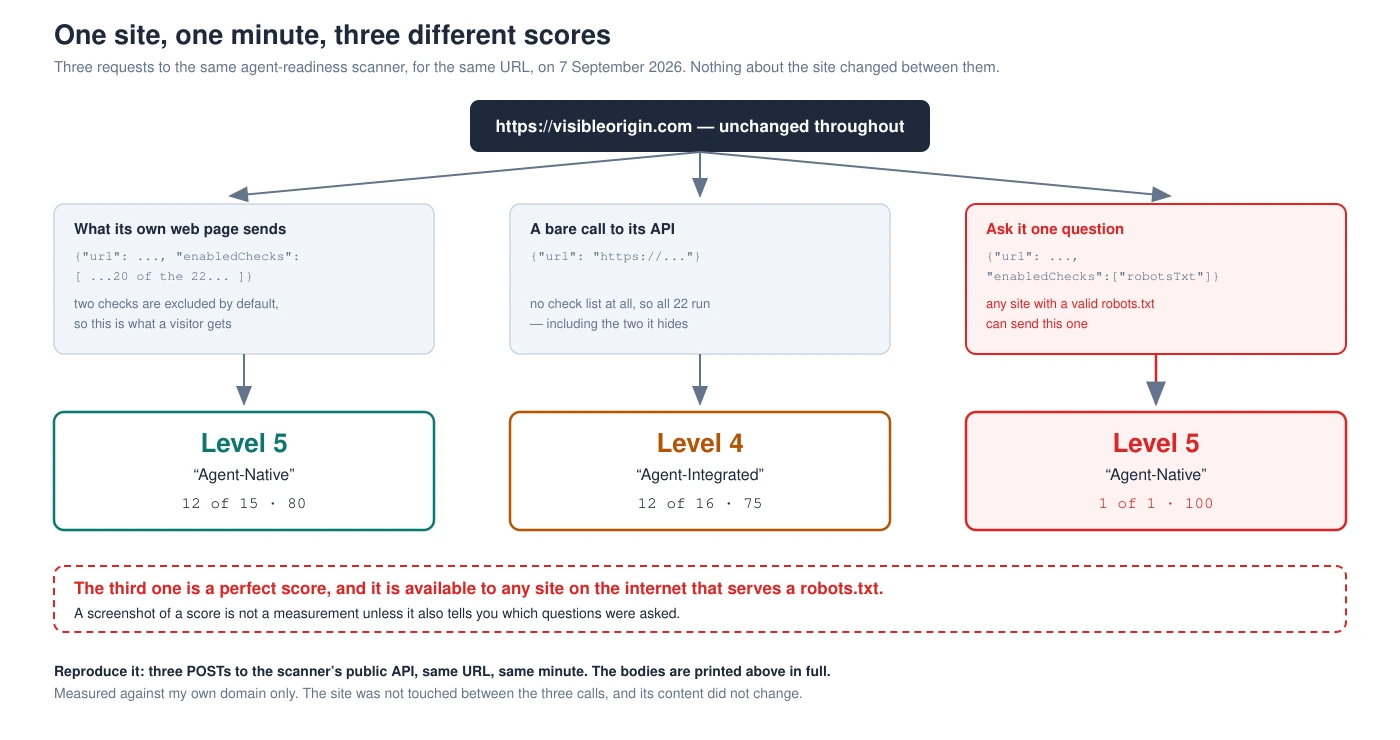
Level 5 for failing the only question asked
The third row above is the one people would screenshot, so I went looking for its worst case rather than its best. I asked for a single check that my site is known to fail:
-d '{"url":"https://visibleorigin.com","enabledChecks":["oauthDiscovery"]}'

scannedAt   2026-09-07T10:52:30.966Z
level       5  "Agent-Native"
oauthDiscovery   fail   "No OAuth/OIDC discovery metadata found"
score the browser would paint:   0 of 1 = 0
The top of the scale, awarded for failing the only thing that was measured. A score of zero next to it, because the two numbers do not come from the same place and do not have to agree.
The reason is in what happens to a disabled check. It is not skipped. Look at the response for a check I did not enable:
robotsTxt neutral "robots.txt exists with valid format (excluded by scan configuration)"The scanner ran it anyway, got a result, and then filed it as neutral. So enabledChecks does not decide what gets measured. It decides whether an outcome counts as a verdict or as an absence — and absence, on this ladder, is not treated as failure.
Two numbers, two different places
The score and the level look like one thing on the card and are not.
The score is computed in your browser. The API response contains no score field at all: its top-level keys are url, targetUrl, scannedAt, level, levelName, checks, isCommerce and commerceSignals. The number is produced client-side, and the arithmetic is legible in the page’s own script bundle, which I downloaded and checksummed (48a9acc6fb658a3a490a896e9d3d31b9):
const h = l.filter(u => u.status === "pass").length,
      y = l.filter(u => u.status === "neutral").length,
      b = l.length - y;
Passes over checks-minus-neutrals, summed across the categories flagged to count. Two consequences follow, and both are visible in my own result. Neutral checks leave the denominator entirely, so anything excluded cannot lower the number. And one whole category is marked not to count at all — the commerce group carries countInScore:!1 — so five of the twenty-two checks never touch the score in either direction.
Run that formula over my own scan by hand and it reproduces exactly: discoverability 4/4, content accessibility 1/1, bot access 2/2, discovery 5/8. Twelve passes over fifteen counted checks, which is the 80.
The level comes from the server, and it is not derived from the score. There is no threshold anywhere in the bundle; the level is read from the response and used to pick a colour. What it actually is, the vendor publishes itself, in a skill document the scanner serves at a well-known path:
0 Not Ready — Fewer than 2 of: robots.txt, sitemap, Link headers · 1 Basic Web Presence — 2 of 3 · 2 Bot-Aware — Level 1 + both: AI bot rules in robots.txt, Content Signals · 3 Agent-Readable — Level 2 + markdown content negotiation · 4 Agent-Integrated — Level 3 + 1 of 4 · 5 Agent-Native — Level 4 + 2 of 3
It is a ladder of gates, not a percentage. And that is the whole explanation for the zero-scoring Level 5: a gate is passed when the checks behind it are not failing, and a neutral is not failing. Turn a check off and you do not lose a point — you remove a gate.
What actually changed between 80 and 75
I had assumed the difference between the two full scans was a matter of size: twenty checks against twenty-two. That is wrong, and the correction is worth more than the original claim.
The server runs all twenty-two every time. I confirmed it in the response bodies: both scans returned all twenty-two entries, including the two the public page never sends. And when I ran twenty-one — the public set plus a2aAgentCard, leaving ap2 out — the result was identical to the twenty-two case, Level 4 and 12 of 16.
The entire difference is one check. a2aAgentCard looks for an agent card at a well-known path, gets a 404 in both scans, and the only thing that changes is whether that 404 is recorded as a failure or as an exclusion. The other hidden check, ap2, is inert: it sits in the category that does not count. So the honest sentence is not “twenty versus twenty-two”. It is that one absent file, counted or not counted, moves this site a full level.
What this looks like as a service. None of the above needed access to anything private. It is a public API, a script bundle anyone can download, and the vendor’s own documentation — read carefully enough to notice that two numbers on the same card come from different machines.
Doing that for a site you are about to buy work on is most of what the free check is: you send a domain, I request it as five named crawlers, one at a time, and send back exactly what each one received together with the command that asked. You can re-run every line, which is the only reason it is worth anything.
You do not need a contrived scan. The menu has one.
Everything above used a check set I chose, which invites the obvious objection: nobody scans a site with one box ticked. So I stopped constructing scans and used the product as shipped.
The interface offers three presets, and their names and descriptions are in the bundle:
all      "All Checks"        Run all default checks — best for comprehensive audits      20 checks
content  "Content Site"      Blog, docs, or marketing site — focuses on discoverability
                             and content accessibility                                     7 checks
apiApp   "API / Application" API service or web app — all checks except commerce         16 checks
This site is a blog with documentation on it. “Content Site” is not a trick; it is the honest choice from the menu, and it is the one a reasonable person would pick. Here it is, measured:
-d '{"url":"https://visibleorigin.com","enabledChecks":[ ...the 7 of the Content Site preset... ]}'

scannedAt   2026-09-07T10:55:27.292Z
level       5  "Agent-Native"
score       7 of 7 = 100
A perfect score and the top of the ladder, from a preset in the tool’s own dropdown, for a site that fails three checks under “All Checks”. Nothing was rigged. The thirteen checks that would have found something were simply not part of the question this profile asks, and the three failures live entirely inside them.
That is what makes the shareability problem concrete rather than theoretical. The person who picked “Content Site” did nothing wrong and gets a screenshot that says 100. The person who receives it has no way to know which of three legitimate questions produced it, and all three are defensible.
What I got wrong, and what the tool gets right
I started this expecting to write that a screenshot of a score proves nothing. That is not true, and I want to be precise about why, because the tool behaves better here than my draft claimed.
When you run a partial scan, the interface says so inside the score card itself. In the bundle:
Partial scan — ${h} of ${y} checks enabledThat line renders directly above the score, the untested categories are drawn greyed out with the sublabel Not checked, the excluded checks are individually marked Skipped, and the enabled set is carried in the URL. A complete screenshot of that card is self-describing. My original sentence was wrong, and would have been unfair.
What remains true is narrower and still worth knowing: the disclosure lives on the card, so it survives exactly as long as the card does. A crop, a number retyped into a slide, a figure quoted in an email — none of those carry it. The failure mode is not the tool being coy. It is that the context is one crop away from gone, and the number that survives the crop looks identical whether it came from twenty checks or one.
It measures declarations, not services — and says so
This is the part I did not expect, and it is the most useful thing in the note.
I went looking for the subset of checks that cannot be satisfied with a static file, on the assumption that a buyer should demand those and ignore the rest. There isn’t one. Every check in the public profile is satisfied by a document that exists, a header, a DNS record or a script on the page. Nothing calls the thing that the document announces.
That is deliberate, and documented. The vendor’s own skill file for the auth check says it plainly:
Do not probe POST /agent/auth during passive scans… Public discovery documents are the safe source of truth.
Which is a defensible engineering decision — a scanner that exercised every endpoint it found would be a scanner nobody could point at a stranger’s site. But it settles what the result is: a report on what a site claims, not on what it does.
The specifications behind these files agree, in their own way. RFC 9727, which defines the API catalog one of these checks looks for, requires that a publisher “SHALL resolve an HTTPS GET request to /.well-known/api-catalog and return an API catalog document” — and says nothing at all about whether the APIs listed inside it answer. Publishing the catalogue is the whole obligation. A checker that verifies the obligation has verified the obligation.
The one that bit me
My own site is the example, and it is not a hypothetical.
The check called markdownNegotiation is the one I would have defended as behavioural rather than declarative: it asks the homepage for Markdown with an Accept header and looks at what comes back. It passes for this site, and the evidence in the response is a real request with a real content type.
And the day before writing this, I measured that a client asking my site the same way can receive HTML instead, because when the page is already in the origin cache the application never runs and the header is never read. Both things are true. The scanner asked at a moment when it worked; the failure depends on cache state, which is not a property any single request can see.
So the check that looked hardest to fake is the one that gave a confident pass over a feature I know to be conditional. Not because the tool is careless — because one request cannot distinguish “works” from “worked just then”, and neither can a screenshot of one.
And then I switched it off, which is where the ladder shows its teeth
Rather than ship a riskier server rule to make a conditional feature reliable, I turned the negotiation off. Asking this site for Markdown by header now returns HTML, consistently. The parallel /slug.md routes are untouched and still serve Markdown to anything that asks.
I expected to lose one checkbox. Here is what actually happened, same scanner, same profile, before and after:
before   level 5  "Agent-Native"      12 of 15 = 80
after    level 2  "Bot-Aware"         11 of 15 = 73

the only difference:  markdownNegotiation   pass  →  fail
One check. Seven points of score, and three whole levels.
That is the ladder working exactly as its documentation says it does, and it is the sharpest illustration in this note of why the two numbers are not the same kind of thing. Markdown negotiation is the gate for level 3, and levels 4 and 5 are defined as “level 3 plus…”. Fail the gate and everything above it becomes unreachable no matter how much else passes. The score, being an average, barely noticed — it moved less than a tenth.
So the same site, with eleven of its fifteen checks still passing and every one of its Markdown routes still serving Markdown, went from the top of the scale to the middle of it. Nothing about how an agent can read this site changed. What changed is that it stopped claiming a behaviour it only had on a cold cache.
Where this stops being a blog post. If you are being sold work on the strength of an audit score, the number is the least examinable part of what you are being shown, and the part most likely to have been produced by a question you never saw.
Establishing what a measurement actually measured, on infrastructure somebody else built, is the work I do for money. It arrives the way this note does: the command, its output, and a clearly marked line between what I verified and what I only inferred.
My own three failures, and why they stay
Under the full profile this site fails three checks, and they are the same three: oauthDiscovery, oauthProtectedResource and authMd. All three want OAuth metadata for an authorization server. There is nothing on this site behind a login for an agent to authorize against — every document it publishes is public — so the honest way to pass them would be to publish endpoints that do not exist.
I am not going to, and the reason is the whole argument of this note in miniature: the number would go up and the site would not get better. It would get slightly worse, because it would then be advertising an authorization server that answers nothing, which is precisely the failure mode I spent the previous section describing.
That is also why, when I put this result on my own homepage, I put the date beside it, named the three failures, and added a sentence explaining that the same scanner returns a perfect result for a partial scan. If the number cannot survive being published with its own context attached, the number was doing something other than informing.
What to ask for instead
Three things, none of which require trusting me or the vendor.
The body, not the picture. Any score produced by a configurable scan should come with the exact request that produced it. If it came from a tool with a share button, ask for the link rather than the image, because the link carries the check set and the image can be cropped.
A second reading at a different moment. Anything that depends on server behaviour rather than a stored file can pass once and fail an hour later. My own Markdown check is the proof; a single timestamp cannot tell the difference and a report built on one is quietly claiming more than it knows.
A call to whatever the documents advertise. This is the gap the scanners leave open by design, and it is the cheapest thing in the world to close: if a file announces an endpoint, request the endpoint. A catalogue that lists an API nobody has called since it was written is a catalogue, not an API.
That last one is three commands. Read what the site claims, then call it:
# what does it say it offers?
$ curl -s https://visibleorigin.com/.well-known/mcp/server-card.json | jq -r '.endpoint'
https://visibleorigin.com/mcp

# now call the thing it just named
$ curl -s -o /dev/null -w '%{http_code}\n' https://visibleorigin.com/mcp
405

$ curl -s -X POST -H 'Content-Type: application/json' \
    -d '{"jsonrpc":"2.0","id":1,"method":"tools/list"}' https://visibleorigin.com/mcp
{"jsonrpc":"2.0","id":1,"result":{"tools":[{"name":"list_pages", ...
Note the 405 on the first call, because it is worth the ten seconds it costs. That endpoint speaks JSON-RPC, so a plain GET is supposed to be rejected, and a checker that graded it on the status code alone would mark a working server as broken. The real answer needs the second command — and it came back with the actual list of tools.
A scanner will not do this for you, on purpose and for good reasons. Nothing stops you doing it yourself. I only know my own endpoint answers because I asked it just now, not because any score card told me — the card is satisfied by the file that names it.
Agent readiness scores: frequently asked questions
Can an agent readiness score be trusted?
It can be read, which is not the same thing. It reports which of a configurable set of checks passed at one moment, and the set is part of the answer. A result presented without the check list has had half of itself removed, and the half that survives is the half that looks like a grade.
Why did my score change without my site changing?
Most likely because the check set changed. Excluded checks are returned as neutral and drop out of the denominator entirely, so removing checks can only hold the number steady or raise it. On the level scale the effect is stronger: a check that is not failing satisfies its gate, so disabling one can move you up a level.
Does a perfect score mean a site is ready for agents?
It means the files a scanner looks for exist and parse. Whether anything behind them answers is a separate question that passive scanners deliberately do not ask, because probing a stranger’s endpoints is not a thing a public tool can do safely.
What is the difference between the score and the level?
On the tool I measured, they come from different places: the level is computed on the server as a ladder of capability gates, and the score is arithmetic done in your browser over the checks that were not neutral. They can disagree completely, and I have a scan showing Level 5 alongside a score of zero.
Is this specific to one scanner?
The line numbers are. The shape is not: any grader with optional checks has this property, including the ones I could write. The general rule is that a configurable measurement is a function of two things, and only one of them is your site.
Should I put a score like this on my own site?
I did, with the date, the check set it came from, the three checks it fails, and a sentence explaining that the same scanner returns a perfect result for a single-check scan. If publishing all of that would make the number look bad, that is information about the number.
The general shape of this
Nothing here is broken. The scanner is careful, labels its partial scans, publishes its own scoring rules and documents why it does not probe. The API answered every request correctly. The arithmetic in the browser is the arithmetic it says it is. And a site can still be handed the top of the scale for failing the only check it was asked about.
What produces that is a mismatch nobody signed off on: a measurement designed to be configurable, presented in a format designed to be shared. Configurability means the answer depends on the question. Shareability means the answer travels and the question does not. Every step is reasonable and the result is a number that means something different to the person holding it than to the person who produced it.
My own check has limits of the same kind, and I measured them: it runs from a datacenter IP, and some sites refuse that address whatever the request claims to be.
Every command here ran against my own domain on the day this was published, and the script bundle I quote is one you can download and checksum. If one of them returns something other than what I said it does, that is worth an email. And if somebody has handed you a score and you want to know what question produced it, that is what the free check is for.