The short version. I ran the LiteSpeed purge command that clears one URL from the cache, on a page I had just changed. It printed Success: Purged the URL! The edge kept serving the old copy for as long as I kept watching, and the origin never dropped its copy either. Nothing was purged, anywhere, and the word on the screen was “Success.”
That message is not a report about a cache. It is a report that an HTTP request came back with a status code in the 200s — which it does whether or not anything was purged, and which it would do if the page simply loaded. Below is the code path that makes that true, the measurement that shows it, and the one command on this stack that does reach the CDN, along with the reason you should be careful with it.
The site runs two caches stacked on top of each other: LiteSpeed at the origin, and Cloudflare in front of it. That is an ordinary arrangement and it is the reason the failure is hard to see, in the same way that a cache can hand a browser the Markdown an agent asked for without a single line appearing in any log. When you purge, you are asking two independent systems to forget the same page, through one command, and there is no rule in HTTP that makes them agree. There is no purge in HTTP at all. RFC 9111 section 4.4 gives caches exactly one obligation of this kind — “A cache MUST invalidate the target URI when it receives a non-error status code in response to an unsafe request method” — which is about traffic a cache sees for itself. Everything else is a vendor control plane: a private API, a plugin, and a command that talks to both.
What I ran, and what it told me
The test page is /about/, which nothing else touches. I measured the edge with a real GET and a pinned IP, never with curl -I, and the origin with a request that bypasses Cloudflare entirely. Two headers carry the whole story: age from Cloudflare, which counts seconds since that specific stored copy was fetched, and x-litespeed-cache from the origin.
IP=$(dig +short @1.1.1.1 A visibleorigin.com | head -1)

# edge
curl -s -o /dev/null -D- --resolve visibleorigin.com:443:$IP \
     https://visibleorigin.com/about/ | grep -iE '^(cf-cache-status|age):'

# origin, past Cloudflare
curl -sk -o /dev/null -D- https://visibleorigin.com/about/ | grep -i '^x-litespeed-cache:'
Warm both layers, then purge the one URL, then keep watching:
  edge: cf-cache-status: MISS            origin: x-litespeed-cache: hit
  edge: age: 8   cf-cache-status: HIT    origin: x-litespeed-cache: hit
  edge: age: 16  cf-cache-status: HIT    origin: x-litespeed-cache: hit

$ wp litespeed-purge url https://visibleorigin.com/about/
Success: Purged the URL!

  edge: age: 25  cf-cache-status: HIT    origin: x-litespeed-cache: hit
  edge: age: 31  cf-cache-status: HIT    origin: x-litespeed-cache: hit
  edge: age: 37  cf-cache-status: HIT    origin: x-litespeed-cache: hit
The age counter is the evidence, and it is not ambiguous. It went 8, 16, 25, 31, 37 without a break. A purge that had worked would have reset it to zero or produced a MISS; instead the same stored copy aged straight through the command as if nothing had been asked of it. Anyone who loaded that page while I was watching got the old version, and I had been told the purge succeeded.
Then the same test with the other command, on the same page, ninety seconds later:
$ wp litespeed-purge all
Success: Purged All!

  edge: cf-cache-status: MISS
  edge: age: 6   cf-cache-status: HIT
  edge: age: 12  cf-cache-status: HIT
That one works. It also does considerably more than I asked, which is the second half of this note — and it is the reason I later went looking at what the edge is holding in the first place, where it turned out that a rule of mine was overriding headers I had set deliberately on files I never thought about.
The success message is about an HTTP request
The command is implemented in the plugin’s WP-CLI purge class, and the two subcommands are not built the same way. The one that purges everything goes through a helper:
private function send_request( $action, $extra = array() ) {
    $data = array(
        Router::ACTION => $action,
        Router::NONCE => wp_create_nonce( $action ),
    );
    if ( ! empty( $extra ) ) {
        $data = array_merge( $data, $extra );
    }

    $url = admin_url( 'admin-ajax.php' );
    WP_CLI::debug( 'URL is ' . $url );

    $out = WP_CLI\Utils\http_request( 'GET', $url, $data );
    return $out;
}
The one that purges a single URL does not use that helper. It builds its own request, sends it to the page itself, and omits the nonce entirely:
public function url( $args ) {
    $data          = array(
        Router::ACTION => Core::ACTION_QS_PURGE,
    );
    $url           = $args[0];
    $deconstructed = wp_parse_url( $url );
    ...
    $purge_ret = WP_CLI\Utils\http_request( 'GET', $url, $data );
    if ( $purge_ret->success ) {
        WP_CLI::success( __( 'Purged the URL!', 'litespeed-cache' ) );
    } else {
        WP_CLI::error( 'Something went wrong! Got ' . $purge_ret->status_code );
    }
}
Everything turns on what $purge_ret->success means. It is not the plugin’s word and it is not Cloudflare’s; it comes from the HTTP library WP-CLI bundles, and that library sets it in one place, from the status line and nothing else:
$return->protocol_version = (float) $matches[1];
$return->status_code      = (int) $matches[2];
if ($return->status_code >= 200 && $return->status_code < 300) {
    $return->success = true;
}
So Success: Purged the URL! is printed when a web page returned a 2xx. Not when a cache entry was removed — nothing in that path ever asks. And because the request is a plain GET for the page, a 200 is the expected outcome no matter what happens next. You can send the same request by hand and watch it happen:
$ curl -sk -o /dev/null -D- 'https://visibleorigin.com/about/?LSCWP_CTRL=PURGE'
HTTP/2 200
x-litespeed-cache-control: no-cache

$ curl -sk -o /dev/null -D- https://visibleorigin.com/about/ | grep -i '^x-litespeed-cache:'
x-litespeed-cache: hit
Two hundred, and the page is still cached. That 200 is all the CLI ever sees, and it is enough for it to declare victory.
This is the same shape as a line that cost me four days on this server a week ago, in a different log: a message that only meant a file had been opened without error, which I read as confirmation that the rules inside it had loaded. A success line describes the last thing that was measured, and the last thing measured is frequently not the thing you care about.
Why the request does nothing
The page request arrives at the plugin’s router, which decides whether the LSCWP_CTRL query string is allowed to do anything. The gate is short, and its own comment states the rule:
// Each action must have a valid nonce unless its from admin ip and is public action
// Validate requests nonce (from admin logged in page or cli)
if (!$this->verify_nonce($action)) {
    // check if it is from admin ip
    if (!$this->is_admin_ip()) {
        Debug2::debug('[Router] LSCWP_CTRL query string - did not match admin IP: ' . $action);
        return;
    }
    ...
The CLI’s single-URL purge sends no nonce, so it falls to the second test: is the caller’s IP in the plugin’s debug IP list? That list is empty in the plugin’s own defaults, in both places it declares them — self::O_DEBUG_IPS => [] at lines 428 and 615 of src/base.cls.php, inside $_default_options and $_default_site_options — so on a clean installation, single site or multisite, the answer is no, the router returns, and the request continues on to render the page like any other visit. The 200 that comes back is the page. That is the entire mechanism.
That detail is the one that turns this from my problem into a general one. Emptying the list here changed nothing about the default: on a site that never touched that option — which is most of them — this command has been reporting a purge it did not perform since the day the plugin was installed.
I can show both sides of that, because this site was not on the default. On September 5 the list here held 127.0.0.1, and the same command behaved differently:
| Debug IP list | What the CLI printed | Origin cache | Cloudflare edge |
|---|---|---|---|
127.0.0.1 (Sep 5) | Success: Purged the URL! | went to miss | untouched, age 38 → 64 → 70 → 76 |
| empty, the default (Sep 6) | Success: Purged the URL! | stayed hit | untouched, age 16 → 25 → 31 → 37 |
I emptied that list on September 5 for a reason that had nothing to do with caching, and I did not connect the two until the purge stopped working. The message on screen was identical in both rows. One line of output covered a command that emptied the origin cache and a command that did nothing at all, and no configuration change announced itself in between.
To be fair to the tool: with the list populated, the origin purge is real. What never happened in either row is the part most people actually want, which is the copy sitting in the CDN.
The plugin has exactly one thing it can say to Cloudflare
This is not a bug, it is a design, and it is four lines long. The whole Cloudflare integration is one 342-line file, and there is one place in it that touches the purge API:
$ cd wp-content/plugins/litespeed-cache

$ grep -rn "purge_cache" src/ cli/
src/cdn/cloudflare.cls.php:161:		$url  = 'https://api.cloudflare.com/client/v4/zones/' . $zone . '/purge_cache';

$ sed -n '161,164p' src/cdn/cloudflare.cls.php
		$url  = 'https://api.cloudflare.com/client/v4/zones/' . $zone . '/purge_cache';
		$data = array( 'purge_everything' => true );

		$res = $this->cloudflare_call($url, 'DELETE', $data);
purge_everything is written into the body as a literal. There is no branch, no parameter, and no code path that could ever put anything else there:
$ grep -cE "'files'|'tags'|'prefixes'|'hosts'" src/cdn/cloudflare.cls.php
0
Zero. Cloudflare’s purge endpoint accepts all four of those, and the plugin sends none of them. And the one call to that function is behind two settings, in the routine that purges everything locally:
$ grep -rn "Cloudflare::purge_all" src/
src/purge.cls.php:232:			CDN\Cloudflare::purge_all( 'Purge All' );
There is one other way into that function, from the admin bar’s own Cloudflare button, and it lands on the same four lines. So every route to Cloudflare in this plugin purges the entire zone, and the only command that gets there is the one that names nothing. The command that names a URL is structurally incapable of it: it never enters that file. The paradox in the CLI is not an accident of my configuration — the specific command does less than the general one, everywhere this plugin is installed.
None of that depends on trusting my copy. The two files I have quoted are byte-identical to the public 7.9.1 release:
$ md5sum src/cdn/cloudflare.cls.php cli/purge.cls.php
0014c219df6b31091b54a67acf5b47c8  src/cdn/cloudflare.cls.php
aaf97fc0abea97759824a1b7eb8d19e8  cli/purge.cls.php

$ curl -s https://plugins.svn.wordpress.org/litespeed-cache/tags/7.9.1/src/cdn/cloudflare.cls.php | md5sum
0014c219df6b31091b54a67acf5b47c8  -
$ curl -s https://plugins.svn.wordpress.org/litespeed-cache/tags/7.9.1/cli/purge.cls.php | md5sum
aaf97fc0abea97759824a1b7eb8d19e8  -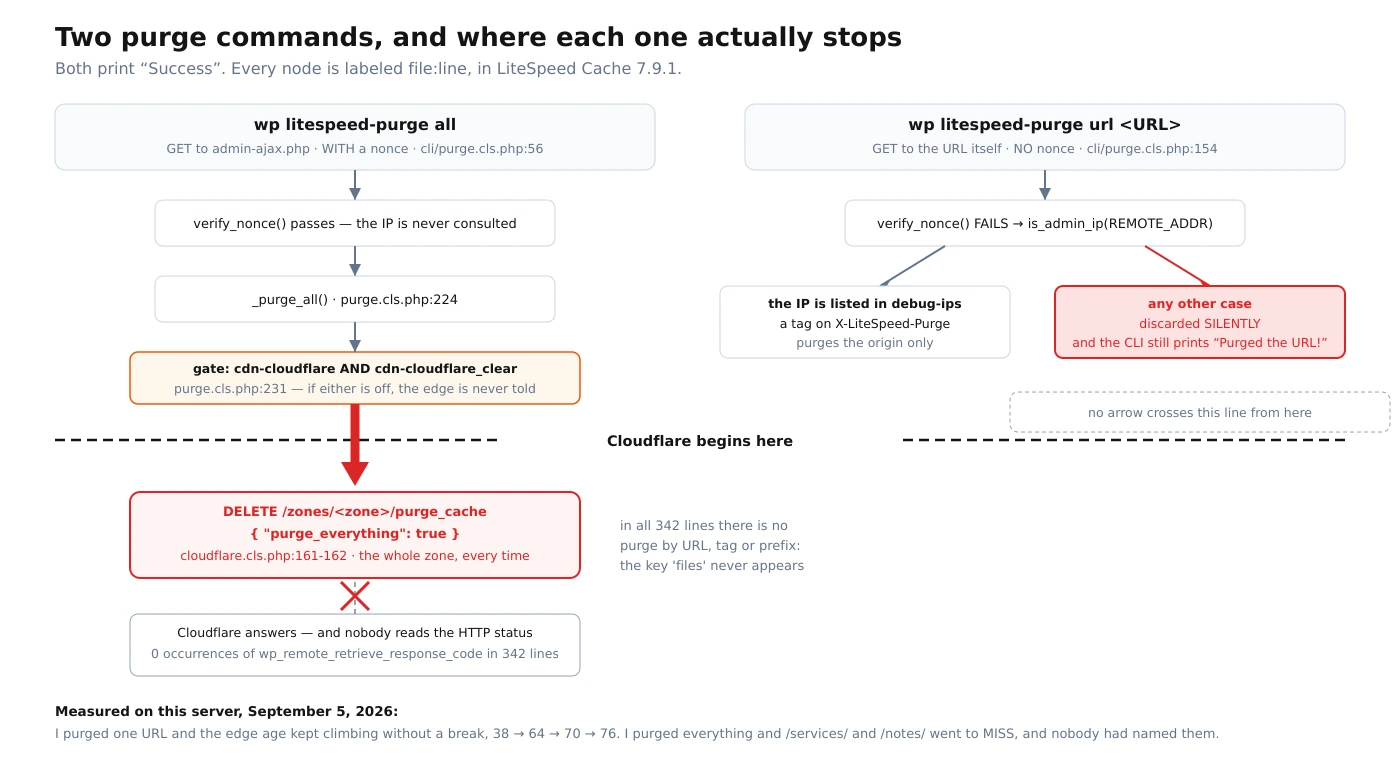
It is worth being clear that this is a plugin limitation and not a platform one. Cloudflare’s own documentation lists the purge methods available on every plan including Free as “URL, Hostname, Tag, Prefix, and Purge Everything.” Purging a single URL is available to everyone. Nothing about the account tier explains the choice in that file.
What this looks like as a service. None of the checks above took longer than a minute. What they needed was the habit of not accepting a tool’s summary of its own work: watch the age counter rather than the exit status, and read the four lines of the plugin that decide what gets sent.
Pointing that same suspicion at a site from the outside is what the free check does: you send a domain, I request its homepage as five named crawlers, one at a time, and send back what each one received together with the command that asked for it. You can re-run every line of it yourself, which is the only reason it is worth anything.
The command that works clears more than your page
When purge all reaches Cloudflare it is not purging your changed page. It is purging the zone. Immediately after that run, three pages that no command had named:
  /services/   cf-cache-status: MISS
  /notes/      cf-cache-status: MISS
  /            cf-cache-status: MISS
Every cached asset on the domain, in every Cloudflare data center, gone because one post was edited. Cloudflare is direct about the cost, and it is worth quoting rather than paraphrasing: “To maintain optimal site performance, Cloudflare strongly recommends using single-file (by URL) purging instead of a complete cache purge,” because “when a site with heavy traffic contains a lot of assets, requests to your origin server can increase substantially and result in slow site performance.” That is their guidance for the operation this plugin performs on every purge.
There is a second cost that is easy to miss, and it is the one I had wrong until I read the table. The purge limits are per account, not per site: “The current purge limits are applied per account,” and on the Free plan that budget is five requests per minute with a bucket size of 25, shared — in Cloudflare’s words, “the above limits are shared between all the zones with the same plan.” If several sites live under one account, they are drawing down the same allowance, and a plugin that only knows how to purge everything is spending it in the most expensive denomination available.
One thing I measured does not match the documentation, and I would rather publish the discrepancy than smooth it over. Cloudflare states that “Purge Everything invalidates the resource, resulting in the CF-Cache-Status header indicating EXPIRED for subsequent requests.” On this zone the next request after a purge returns MISS, consistently, across every run I have done. I do not know whether that is a plan difference, a documentation lag, or something about this zone specifically, and I have not established it either way. What matters operationally is that both values mean the stored copy is gone; what it means for reading the docs is that the header is not the check I would build a test on.
What the integration never looks at
There is one more layer of silence, and it is upstream of everything above. When the plugin does call Cloudflare, it decides whether the call worked by decoding the JSON body:
$result = wp_remote_retrieve_body($resp);

$json = \json_decode($result, true);

if ($json && $json['success'] && $json['result']) {
    ...
Debug2::debug("[Cloudflare] cloudflare_call called failed: $result");
if ($show_msg) {
    $msg = __('Failed to communicate with Cloudflare', 'litespeed-cache');
    Admin_Display::error($msg);
}

return false;
Reading the API’s own success field is the right idiom, and I want to be accurate: the plugin is not ignoring failures. But it never looks at the status code — grep -c wp_remote_retrieve_response_code src/cdn/cloudflare.cls.php returns 0 for the whole file — so a response that is not JSON at all, which is what a rate limit page or a proxy error looks like, decodes to null and lands in the same branch as a legitimate rejection, with the same text.
And look at where that failure goes. Admin_Display::error() queues a notice for a wp-admin screen. Meanwhile the function that started the purge returns nothing:
public static function purge_all( $reason = false ) {
    if ($reason) {
        Debug2::debug('[Cloudflare] purge call because: ' . $reason);
    }
    self::cls()->purge_all_private();
}
No return value, and the caller in purge.cls.php does not assign one. So when a purge is triggered by WP-CLI, by cron, or by any of the hooks that fire on a post update — that is, in every case where nobody is looking at an admin screen — a failed CDN purge produces no observable signal at all outside the plugin’s debug log, which is off by default. The site keeps serving the stale page and every layer reports that everything is fine.
Where this stops being a blog post. Every defect above is in shipped, working, popular software, installed on a few million sites, and none of it throws an error. None of it is a local modification either — the checksums above say so — which means the interesting question is not whether the code is broken but how many people are looking at a green line right now and drawing the wrong conclusion from it.
Finding this class of gap on infrastructure somebody else built, and saying which layer produced it, is the work I do for money. It arrives the way this note does: the command, its output, and a clearly marked line between what I measured and what I only believe.
What I got wrong
Three things, and they were not small.
I trusted the word Success for months. Every deployment on this site ended with a purge and a green line, and I never once checked the age counter afterward. The measurement that falsified it is two requests and needs no tools I did not already have open.
I believed the purge budget was per site. When I first sketched this note I wrote that several sites on one server share a quota because they leave through the same IP address. That is wrong twice: Cloudflare’s limits are not tied to an IP at all, and the sharing that does exist is by account, which is a different mechanism with a different fix. I got that from memory instead of from the limits table, which was one click away and says so plainly.
I nearly published a cause I had not observed. An earlier draft of this note opened with a rate-limit incident on a different site as the consequence of this design. Reading back through the record, nobody had established that the plugin caused it — three separate documents inferred it from the same circumstantial timing, and I would have been the fourth, in public, with more confidence than any of them. It is out. That is the same failure mode as publishing a DNS record for a draft that was not finished: a claim that fits the facts is not a claim that has been tested against them.
How to check your own in two minutes
You do not need any of the source reading. Pick a page, edit it visibly, and watch one header.
IP=$(dig +short @1.1.1.1 A example.com | head -1)
while true; do
  curl -s -o /dev/null -D- --resolve example.com:443:$IP https://example.com/page/ \
    | grep -iE '^(cf-cache-status|age):' | tr -d '\r' | paste -sd' '
  sleep 6
done
Run your purge in another terminal. If age keeps climbing through it, the edge never heard you, whatever the command printed. If it resets or you get a MISS, it did. Two rules make that test trustworthy. Use a GET rather than curl -I: a HEAD is not answered from the same path at the edge, and on this URL, in the same second, the two disagree completely — cf-cache-status: MISS for the GET and cf-cache-status: DYNAMIC for the HEAD, which reads as “this page is not cacheable” and is simply not true. And pin the IP with --resolve, so you are certain which machine answered. The same discipline of asking the layer that actually answers, rather than the one that is convenient to ask, is what separated four answers about a PHP setting into one right one and three wrong ones on this same server.
LiteSpeed purge on WordPress: frequently asked questions
Does wp litespeed-purge url work?
It never reaches Cloudflare, because the plugin’s only call to the Cloudflare purge API sends purge_everything, and the only routes to it purge the entire zone. At the origin it works if the machine running the command has its IP in the plugin’s debug IP list, which is empty by default. In every combination the command prints Success: Purged the URL!, because that message reflects an HTTP status code in the 200s from loading the page, not the state of any cache.
Why does my page still show the old version after a purge?
Because two caches are stacked and only one of them was cleared. Check them separately: x-litespeed-cache in a request that goes straight to your origin tells you about the server’s copy, and cf-cache-status with age in a request through the CDN tells you about the edge copy. An age value that keeps increasing across your purge is the same stored object, still being served.
Is purge everything bad?
It is expensive rather than dangerous. Cloudflare recommends single-file purging instead, because after a full purge every request goes back to your origin until the cache refills, which on a busy site is a traffic spike you did not schedule. It also consumes the tightest purge allowance you have, and that allowance is per account, shared across your zones on the same plan.
How can I purge one URL from Cloudflare on WordPress?
Not through this plugin’s Cloudflare integration as it stands in 7.9.1. The options are Cloudflare’s API or dashboard directly, a plugin that implements selective purge, or a small piece of your own code on the post-save hook that sends a files array to the purge endpoint. Any of those is a real decision to make deliberately; what is not tenable is assuming the URL purge you are already running does it.
Will I see an error if the purge fails?
Only on a wp-admin screen. A failed Cloudflare call produces an admin notice and a debug log line, and the purge function returns nothing to its caller, so a purge triggered from WP-CLI, from cron, or from a post-update hook fails without any signal reaching whoever or whatever triggered it.
Does this apply to other cache plugins and CDNs?
The specific lines are LiteSpeed Cache 7.9.1 and Cloudflare. The shape is not. Any time a command reports on the transport rather than on the effect, you get a success message that is true and useless at the same time, and the only defense is to measure the thing you actually wanted at the layer that holds it.
The general shape of this
Everything here reported success. The CLI succeeded, because its request returned 200. The router succeeded, because dropping an unauthorized action is exactly what it is built to do. The page succeeded, because it rendered. Cloudflare succeeded, because it was never asked anything. There is no error to find in this system, and no log line to grep for, because at no point did any component fail at the job it believed it had.
What is missing is the only question anybody cared about: is the old copy still being served? Nothing in the chain asks it, and it is answerable in two requests by anyone with curl. That gap between the question a tool answers and the question you meant is not a rare condition on a server; it is the normal condition, and finding it is mostly a matter of refusing to let a green line stand in for a measurement.
A command that reports a success it did not achieve has a mirror image in tools that report a failure that is not there: two DKIM utilities that misread a key which was, in fact, correct.
This was not the only WP-CLI rule I had written down wrong: another one in my own documentation turned out to be backwards, and following it had never hurt, which is why nobody noticed.
Every command above ran against this server on the day this was published, and the source quotes are from files whose checksums match the public releases. If one of them returns something other than what I said it does, that is worth an email. And if you would rather have somebody else check whether your own stack is telling you the truth, that is what the free check is for.