The short version. This page maps six ways the LiteSpeed Cache with Cloudflare stack gave me a misleading answer on this site, from a purge that said Success to an access log that recorded 6 of 60 requests. Each was measured, and each has a full note with the commands printed.
In every case the answer I got was true of the layer that gave it. The mistake was reading it as an answer about a different layer.
Every row below is something I saw on this LiteSpeed Cache with Cloudflare setup, with the first check I would run. The notes were written against LiteSpeed Cache 7.9.1 and OpenLiteSpeed 1.9.1.
| Symptom | What was really happening | First check |
|---|---|---|
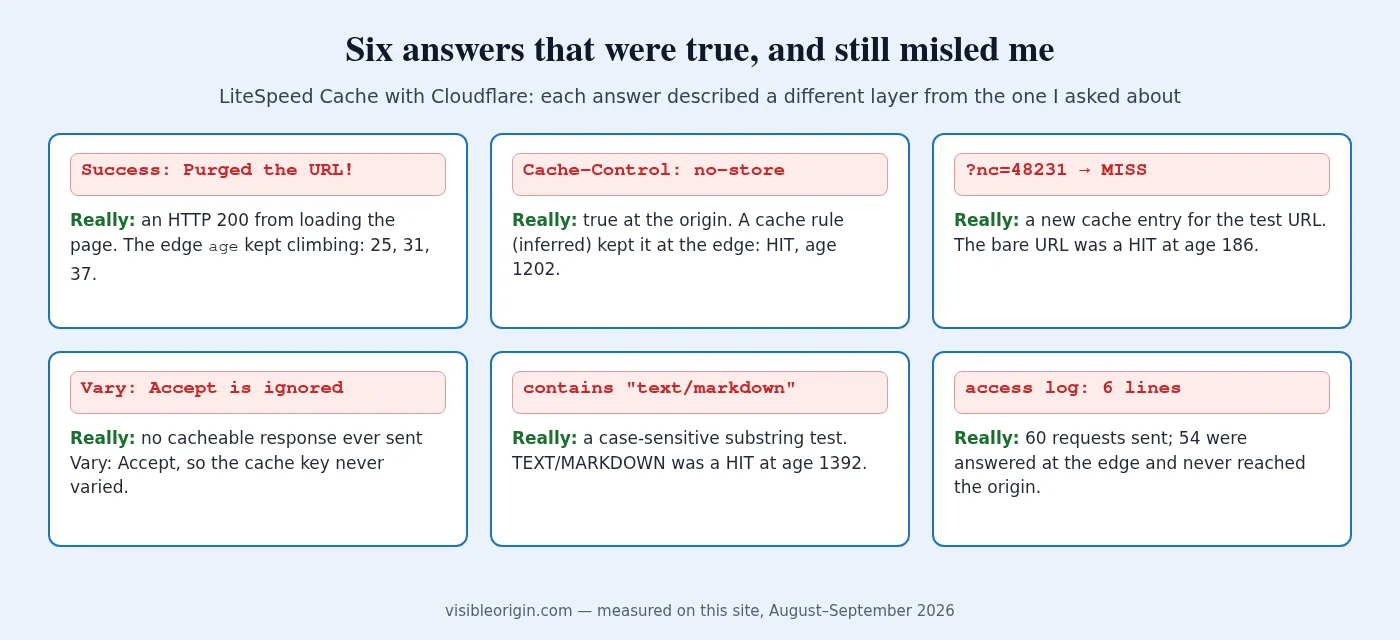
wp litespeed-purge url prints Success; the page does not change | The message reports an HTTP 2xx, not a purge; the edge age kept climbing (25, 31, 37) | Watch age through the purge |
A no-store file is still served from Cloudflare | A cache rule of mine (inferred) overrides the header; the sitemap stayed a HIT to age 1202 | Compare origin Cache-Control with the edge |
Fixed with ?nc=123, but not at the normal address | The query string is part of the cache key, so the test URL had its own entry | Request the bare URL with GET |
Vary: Accept seems to do nothing | The cache learns to vary from a cacheable response; mine never sent Vary: Accept on one | Read the Vary on the response that warmed the cache |
A rule on the Accept header skips the wrong requests | A case-sensitive substring test: it missed TEXT/MARKDOWN and caught application/vnd.foo+text/markdown | Send inputs the rule should reject |
| The access log shows far fewer requests than were sent | Edge hits never reach the origin: 60 sent, 6 logged | Send counted traffic with a unique user agent |
Every number comes from the note linked in its section below.
The purge says Success but the old page is still served
I ran wp litespeed-purge url on a page I had just changed and it printed Success: Purged the URL! Cloudflare kept serving the old copy: the edge age read 8 and 16 before the command and 25, 31 and 37 after it, with no reset. The message only reports that the HTTP library WP-CLI bundles got a status in the 200s for a plain GET of the page, which says nothing about any cache.
Nor can that command reach the edge. In LiteSpeed Cache 7.9.1 the only call to Cloudflare’s purge API sends purge_everything, so every route to the edge clears the whole zone: after wp litespeed-purge all, the home page, /services/ and /notes/ all came back MISS. Cloudflare itself recommends single-file purging over that.
On a LiteSpeed Cache with Cloudflare setup, use wp litespeed-purge all when the edge has to change, and judge any purge by the age counter, never by the exit message. The full note covers three ways a cache purge reported success without looking at the cache.
Cloudflare is caching a response my server marked no-store
My sitemap is sent with no-cache, no-store, must-revalidate, max-age=0. The edge stored it anyway: a second request was a HIT at age 21, and the copy kept aging to 1202 seconds, although RFC 9111 section 5.2.2.5 says a cache must not store such a response. A manifest sent with public, max-age=300 was still a HIT at age 1202, and two files sent with public, max-age=3600 were never stored.
By inference, the cause is one cache rule of mine, written so HTML would be cached at the edge; it matches on method and path shape and cannot know which files carry instructions of their own. That is documented: Origin Cache Control is on by default on the Free plan, and Cache Rules can augment or override the origin’s Cache-Control. On a LiteSpeed Cache with Cloudflare stack, a header and a rule answer to nobody in common.
Compare the origin’s Cache-Control with the edge on the second request, then relax the header or exclude the path from the rule. It has not bitten me, because I purge the whole zone on every publish. The full note covers the file I marked no-store and the rule that stored it.
The page looks fixed with a cache-buster, but visitors still get the wrong one
A new hostname in my Cloudflare zone checked clean with a random query string: a 200, the right site, 70,417 bytes. I asked for the bare hostname and got 752 bytes of a hosting control panel’s default page, served from cache. My cache rule named no hostname, so it governed every hostname in the zone, and the origin sent no Cache-Control to push back.
A cache-buster does not skip the cache: Cloudflare’s default cache key includes the full URL with its query string, so a busted URL gets an entry of its own. On my homepage the bare URL was a HIT at age 186, two different ?nc= values were each a MISS, and repeating the first gave a HIT at age 0. A MISS means the response is eligible for cache, so seeing one proves you just created the copy.
On a LiteSpeed Cache with Cloudflare site, use the cache-buster to ask whether the origin works, and the bare URL to learn what visitors are served. Request it with GET: curl -I said DYNAMIC on a page that GET showed as a HIT at age 1738. The full note covers a cache-buster that gave me my own copy of the page.
The cache seems to ignore my Vary: Accept header
I spent two days concluding that my server would not vary its cache by the Accept header, and published that conclusion. It was wrong. My test looked conclusive: after a miss and a hit, Accept: text/markdown and Accept: application/x-nada both returned hit. But the HTML response that warmed the cache carried no Vary: Accept, so the cache had no reason to look at that header. A negative result with no positive control restates the setup.
The cache module in OpenLiteSpeed 1.9.1 reads the Vary of the response and puts the matching request header into the cache key, but only for a response it stores. My one response with Vary: Accept was marked no-cache. With Vary: Accept on the cacheable HTML, text/html, text/markdown and application/json each got their own entry.
A LiteSpeed Cache with Cloudflare stack has two caches, and in my 26 August measurement Cloudflare did not honor Vary on HTML, so this site gives each format its own URL, /terms/ and /terms.md. The wrong explanations I wrote, and the forty lines of source that settled it, are in the note on a cache that was never ignoring the header.
A Cloudflare cache rule on the Accept header matches the wrong requests
The rule that keeps Markdown out of the cache is recorded in a comment in my own plugin as any(http.request.headers["accept"][*] contains "text/markdown"), with the action Bypass cache. I sent eight requests to one URL that differed only in Accept. text/markdown was DYNAMIC, as intended, and so was application/vnd.foo+text/markdown, which is not Markdown. TEXT/MARKDOWN, the same media type in capitals, was a HIT at age 1392, and so was text/markdow, one character short.
That is a case-sensitive substring test standing in for content negotiation. RFC 9110 says the type and subtype of a media type are case-insensitive, and Cloudflare documents that string evaluation is case-sensitive by default, with lower() as the remedy. But lower() fixes only the missed half: a substring match still catches xxtext/markdownxx, and cannot tell text/html, text/markdown;q=0.9 from a request that wants only Markdown.
I could not read the live rule, so which rule produced each row is inference; the behavior is measured. If your LiteSpeed Cache with Cloudflare stack has a rule like this, test it with inputs it should reject. The full note covers a cache rule that asks a different question from the one it looks like it asks.
The access log shows far fewer requests than I sent
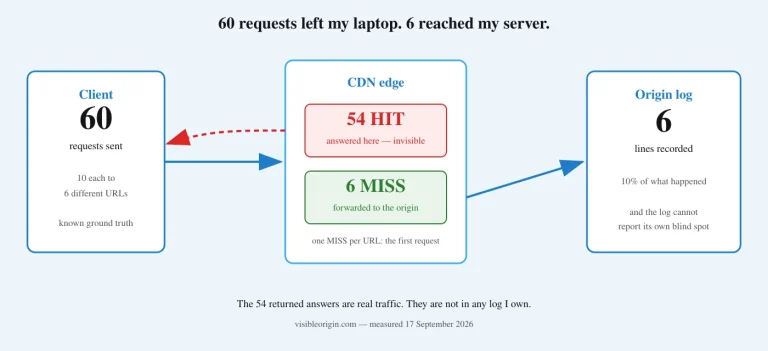
I sent 60 requests from outside the server, ten each to six URLs: the home page, the blog index, one post, robots.txt, the sitemap and one image. The access log recorded six. The first request to each URL filled the edge cache and the other nine were HIT responses the origin never saw, so 54 of 60 left no trace on my machine (measured 17 September 2026).
Behind a LiteSpeed Cache with Cloudflare stack, that is caching working, and the log is an honest record of what reached the server. It is not a record of what crawlers do, and one location hit ten times in a row is no guide to real crawler traffic. Google’s Crawl stats report counts requests issued, not received, so a crawler’s count and your server’s are supposed to disagree.
Use the origin log for questions about the server and a second source for questions about clients; a low count is not proof that a page is not crawled. The full note, 60 requests and 6 log lines, adds a table of what a log can and cannot support.
What the six have in common
In all six cases the LiteSpeed Cache with Cloudflare stack was doing what its documentation, its source or my configuration said. A success line described an HTTP request, a header described one response, a rule described a shape of request, and a log described only what reached the server. What caught each one was measuring the thing I actually wanted at the layer that holds it.
How to check your own LiteSpeed Cache with Cloudflare setup
These commands are copied from the six notes, so swap in the hostname of your own LiteSpeed Cache with Cloudflare site. Use GET rather than curl -I, pin the IP with --resolve, and run them away from the origin server, where a request may never reach your own edge. The rules I follow when I point requests at a site that is not mine are on how I measure.
Does the edge hear your purge? Run this while you purge in another terminal. If age keeps climbing, it did not; a reset or a MISS means it did.
IP=$(dig +short @1.1.1.1 A example.com | head -1)
while true; do
  curl -s -o /dev/null -D- --resolve example.com:443:$IP https://example.com/page/ \
    | grep -iE '^(cf-cache-status|age):' | tr -d '\r' | paste -sd' '
  sleep 6
done
Does the edge match what the origin asked for? Look for a HIT on anything marked no-store or private, an age that climbs past the origin’s max-age, and a Last-Modified at the edge that the origin never sent.
IP=$(dig +short @1.1.1.1 A example.com | head -1)
for u in /robots.txt /sitemap.xml /llms.txt /.well-known/api-catalog; do
  echo "== $u"
  # what the origin asked for
  curl -s -o /dev/null -D- https://ORIGIN-IP-OR-HOST$u | grep -iE '^(cache-control|etag|last-modified):'
  # what the edge did, second request
  curl -s -o /dev/null --resolve example.com:443:$IP https://example.com$u
  curl -s -o /dev/null -D- --resolve example.com:443:$IP https://example.com$u \
    | grep -iE '^(cf-cache-status|age|cache-control|last-modified):'
done
What are visitors served? Use a number of your own for ?nc=, since 48231 is now a cached entry on this site. The third line shows why not to audit with -I.
curl -s -o /dev/null -D - https://visibleorigin.com/ | grep -iE '^(cf-cache-status|age):'
curl -s -o /dev/null -D - 'https://visibleorigin.com/?nc=48231' | grep -iE '^(cf-cache-status|age):'
curl -sI https://visibleorigin.com/ | grep -iE '^(cf-cache-status|age):'
Is the cache varying at all? Warm it with one header value, ask with another, and read the cache status: a hit means one shared entry, a miss means it is keying on that header. Then confirm the response you warmed it with carried the Vary you think it did, the step I skipped.
Which requests does a header rule catch? Change only the Accept value, and include values the rule should reject. Check first what the rule guards: where negotiation is live, this experiment can write the wrong representation into a shared cache.
IP=$(dig +short @1.1.1.1 A visibleorigin.com | head -1)
curl -s -o /dev/null -D - --resolve visibleorigin.com:443:$IP \
     -H 'Accept: text/markdown' https://visibleorigin.com/services/ \
  | grep -iE '^(cf-cache-status|age):'
Does the origin log see everything? Send traffic you can count with a user agent of your own, then count the lines. The log path is this server’s; use yours.
IP=$(dig +short @1.1.1.1 A visibleorigin.com | head -1)
M="vo-cache-probe-$(date +%s)"
curl -s -o /dev/null --resolve visibleorigin.com:443:$IP -A "$M" \
     https://visibleorigin.com/robots.txt -D - | grep -i "cf-cache-status"
grep -c "$M" /home/visibleorigin.com/logs/visibleorigin.com.access_log
Where this stops being a guide. Finding this kind of gap on infrastructure somebody else built, and saying which layer produced it, is the technical SEO and server work I do. The free check is the outside view of it: you send a domain, I request its homepage as five named crawlers, one at a time, and send back what each one received together with the command that asked for it.
LiteSpeed Cache with Cloudflare: frequently asked questions
Does wp litespeed-purge url clear the Cloudflare cache?
No. The plugin’s only call to Cloudflare’s purge API sends purge_everything, so on a LiteSpeed Cache with Cloudflare setup the only command that reaches the edge is wp litespeed-purge all, which clears the whole zone. The single-URL command still prints Success: Purged the URL!, which reflects a status in the 200s from loading the page, not any cache.
How can I tell which cache served a page on a LiteSpeed Cache with Cloudflare setup?
Check the layers separately. x-litespeed-cache on a request straight to your origin describes the server’s copy; cf-cache-status with age on a request through the CDN describes the edge copy. An age that keeps increasing across a purge is the same stored object, still being served.
Why is Cloudflare caching a response marked no-store?
In my case the cause is, by inference, a cache rule that marked it eligible for cache and gave it an edge lifetime; Cloudflare documents that Cache Rules can override the origin’s headers. The no-store still reaches the client: the header travelled but did not govern the hop where the copy is kept.
Is a low count in my origin access log evidence that crawlers are not visiting?
Weak evidence at best. On a LiteSpeed Cache with Cloudflare site, a low count is consistent with a page being crawled often and served from the edge every time. Use the log for questions about the server, and Search Console’s Crawl stats or your CDN analytics for questions about clients.