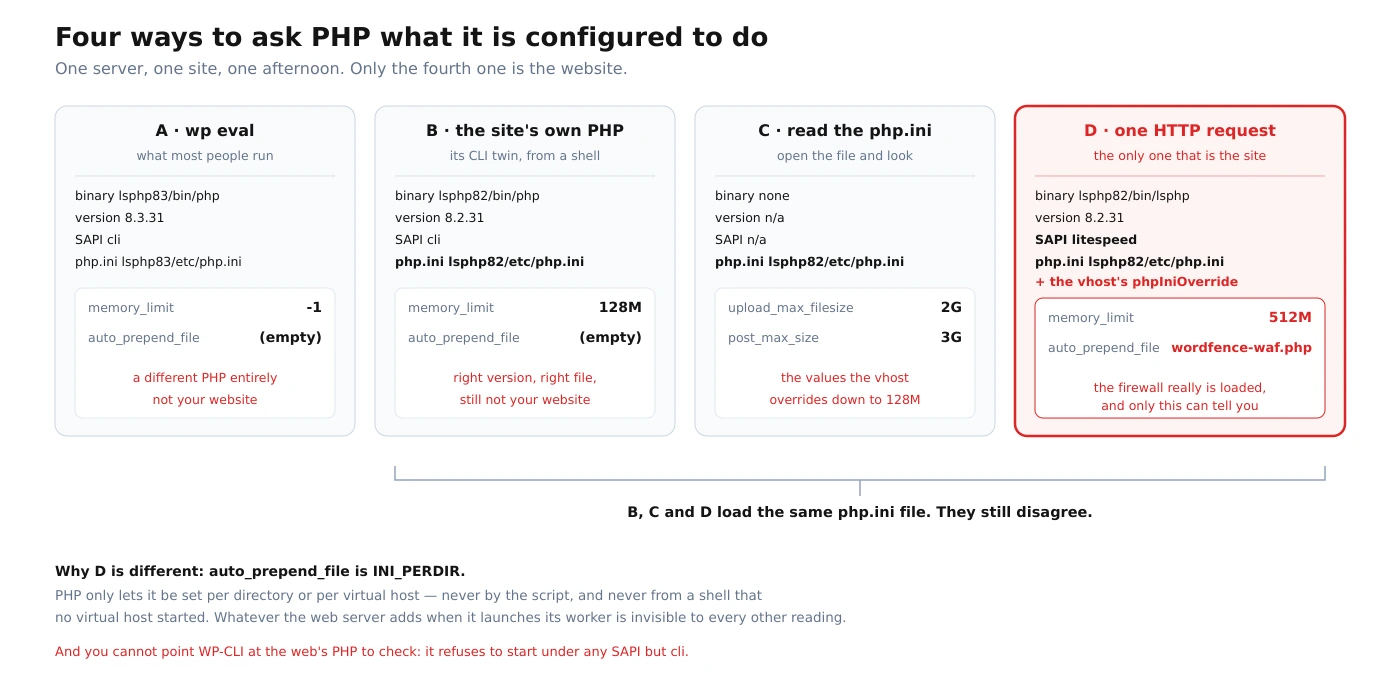
The short version. I wanted to confirm that one of the PHP settings on this OpenLiteSpeed server was actually in effect for my site. There are four ways to ask, they are all one line long, and three of them answer about something that is not my website. Two of those three load the same php.ini file as the real one and still disagree with it on every value I checked.
The one that most people run — wp eval — was the furthest off, and it cannot be fixed by pointing it somewhere better: WP-CLI refuses to start under a web server’s PHP, by design. What I did not expect is that the correct answer was already sitting in my own admin, and that on four of the five sites on this box the whole trap is invisible.
The setting was auto_prepend_file. Wordfence uses it to load its firewall before WordPress rather than after, which is the difference between a firewall that sees a request and one that sees the wreckage. I wanted to know whether it was really in effect. That is a yes-or-no question about a running web server, and it took me four tries to ask it correctly.
Why this question is harder than it looks
A PHP setting does not have one value. It has a value for a given process, and a web server can start that process with settings that exist nowhere in any file you would think to open. Which means the honest form of the question is not “what is auto_prepend_file set to” but “what is it set to in the process that answers requests for this site”, and those are different questions with different answers.
PHP itself draws that line, and you can look it up. Every directive is tagged with where it may be changed, and the list of core directives gives this one as INI_PERDIR:
auto_prepend_file null INI_PERDIRINI_PERDIR means it can be set per directory or per virtual host — in .htaccess, in a .user.ini, in the server’s own configuration — and never by the script at runtime. So its real value depends on which directory and which virtual host you are in. A shell has neither.
Four ways to ask, on one server, in one afternoon
A. wp eval, which is what most people run
runuser -u <site-user> -- wp --path=/home/<site>/public_html eval '
foreach (["auto_prepend_file","memory_limit","upload_max_filesize",
          "post_max_size","max_execution_time","max_input_time"] as $k)
  printf("  %-22s %s\n", $k, var_export(ini_get($k), true));
printf("  %-22s %s / %s\n", "(version / sapi)", PHP_VERSION, PHP_SAPI);'
#   auto_prepend_file      ''
#   memory_limit           '-1'
#   upload_max_filesize    '64M'
#   post_max_size          '64M'
#   max_execution_time     '0'
#   max_input_time         '-1'
#   (version / sapi)       8.3.31 / cli
Empty. If I had stopped here I would have concluded the firewall was not being prepended and gone looking for a problem that does not exist.
B. The site’s own PHP, run from a shell
The obvious correction is to stop using whatever PHP wp found and use the one this site actually runs. The virtual host names it, in a single line:
path /usr/local/lsws/lsphp82/bin/lsphpThat binary will not take a script from the command line — it prints its own usage and tells you it runs in LSAPI mode — but the same directory ships a command-line twin, same version, same build. Running that:
/usr/local/lsws/lsphp82/bin/php -r '...same loop...'
#   auto_prepend_file      ''
#   memory_limit           '128M'
#   upload_max_filesize    '2G'
#   post_max_size          '3G'
#   max_execution_time     '0'
#   max_input_time         '-1'
#   (version / sapi)       8.2.31 / cli
#   (php.ini loaded)       /usr/local/lsws/lsphp82/etc/php.ini
Right version. Right configuration file. Different answers from A on four rows out of six — and still empty on the one I care about.
C. Open the php.ini and read it
The file B just named is a real file, and reading it is the most direct thing a person can do. It says upload_max_filesize = 2G and post_max_size = 3G. Those are not the values this site runs either. They are the defaults the virtual host overrides on its way down to 128M. The configuration file is not wrong; it is simply not the last word.
D. Make an HTTP request
The fourth way is the only one that asks the process that actually serves the site. It costs a temporary file, which is the part everybody skips. This is the whole of it:
<?php
header('X-Robots-Tag: noindex, nofollow');
header('Content-Type: application/json');
$d = ['php_version' => PHP_VERSION, 'sapi' => PHP_SAPI,
      'ini_file' => php_ini_loaded_file()];
foreach (['auto_prepend_file','memory_limit','upload_max_filesize',
          'post_max_size','max_execution_time','max_input_time'] as $k)
    $d['ini'][$k] = ini_get($k);
$d['wf_prepended'] = (defined('WFWAF_RUN_COMPLETE')
                      || class_exists('wfWAF', false)) ? 'yes' : 'no';
echo json_encode($d, JSON_PRETTY_PRINT|JSON_UNESCAPED_SLASHES);
Three rules make that safe to do on a live site, and they are worth following even though the file lives for about two seconds. Give it an unguessable name, so the window is not something anyone can find by scanning. Request it over loopback with a Host: header rather than through your public address, so it passes through the web server and the virtual host — which is the entire point — without ever reaching your CDN, your cache, or the internet. And remove it in the same command that fetches it, then confirm it is gone rather than assuming:
N="probe-$(head -c 12 /dev/urandom | od -An -tx1 | tr -d ' \n').php"
install -m 644 -o <site-user> -g <site-user> probe.php "$DOCROOT/$N"
curl -s -4 -H "Host: example.com" "http://127.0.0.1/$N"
mv "$DOCROOT/$N" /somewhere/outside/the/docroot/
find "$DOCROOT" -maxdepth 1 -name 'probe-*' | wc -l    # must print 0
The last line is not decoration. A probe file left behind is a worse problem than the one you were investigating, and “I meant to delete it” is how those end up indexed. The answer it returned is the fourth column below, and it disagrees with all three of the others.
A — wp eval | B — site’s PHP, from a shell | C — the php.ini file | D — an HTTP request | |
|---|---|---|---|---|
| PHP version | 8.3.31 | 8.2.31 | — | 8.2.31 |
| SAPI | cli | cli | — | litespeed |
auto_prepend_file | empty | empty | not set | …/wordfence-waf.php |
memory_limit | -1 | 128M | 128M | 512M |
upload_max_filesize | 64M | 2G | 2G | 128M |
post_max_size | 64M | 3G | 3G | 128M |
max_execution_time | 0 | 0 | 0 | 600 |
max_input_time | -1 | -1 | -1 | 600 |
Measured on this server on September 5, 2026, within a few minutes of each other. Column D was produced by a small PHP file placed in the document root, requested once over loopback so it never reached the public edge or any cache, and moved out of the document root in the same step; nothing remains. Column A is what WP-CLI reports; note that its memory_limit of -1 means unlimited, which is the opposite of the 512M the site actually enforces, and its max_execution_time of 0 means no limit against a real 600 seconds. Every row disagrees somewhere.
What this looks like as a service. Nothing above is difficult. It is four one-line questions and the discipline to notice that they returned four different answers instead of picking the one that matched what I expected.
Reading a site the way the outside world reads it is the same habit pointed outward, and it is what the free check does: you send a domain, I request its homepage as five named crawlers, one at a time, and send back what each one received along with the command that asked. You can disagree with any of it using your own terminal, which is the point.
What each wrong answer would have cost
A table of mismatched numbers is easy to shrug at. It is worth walking two of these rows to the point where they turn into a support ticket, because none of them announce themselves as configuration problems — they arrive as behavior nobody can reproduce.
Take memory_limit. Column A says -1, which does not mean 512 megabytes or 64; it means no limit at all. That is the normal default for a command-line PHP, and it is why bulk operations run from a shell so often succeed where the same work fails in a browser. If I had trusted that reading, my conclusion would have been that this site cannot run out of memory. The site enforces 512M. A plugin doing image work on a large upload has a ceiling that my measurement said did not exist, and the failure would appear as a blank screen in the admin with a fatal error in a log I would not have been watching, on a site I had just declared unconstrained.
Take max_execution_time. Columns A, B and C all say 0, which again means unlimited, and the real answer is 600 seconds. This is the one that produces the most confusing support conversations in WordPress, because the person running an import over SSH genuinely never sees a timeout, and the person running the same import through the browser is cut off in the middle. Both are looking at the same site. Both are right about their own process. WordPress core is aware enough of this to leave a comment about it in the file that builds the Site Health screen, which is a small mercy and also a signal about how often it comes up.
And then there is the row I actually went looking for. auto_prepend_file empty would have meant a firewall loading after WordPress instead of before it, which is the difference between a request being inspected and a request being logged. That is not a performance nuance; it is the whole reason the setting exists. Three of my four measurements said it was empty, and all three were answering honestly about a process that does not serve this website.
The pattern across all three is the same, and it is not a coincidence: the command-line defaults are systematically more permissive than the web values — unlimited memory, unlimited time, no prepend. A measurement error that leans consistently toward “everything is fine” is the worst possible bias for a check whose entire job is to find out whether something is wrong.
B and D read the same file and still disagree
This is the part worth slowing down for, because it rules out the comfortable explanation. B and D are the same PHP version, the same build date, and — verified in both — the same loaded configuration file, /usr/local/lsws/lsphp82/etc/php.ini. If the difference were “you read the wrong php.ini,” these two would agree. They disagree on all six values.
What separates them is that D runs inside a virtual host and B does not. This server keeps per-site PHP settings in a block of the virtual host configuration, and OpenLiteSpeed applies them when it starts the worker that serves that site. A shell command starts no virtual host, so it inherits none of it.
I am not going to tell you the mechanism by which those values reach the worker, because I could not establish it. They are not in any php.ini in either PHP tree, not in a php.d directory, not in the server’s main configuration file, and not in the environment of the running worker process — I dumped it, and it holds six variables, all of them LSAPI plumbing. It works, it is documented as a place to put settings, and how it is transmitted is something I do not know. Writing down a plausible mechanism I had not verified is how the last note on this site came to exist, and once is enough.
You cannot point WP-CLI at your site’s PHP
The natural reflex after column A is to make wp use the right interpreter. There is a documented way, and on a standard install it does nothing:
WP_CLI_PHP – PHP binary path to use when overriding the system default
             (only works for non-Phar installation).
That parenthesis is from WP-CLI’s own handbook, and the recommended install is the Phar. Setting the variable here changes nothing at all:
runuser -u <site-user> -- env WP_CLI_PHP=/usr/local/lsws/lsphp82/bin/php \
  wp --path=/home/<site>/public_html cli info | grep -i 'php binary\|php version'
#   PHP binary:   /usr/local/lsws/lsphp83/bin/php
#   PHP version:  8.3.31
And invoking WP-CLI with the web server’s PHP directly does not work either, because WP-CLI will not run under a web SAPI at all. The guard is the first executable statement of its bootstrap, and the message names the SAPI you tried:
if ( 'cli' !== PHP_SAPI ) {
	echo "WP-CLI only works correctly from the command line, using the 'cli' PHP SAPI.\n",
		"You're currently executing the WP-CLI binary via the '" . PHP_SAPI . "' PHP SAPI.\n",
		...
	die( -1 );
}
Run on this box, that is exactly what comes back: “You’re currently executing the WP-CLI binary via the ‘litespeed’ PHP SAPI.” The source is boot-phar.php, and the refusal is correct — WP-CLI is a command-line tool and has good reasons not to run under a web server. But the consequence is worth stating plainly: there is no configuration you can apply that makes wp eval report your website’s PHP settings. It is not a tuning problem. It is a category error.
What I got wrong, and why it stayed hidden
I went into this expecting to write that a control panel gives your website a different PHP from the one your tools use. Then I looked at the other virtual hosts on the same machine:
| Virtual host | PHP it declares | Same interpreter as wp? |
|---|---|---|
| site 1 | lsphp83 | yes |
| site 2 | lsphp83 | yes |
| site 3 | lsphp83 | yes |
| the panel’s own hostname | lsphp83 | yes |
| this site | lsphp82 | no |
Read from the path line of each virtual host’s configuration on September 5, 2026. Four of the five run the same PHP tree that WP-CLI resolves to, so on four of them wp eval reports the right version and the right php.ini — and still the wrong per-site values, because the virtual host layer applies to all five equally. Only the version mismatch is site-specific.
So the sentence I was about to publish was false, and the counterexamples were four directories away. The control panel does not hand you a different PHP; somebody chose 8.2 for this one site. What is universal here is narrower and, I think, more useful: the per-virtual-host layer is invisible from a shell on every one of the five, including the four where the version matches perfectly and everything looks consistent.
That is what makes it worth writing down. On a machine where all your sites run the same PHP version, wp eval gives you the right version, the right build, and the right configuration file — and quietly wrong values for anything set per site. There is no visible seam. The four-of-five case is the dangerous one, not mine.
Where this stops being a blog post. Every wrong answer above was returned confidently by a real tool that was working correctly. None of them printed a warning, because none of them were malfunctioning — they were answering a question slightly different from the one I asked.
Finding that class of gap on infrastructure somebody else built, and saying which layer produced it, is the work I do for money. It arrives the way this note does: the command, the output, and the part I could not establish.
How to check it without guessing
OpenLiteSpeed documents this exact case, for this exact plugin, and its instructions are the ones I should have read first. Its page on enabling Wordfence opens by saying that the plugin’s default approach does not apply here:
WordFence requires auto_prepend_file in order to work correctly, as it
allows the Wordfence WAF to load before WordPress, rather than afterward.
By default, the following directive in .htaccess is used to load
WordFence, but this directive does not work in OpenLiteSpeed.
It then gives three alternatives — the admin console, editing the php.ini directly, or the virtual host — and, crucially, it tells you how to confirm the result: “Check the phpinfo page, and you will see that the wordfence-waf file is listed as the Local Value for the auto_prepend_file Directive.” The vendor’s own verification step is an HTTP request. Not a command, not a file. That is column D, recommended by the people who wrote the server.
The same page explains why a .user.ini is the wrong instrument here, and PHP’s manual explains it more generally. Per-user configuration files, says the manual, are “processed only by the CGI/FastCGI SAPI.” Under a different SAPI the file is not rejected or logged — it is simply not read, which is the most expensive kind of quiet.
And there is one more route I did not know about while I was building a decoy, which is mildly humbling: WordPress already measures this correctly and shows you the answer. Site Health’s info screen reads these directives with ini_get() inside a real web request, so its numbers come from column D by construction. Core even knows about the trap and says so in a comment, which you can read in your own install at wp-admin/includes/class-wp-debug-data.php:
/*
 * The max_execution_time defaults to 0 when PHP runs from cli.
 */
Site Health covers the ordinary limits. It does not report auto_prepend_file, so for that one the choice is the vendor’s phpinfo route, the plugin’s own status indicator, or a temporary file of your own. What matters is that all three are HTTP requests.
php.ini and still disagree.PHP settings on OpenLiteSpeed: frequently asked questions
Why does my .user.ini do nothing on OpenLiteSpeed?
Because per-user configuration files are read only by the CGI and FastCGI server APIs, per PHP’s manual, and your site is not being served by one. Nothing is logged when the file is skipped, so the file’s presence tells you nothing about whether it took effect. On this platform the per-site place for these settings is the virtual host’s PHP override block; OpenLiteSpeed’s own documentation walks through three ways to set it and none of them is a .user.ini.
Does wp eval 'echo ini_get("x");' tell me my site’s setting?
It tells you the value in the PHP process that WP-CLI started, which is a command-line process with no virtual host. That may coincide with your site’s value, and on a simple stack it usually will. For anything set per site — memory, upload limits, execution time, auto_prepend_file — treat it as unrelated until you have checked over HTTP. On this server it was wrong on six directives out of six.
Can I make WP-CLI use my web server’s PHP?
No. WP_CLI_PHP exists but its documentation says it “only works for non-Phar installation,” and the standard install is the Phar. Invoking WP-CLI with the web server’s PHP binary is refused outright: its bootstrap exits unless the SAPI is cli, and the error message names the SAPI you used. You can point it at a different command-line PHP; you cannot point it at a web one.
What is the fastest correct check?
For the common limits, open Site Health → Info → Server in wp-admin: those values are read inside a web request. For auto_prepend_file, use the route the server’s documentation gives, or a temporary file that prints ini_get() and is removed immediately. Request it over loopback rather than through your CDN so no cache layer ever sees it, and confirm afterward that it is gone.
Is this specific to OpenLiteSpeed or CyberPanel?
The version mismatch is not: it is particular to this virtual host, and elsewhere on the same machine the two versions agree. What is general is that per-site settings applied by a web server are invisible to a command-line process, and that is true of any stack with per-site configuration — PHP-FPM pools, Apache virtual hosts, containers with different images. The names change; the gap does not. On some stacks there are command-line ways to dump the effective per-pool configuration, so “only HTTP works” is a rule for this platform, not a law.
How do I know the firewall really loaded, not just that a path is configured?
A configured path proves configuration, not execution. The check that distinguishes them is asking, inside a web request, whether the prepended file actually ran — whether the class or constant it defines exists. On this site it does. That is a different question from “is the setting present,” and it is the one worth asking, because it is the one that fails silently.
The general shape of this
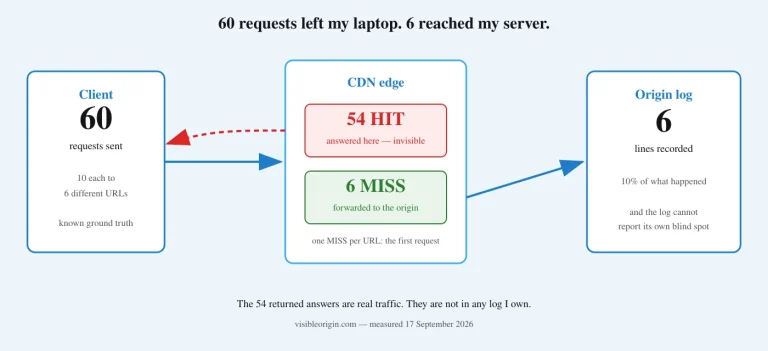
Every tool above was working. None of them returned an error, because none of them had one to return. They answered the question they were asked, which was not quite the question I meant, and the gap between those two questions is invisible in the output. That is the entire failure mode, and it does not look like a failure at any point — the same shape as a command that reports success because an HTTP request completed, while the cache it was supposed to clear is still serving the old page.
The habit that catches it is unglamorous: ask the same question more than one way, and treat disagreement as information rather than as noise to resolve in favor of whichever answer you liked. Four answers arrived here and three were wrong; what saved the check was not expertise but the accident of asking twice. It is the same accident that would have saved me from a verification step I had written down with the wrong tool and left in place for a week.
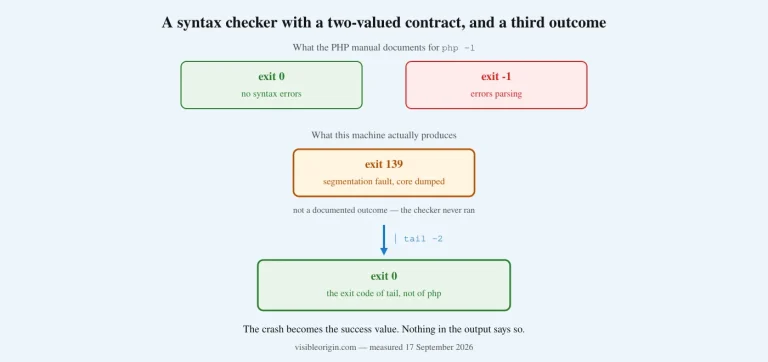
The same thing happens one level down, in the tools you use to check PHP itself: the syntax check on this server crashes, and a pipe turns the crash into a pass.
Every command above ran against this server on the day this was published. If one of them returns something other than what I said it does, that is worth an email. And if you would rather have somebody else ask the awkward questions about your own stack, that is what the free check is for: you send the domain, I make the requests one crawler at a time, and you get back exactly what each one received.