
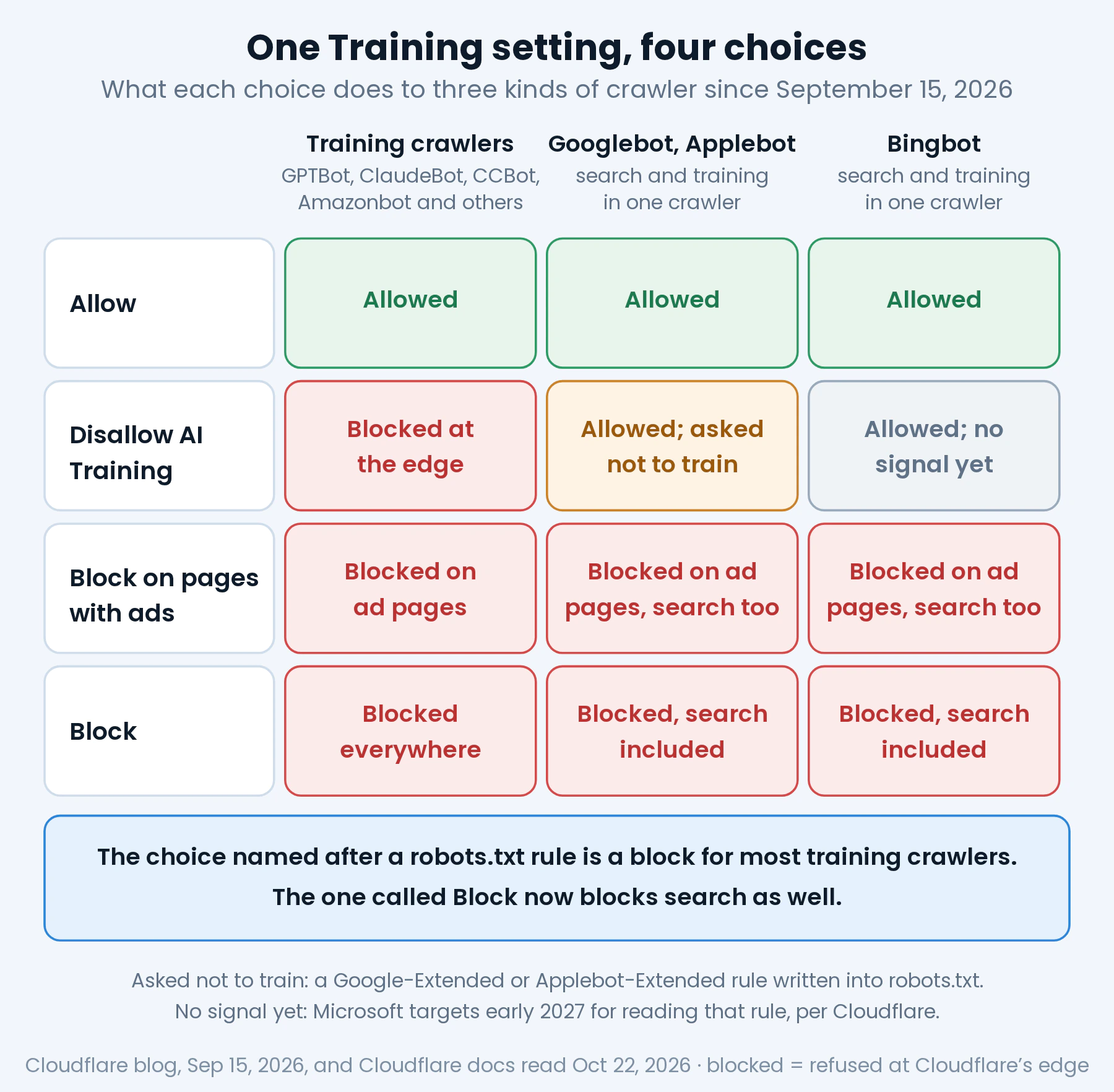
The short version. Since September 15, 2026, the Cloudflare AI bot settings give Training four choices, and two of them do something other than what their names suggest. Disallow AI Training is a block at Cloudflare’s edge for GPTBot, ClaudeBot and every other training crawler, and only a robots.txt request for Google and Apple, whose crawlers stay allowed for search; for Bing it sends no signal yet. Block now refuses Googlebot, Bingbot and Applebot too, search included. And Disallow AI Training does not take a site out of Google’s AI Overviews: that switch is in Search Console. On my own zone nothing changed that day: my server answered 2,594 requests from verified crawlers after it without a single 403, and every crawler that had come before that date kept coming after it.
In July, Cloudflare announced that from September 15, sites that refused AI training would refuse Googlebot too. They can, but only if the site owner picks one particular option, and that plan never shipped in the form it was announced. What shipped instead leaves the dashboard labels a poor guide to what each choice does. The option named after a robots.txt directive works as a block at the edge for most AI training crawlers. The option called Block is the one that shuts out the crawlers Google and Bing use for search.
This note reads the change from the primary sources as they stood on October 22, 2026: Cloudflare’s three blog posts of July 1, August 21 and September 15, and its documentation, which on that date still described the July plan in one place; Google’s documentation for Google-Extended and for the Search Console control that removes a site from AI Overviews; Bing’s documentation for the tags it reads instead; and Apple’s. Then it measures what can be measured without touching a setting: my own zone, where nothing changed, and the robots.txt files of 1,000 domains from a public popularity list, to see who uses these settings.
What changed on September 15, 2026
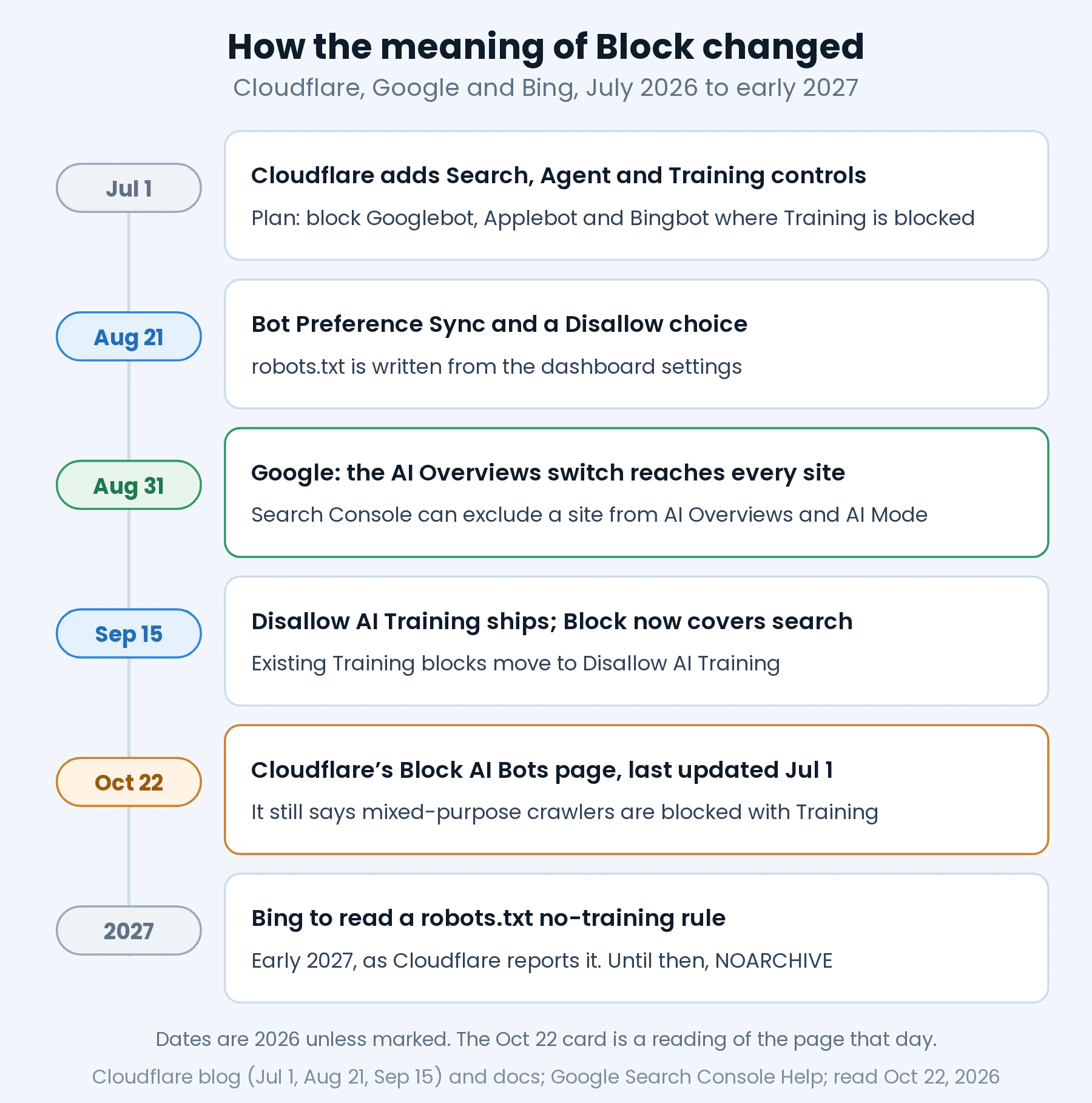
The change came in three steps, and the second one is why the first one did not ship as announced.
July 1. In a post titled “Your site, your rules,” Cloudflare added, next to its single Block AI bots toggle, three behaviors that every customer, the free plan included, could allow or block separately: Search, Agent and Training. Training is “a crawler taking your content to train or fine-tune a model.” The same post set September 15 as the date for new defaults and added a rule for crawlers that do more than one thing: “multi-purpose crawlers such as Googlebot, Applebot, and BingBot will be blocked by customers who have selected to block Training (either through the new options to manage AI traffic, or through the legacy Block AI bots service).” That is the plan that did not ship as written.
August 21. Cloudflare introduced Bot Preference Sync, which writes robots.txt from the dashboard settings so that “what you say to the world and what you enforce at the edge are kept in sync,” together with a new Training option, Disallow. It also set four conditions under which crawlers that do both search and training would “not be blocked when ‘Disallow Training’ is set”: respect a no-training preference in robots.txt, let site owners opt out of AI summaries, show which pages were used for training, and show that opting out of training does not hurt search results.
September 15. What shipped is described in “Have it both ways,” published that day. Apple, Google and Microsoft received an “Accountable” designation, which Cloudflare says “recognizes both capabilities available today and concrete commitments to deliver them.” Training gained a choice called Disallow AI Training, “named for the Disallow: directive it publishes in your robots.txt.” And the meaning of Block changed: “Block and Block on pages with ads now apply to mixed-use crawlers, including Applebot, Bingbot, and Googlebot, so either setting impacts search as well as training.” The old Block AI bots toggle was marked for deprecation, and so was managed robots.txt, in favor of Bot Preference Sync.
The part that decided what happened to existing zones is the migration, and it moved nobody into a block on Googlebot:
| What the zone had before September 15 | Training afterward | Agent afterward |
|---|---|---|
| Block AI bots off, new controls never used | Allow | Allow |
| Block AI bots set to Block | Disallow AI Training | Block on pages with ads |
| Block AI bots set to Block on pages with ads | Disallow AI Training | Block on pages with ads |
| Training set to Block, or to Block on pages with ads, in the new controls | Disallow AI Training | Kept as it was |
From Cloudflare’s post of September 15, 2026. Search keeps its value; for zones that never used the new controls it is Allow. Cloudflare’s own summary of the result: “If you want mixed-use crawlers gone entirely, you now have to say so.”
So after September 15 a zone refuses Googlebot for training reasons only if someone picked Block, or Block on pages with ads, under the new definitions. New domains get a preset that depends on one question during setup. A site without ads is offered Allow for all three behaviors. A site that says it earns money from ads is offered Disallow AI Training for Training and Block on pages with ads for Agent. Search stays allowed in both.
What each Cloudflare AI setting blocks, and what it only asks
Cloudflare classifies bots by behavior, and one bot can have several. A mixed-use crawler is “a single crawler doing both Search and Training,” and the three Cloudflare names are Googlebot, Bingbot and Applebot. Amazon, Anthropic, Meta and OpenAI run separate crawlers for search and for training, so their training crawlers can be refused without touching their search ones. With that split in mind, the four Training choices do this:
| Training choice | Training crawlers: GPTBot, ClaudeBot, CCBot, Amazonbot and others | Googlebot, Applebot and Bingbot |
|---|---|---|
| Allow | Allowed, unless another setting or a firewall rule blocks them | Allowed |
| Disallow AI Training | Blocked at the edge; with the sync on, also named in robots.txt | Allowed. With the sync on, robots.txt asks Google and Apple not to train; Bing gets no signal yet |
| Block on pages with ads | Blocked on pages where Cloudflare detects an ad | Blocked on those pages too, search included |
| Block | Blocked everywhere | Blocked everywhere, search included |
From Cloudflare’s post of September 15, 2026, and its robots.txt setting documentation, last updated October 22, 2026. “Blocked” means refused at Cloudflare’s edge, before the request reaches the site’s server.
Read the table by columns and two things stand out. Disallow AI Training is a robots.txt request for only two companies. For every other training crawler it is a block at the edge. In Cloudflare’s words, “Every other training crawler is blocked, including the training-only crawlers run by Amazon, Anthropic, Meta, and OpenAI.” The documentation says the same from the other side: setting Training to Disallow “adds managed directives and enables edge blocking for AI training crawlers. Mixed-use crawlers are excluded from this edge block.” The three mixed-use crawlers are let through, and only Google and Apple also receive the request, through two robots.txt tokens their operators read, Google-Extended and Applebot-Extended.
The second thing is that Block is now a search setting as much as a training one. Choosing it for Training is, in the post’s words, the way to have mixed-use crawlers gone entirely: “It will stop Applebot, Bingbot, and Googlebot from reaching your site.” Block on pages with ads does the same on every page where Cloudflare detects an ad, which gives it an odd profile. For GPTBot it is milder than Disallow AI Training, since it lets the crawler through on pages without ads. For Googlebot it is harsher, since it refuses it on pages with them.
What a refusal looks like to the crawler depends on the product that sends it. Cloudflare’s rules documentation says the status code for a block “can be 403 (most security features) or 429 (for example, rate limiting rules),” and AI Crawl Control lets paid plans choose between a 403 and a 402 for the crawlers it blocks. Either way the refusal happens at the edge, so the site’s own server never sees the request. I took that fingerprint apart, page body and headers, in how to tell which layer sent a 403 Forbidden.
One more dependency is easy to miss. The robots.txt half of Disallow AI Training is written by Bot Preference Sync, and Cloudflare’s documentation says it prepends its lines “only when Enable Bot Preference Sync is turned on” and at least one policy is set to block or disallow. Cloudflare turns the sync on by default for new domains, and says zones that used the old managed robots.txt migrate to it; for other existing zones, its posts do not say it was switched on. With the sync off, nothing is written to robots.txt, and for Google and Apple that line is the whole effect of the setting. The quickest way to know is the file itself, which the AI visibility checker reads for any domain, reporting the Cloudflare block and any Content-Signal lines it finds.
What Googlebot and Bingbot see under each setting
Googlebot
Under Allow and under Disallow AI Training, Googlebot gets your pages exactly as before. With the sync on, Disallow AI Training adds a group for Google-Extended to robots.txt, and that group is the entire signal Google receives. Google describes Google-Extended as “a standalone product token” that site owners use to manage whether crawled content “may be used for training future generations of Gemini models,” and for grounding in Gemini Apps and Vertex AI. It adds that Google-Extended “does not impact a site’s inclusion in Google Search nor is it used as a ranking signal.” It is not a crawler at all: “Google-Extended doesn’t have a separate HTTP request user agent string.”
The Cloudflare block also carries a Content-Signal line such as search=yes, ai-train=no, and that line tells Googlebot nothing. Google’s robots.txt documentation lists the fields it supports, which are user-agent, allow, disallow and sitemap, and says “other fields such as crawl-delay aren’t supported.” Cloudflare itself warns that Search Console may flag Content Signals lines as “Syntax not understood,” and says it has seen “no impact on crawling rates or SEO” from those reports. For Google, the Google-Extended group is the part that counts.
Under Block, Googlebot is refused at the edge, and Google’s documentation on status codes is plain about the result: “Google doesn’t index URLs that return a 4xx status code, and URLs that are already indexed and return a 4xx status code are removed from the index.” Under Block on pages with ads, the same applies to the pages with ads.
Bingbot
Bing is the case where the name of the setting and its effect are furthest apart. Cloudflare’s post says Microsoft “is extending these capabilities and currently building the mechanism to also respect a ‘no training’ preference in robots.txt at the domain/site level, targeted for early 2027,” and that until then “selecting Disallow AI Training will not automatically convey a no-training preference to Bing through robots.txt.” On Bing, Disallow AI Training does nothing today. The early 2027 date comes from Cloudflare’s post; I found no Microsoft page that states it.
What Bing reads today is a meta tag. Its documentation lists three effects for noarchive: “Do not store a cached page for this document,” “Do not link in Chat and Copilot,” and “Do not use the content for training Microsoft’s generative AI foundation models.” Its webmaster guidelines state the cost more directly: “NOARCHIVE prevents content from being used in Copilot responses and grounding results.” The milder nocache lets Copilot show only the URL, title and snippet, and limits training to the same three things. Bing said in 2023 that pages with either tag “will still appear in our search results.” So Bing has no training-only switch yet: the way to refuse Microsoft’s model training also limits how Copilot can use the page. Under Block, Bingbot is refused at the edge like Googlebot.
Applebot
Apple works like Google. Applebot-Extended “does not crawl webpages,” and Apple says “webpages that disallow Applebot-Extended can still be included in search results,” because the token is “only used to determine how to use the data crawled by the Applebot user agent.” Under Disallow AI Training, Applebot keeps crawling and the robots.txt group tells Apple not to train on what it collects. Under Block, Applebot is refused with the others.
AI Overviews have their own switch, and it is not in Cloudflare
A site that picks Disallow AI Training to keep its pages out of Google’s AI answers has picked the wrong switch, and Block gets there only by taking the pages out of Google altogether. Google’s documentation on AI features says “AI is built into Search and integral to how Search functions, which is why robots.txt directives for Googlebot is the control for site owners to manage access to how their sites are crawled for Search.” To limit what is shown, it points to nosnippet, data-nosnippet, max-snippet and noindex. Google-Extended, in the same page, is for “AI training and grounding in some of Google’s other systems.” The Content-Signal line in Cloudflare’s block defines search as excluding “AI-generated search summaries,” but as shown above, Google does not read that line.
Since this summer there is a direct switch, and it lives in Search Console, not in Cloudflare. Google announced its “Search generative AI” control on June 3, 2026, and the help page now says: “As of August 31, 2026, we’ve rolled out this control to all websites worldwide.” If you choose to exclude your site, “links to your site and your site’s content won’t appear in Search generative AI features,” which today are AI Overviews, AI Mode and generative AI features in Google Discover, and “you won’t receive any traffic or impressions from these features.” Google says the control is not used “as a ranking or inclusion signal affecting other parts of Search,” that a change takes “a few days” to apply, and that it is set per Search Console property, with child properties inheriting from their parent.
The same help page closes the loop with training: the control “doesn’t affect AI training; to limit training of the models used to generate responses in Search generative AI features, use Google-Extended.” So Google’s two switches split the work. Google-Extended, which Cloudflare can write for you, is about training. The Search Console control, which Cloudflare cannot reach, is about appearing in AI answers. Disallow AI Training on its own leaves a site’s pages available to AI Overviews.
My own zone: what September 15 changed, and how I can tell
This site sells machine readability, so its zone is set the opposite way from most of the above. Search, Agent and Training have been on Allow since the zone was created at the end of August. Bot Fight Mode and AI Labyrinth are off, and the custom firewall rules target login probes and credential-file scanners, none of them by crawler name. The robots.txt, generated by WordPress, allows every AI crawler and says ai-train=yes. I measured who reads it, and how often, in robots.txt for AI crawlers, agent by agent. So September 15 should have changed nothing in this zone’s Cloudflare AI settings, and that is what I checked, from outside the dashboard.
The first check is the file. On October 22 I fetched robots.txt through Cloudflare and directly from the origin. Both answers were 1,610 bytes with the same checksum and no Cloudflare block in them, so nothing is being prepended at the edge:
$ IP=$(dig +short @1.1.1.1 A visibleorigin.com | head -1)
$ curl -s --resolve visibleorigin.com:443:$IP https://visibleorigin.com/robots.txt | md5sum
bdbc3b28c40d4ce7fb9e2e71b4dc2596  -
$ curl -s --resolve visibleorigin.com:443:192.0.2.10 https://visibleorigin.com/robots.txt | md5sum
bdbc3b28c40d4ce7fb9e2e71b4dc2596  -
The second address, 192.0.2.10, stands in for my origin server; it is a documentation address (RFC 5737), not the real one. The second check is the log. From August 28 to October 22 my server logged 77,815 requests. I kept those that came from crawlers whose address is on their operator’s published list, checked the same way as in verifying AI crawlers by IP instead of by name, and split them at September 15:
| Verified crawler | Aug 28 to Sep 14 | Sep 15 to Oct 22 |
|---|---|---|
| Googlebot | 116 | 328 |
| Bingbot | 6 | 169 |
| Applebot | 0 | 2 |
| GPTBot | 132 | 297 |
| OAI-SearchBot | 81 | 335 |
| ChatGPT-User | 6 | 24 |
| ClaudeBot | 284 | 739 |
| PerplexityBot | 7 | 19 |
| Amazonbot | 226 | 573 |
| GoogleOther | 69 | 99 |
| DuckAssistBot | 0 | 9 |
| All of them | 927 | 2,594 |
| Answered with a 403 | 0 | 0 |
Requests that reached my server from addresses on each operator’s published list, downloaded October 22, 2026. The first period is about 17 days and the second about 38. Besides 3,258 answers of 200, there were 226 redirects and 37 answers of 400, 404 or 405, to paths that do not exist or requests the site rejects. No 403 and no 5xx in either period.
Two things in that table matter here. The first is the last row: not one of the 3,521 requests that reached my server from a verified crawler got a 403, before or after the change. The second is the shape of each series across September 15, shown week by week below.
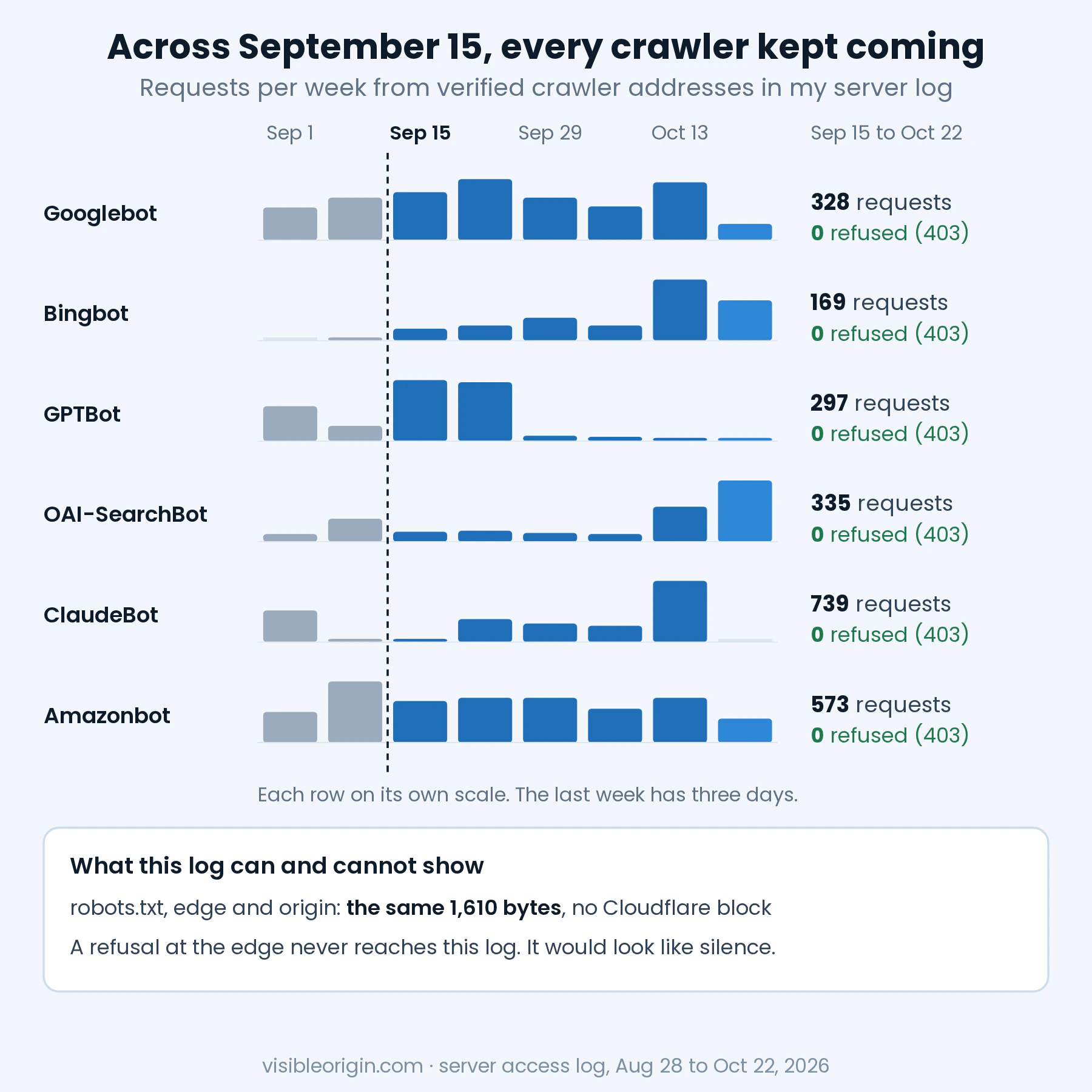
The zero is the weaker of the two findings. A block at Cloudflare’s edge never reaches the origin, so it cannot appear in this log as a 403. It can only appear as silence, for the same reason my log recorded 6 of the 60 requests I sent to my own site in what an access log cannot see. What the log can show is that every verified crawler kept reaching my server after September 15, and, averaged over the weeks after it, the six busiest came at the same daily pace or faster. Googlebot averaged 6.8 requests a day before that date and 8.7 after it, and its longest gap after it was 26 hours, against 34.5 before.
Each series moved its own way afterward, and one change is large. GPTBot went from more than 130 requests a week in the second half of September to 13 or fewer a week from September 29, while OAI-SearchBot, from the same company, rose. GPTBot still got a 200 from my server on October 21, which rules out a block on it across the zone. It does not rule out a block on some pages, which only the zone’s security events would show. ClaudeBot, as I write this on October 22, has not reached my server for four days. From September 8 to September 21 it did not come at all, then returned to plain 200s with nothing changed in the zone. A silence is not a block, and a block looks exactly like a silence. That is why the count settles less than it seems.
The test that would turn this into a demonstration is the obvious one: set Training to Block on a zone, watch verified Googlebot stop reaching the origin, and read the refusals in Cloudflare’s security events and in Search Console. I have not run it, and I will not run it on this zone. These settings apply to every page of the zone at once, a scope I already misjudged once with a firewall rule that would have blocked some of my own future articles, and the test would take this site out of Google for as long as it lasted. Until someone runs it on a zone with nothing to lose, what the tables say about Googlebot under Block is Cloudflare’s description, not a measurement of mine.
What I could test without changing anything is how the zone treats a crawler’s name. On October 22 I requested the same page six times through Cloudflare, each time with a different User-Agent: a browser, my own checker, GPTBot, ClaudeBot, Googlebot and Bingbot. All six got a 200 with the same 118,195 bytes, and all six reached the origin, where the log recorded them with this server’s own address. So no rule in the zone matches those names. That says nothing about what the real crawlers receive, because Cloudflare verifies them by published address, reverse DNS or a signature. One detail makes a borrowed name more useful than usual on small zones, though: on the Free plan, Cloudflare AI Crawl Control “identifies AI crawlers based on their user agent strings,” according to its documentation. A per-crawler block set there should catch a borrowed name as well. The Search, Agent and Training policies work from Cloudflare’s own classification instead: verified bots with that behavior, “plus additional unverified bots that fall under these classifications.”
What 1,000 robots.txt files showed on October 22
The robots.txt half of the Cloudflare AI settings is the only part anyone can see from outside, so I went looking for it. I took the Tranco list generated on October 21, 2026, which combines five popularity rankings over the previous 30 days, and fetched robots.txt from 1,000 of its domains: the 500 at the top, and 500 drawn at random, with a fixed seed, from ranks 10,001 to 1,000,000. Each got one GET with my checker’s User-Agent, following up to five redirects, one domain at a time with a two-second pause, between 18:08 and 19:06 UTC on October 22. Only that file, and only counts: no domain is named here.
A failed fetch is not a zero, so the failures come first. In the top 500, 269 domains did not return a usable file: 164 gave no HTTP answer at all, most because the certificate did not validate for that name, which is common at the top of the list, where many names serve infrastructure rather than a website; 69 answered with an error status; and 36 sent a web page or an empty answer instead. In the random 500, 221 failed the same three ways (116, 70 and 35). One file in the top 500 and 12 in the random half had no rules in them at all, a case I come back to below. That leaves 230 and 267 files to read.
| In the files that answered | Top 500 | Random 500 from the long tail |
|---|---|---|
| Usable robots.txt files | 230 | 267 |
| Served through Cloudflare | 53 | 117 |
| With a block written by Cloudflare | 0 | 7 |
| With any Content-Signal line | 8 | 10 |
| With a Content-Signal line saying ai-train=no | 5 | 10 |
| With a Content-Usage line (IETF draft) | 1 | 0 |
| Disallow: / for Google-Extended | 35 | 16 |
| Disallow: / for GPTBot | 41 | 24 |
| Disallow: / for Googlebot | 1 | 0 |
Fetched on October 22, 2026, from the Tranco list of October 21. “Served through Cloudflare” means the final response carried a cf-ray or a server: cloudflare header. A Disallow: / counts when the group that names the crawler contains it; the one file that closes the site to Googlebot reopens three single files.
The block Cloudflare writes was rare: none in the top 500, and 7 of the 117 Cloudflare-served files in the long tail. All seven used the # BEGIN Cloudflare Managed content marker and carried Content-Signal: search=yes,ai-train=no,use=reference, and six were identical to the block on the demonstration domain, the same 32 names. Where it does appear, it does a large share of the work: in the long tail, 7 of the 16 files that close the door to Google-Extended had that line written by Cloudflare, while in the top 500 none of the 35 did.
The seventh block named 61 crawlers. Besides the training list it disallowed search crawlers and fetchers that act for a person, from OAI-SearchBot, PerplexityBot and Applebot to ChatGPT-User and Claude-User, which is what the documentation says happens when the Search or Agent policy is also set to block. Googlebot and Bingbot were not in it. The documentation does not explain why Applebot is listed and those two are not; Cloudflare’s own bot reference files Applebot under “AI Search” and the other two under “Search Engine.” Whatever that zone does at the edge, its robots.txt asks Apple’s search crawler to stay out and says nothing to Google’s.
More common than the block was a file that looks like a policy and states none. Twelve domains in the long tail and one in the top 500, all served through Cloudflare, returned only Cloudflare’s Content Signals policy text: the definitions of search, ai-input and ai-train, and not a single rule or signal. Cloudflare’s documentation describes this as what Free plan domains without a robots.txt of their own display, and says the policy “does not express any specific preferences about your content.” A crawler that reads it finds no rule to follow.
Content-Signal itself has spread beyond Cloudflare’s network: 6 of the 8 files with a Content-Signal line in the top 500 were not served through Cloudflare. The IETF’s Content-Usage line, still a draft, appeared once. This site, for the record, is in the minority with a Content-Signal line, which says ai-train=yes, and has no Cloudflare block.
None of this says what any zone does at its edge. A zone with the sync off leaves no trace in its robots.txt whatever it blocks, and from outside, a refusal meant for Googlebot can only be seen by Googlebot. Cloudflare publishes the aggregate itself: “less than 1% of Cloudflare sites choose to block Search bots,” and “17% of sites choose to enable some mechanism to block training.”
The other Cloudflare AI switches on the same page
Cloudflare AI Crawl Control: per-crawler Block and Charge
AI Crawl Control lists the AI crawlers that visit a zone and lets you allow or block each one. Blocking one is not a preference either: “the system creates or updates a WAF custom rule on your zone to enforce that block.” Paid plans can choose the answer the crawler gets, a 403 Forbidden or a 402 Payment Required. A third action, Charge, belongs to Pay Per Crawl, which the documentation described as a closed beta on October 22. On September 30 Cloudflare also announced Pay Per Use, which pays publishers for what an AI company does with content after the crawl instead of charging for the fetch itself.
AI Labyrinth
AI Labyrinth does not block anything. It “adds invisible links on your webpage with specific Nofollow tags,” and crawlers that follow them anyway end up in what Cloudflare calls “a maze of never-ending links.” Cloudflare is explicit about what it is not: “AI Labyrinth actions are not mitigations. Cloudflare does not block or challenge the request.” Cloudflare also says the links do not affect SEO and are only seen by bots. I keep it off anyway. It makes the HTML a crawler receives differ from the HTML a person receives, on a site whose subject is exactly that difference, and nothing in my own log would tell me which crawler got which version.
Bot Fight Mode
Bot Fight Mode answers traffic it identifies as bots with “computationally expensive challenges,” and it has one property that matters more than any of its detections: “You cannot bypass or skip Bot Fight Mode using WAF custom rules or Page Rules.” If it ever challenges a crawler you want, there is no exception to write. That is why it stays off on this zone, and why Cloudflare sends customers who need exceptions to Super Bot Fight Mode, which is part of the paid plans.
Content Signals, and the standard that may replace them
The Content-Signal line in Cloudflare’s block uses three categories, search, ai-input and ai-train, and a policy text that defines search as excluding “AI-generated search summaries.” Since July, Cloudflare has also been testing a fourth field, use, with three levels from immediate to full. At the IETF, the AI Preferences working group is drafting another syntax for the same idea, Content-Usage: train-ai=n, for robots.txt and for an HTTP header. Its vocabulary draft, revised on September 13, says plainly that it does not “ensure that preferences are followed.” None of these is a block, and the robots.txt standard says so about itself: “These rules are not a form of access authorization.” Cloudflare’s own documentation puts it in four words: “robots.txt compliance is voluntary.”
How to check what your Cloudflare AI settings do to Googlebot and Bingbot
1. Read the robots.txt the world receives
Fetch the file through Cloudflare and look for the block Cloudflare writes, its Content-Signal line and the two tokens Google and Apple read. If your origin serves its own file, fetch that one too and compare: anything extra came from the edge.
$ curl -s https://example.com/robots.txt \
    | grep -n -i -E 'BEGIN Cloudflare|content-signal|google-extended|applebot-extended'
$ curl -s --resolve example.com:443:192.0.2.10 https://example.com/robots.txt | md5sum
Replace 192.0.2.10 with your origin’s address. A Cloudflare block in the file means the sync is on and at least one policy is something other than Allow; it does not tell you which one. No block while the dashboard says Disallow AI Training means the sync is off, and Google and Apple are hearing nothing.
Read the list inside the block, too, rather than the example in the documentation. Cloudflare says it updates the list from its bot directory, and on October 22 the demonstration domain that its documentation links to served a block naming 32 crawlers, where the documentation’s example shows 8. One of them was GoogleOther, a crawler whose rules, Google says, “don’t affect any specific product.” None was Googlebot, Bingbot or Applebot.
2. Read the settings where they live
The Search, Agent and Training choices are on the Security Settings page, filtered by bot traffic, under “Configure AI bot policies.” Per-crawler blocks are in Cloudflare AI Crawl Control, and each one is also a WAF custom rule you can open and read. Check all of them: the September 15 migration moved old choices into new names, and a rule nobody remembers creating still applies to every page of the zone.
3. Count verified Googlebot and Bingbot in your origin log, day by day
$ grep 'Googlebot/' access.log | awk '{print substr($4, 2, 11)}' | uniq -c | tail -14
$ grep 'Googlebot/' access.log | awk '{print $1}' | sort -u > googlebot-addresses.txt
Keep only the addresses that appear on the operator’s published list; Google and Bing both publish theirs. A verified crawler that stops reaching the origin from one day to the next, while nothing on the site changed, is what an edge block looks like from your server. Remember that the CDN answers some requests from its cache, so these counts are a floor, not a total.
4. Find the refusal where it is recorded
Cloudflare records its own blocks in the dashboard’s security events, with the rule or setting that fired, and AI Crawl Control counts unsuccessful requests for each crawler. Search Console’s crawl stats show “the responses that Google received when crawling your site, grouped by response type,” and its URL Inspection live test fetches a page in real time, though Google says it “only confirms if Google-InspectionTool can access your page,” which is a different user agent from Googlebot. Bing Webmaster Tools has a live URL test of its own. Reading those instruments side by side for one domain, request by request, is the core of the crawler and AI readiness audit, which goes through the server, CDN and cache layers that decide what each crawler receives.
5. Do not test with a borrowed name alone
Sending a request with Googlebot’s User-Agent shows how your zone treats that string, not what Googlebot receives, because Cloudflare verifies the real crawler by its address or signature. From a rented server the result is distorted twice, which I measured when my free check turned out to run from an address some sites refuse outright.
6. Pick the setting by what you want to stop
| If you want to | Use |
|---|---|
| Stay in search and refuse training by OpenAI, Anthropic, Amazon, Meta and the rest | Disallow AI Training, with Bot Preference Sync on |
| Also refuse training by Google and Apple | The same setting; check that robots.txt now names Google-Extended and Applebot-Extended |
| Refuse training by Microsoft | Short of Block, no Cloudflare setting does it today. A noarchive or nocache tag on your pages does, and it limits Copilot too |
| Stay out of AI Overviews and AI Mode | Search Console’s Search generative AI control, or snippet controls on each page |
| Refuse every training crawler, search included | Block, knowing it also shuts out Googlebot, Bingbot and Applebot |
As documented by Cloudflare, Google, Microsoft and Apple on October 22, 2026. None of these settings decides whether an AI product cites a page; they decide what may be fetched or used.
Setting up a zone so that its protection never costs it search visibility is the work I describe under Cloudflare security and performance, and after September 15 that starts with reading which of the four Cloudflare AI choices for Training the zone has, whoever chose it.
Cloudflare AI Crawl Control: frequently asked questions
Does Cloudflare block Googlebot if I block AI training?
Only if you choose Block, or Block on pages with ads, for Training in the Cloudflare AI bot policies. Since September 15, 2026, both apply to Googlebot, Bingbot and Applebot, search included. Disallow AI Training keeps those three allowed, and asks Google and Apple through robots.txt not to use your content for training.
What is the difference between Block and Disallow AI Training in Cloudflare?
Block refuses every training crawler at the edge, including the crawlers Google, Bing and Apple use for search. Disallow AI Training refuses the other training crawlers at the edge, such as GPTBot and ClaudeBot, and only writes a robots.txt request for Google-Extended and Applebot-Extended. Bing gets no signal from it yet.
Does Disallow AI Training keep my site out of AI Overviews?
No. It writes a Google-Extended rule, which covers training and grounding in Gemini products, and Google says that token does not affect inclusion in Search. AI Overviews and AI Mode are governed by the Search generative AI control in Search Console, available to all sites since August 31, 2026, and by snippet controls such as nosnippet.
What happened to Block AI bots and managed robots.txt?
Both were marked for deprecation on September 15, 2026. Zones that had Block AI bots on were moved to Disallow AI Training for Training and to Block on pages with ads for Agent. Managed robots.txt is being replaced by Bot Preference Sync, which writes robots.txt from your Search, Agent and Training choices.
Do AI Labyrinth and Bot Fight Mode block AI crawlers?
AI Labyrinth does not block anything: Cloudflare says its actions are not mitigations, and it only adds hidden links that lead crawlers that ignore them into a maze of links. Bot Fight Mode challenges traffic it identifies as bots, and it cannot be bypassed with WAF custom rules, so you cannot tell it to spare a particular crawler.
How can I tell if Cloudflare is blocking Googlebot on my site?
Look where blocks are recorded: Cloudflare’s security events and Search Console’s crawl stats by response. The URL Inspection live test helps, but it fetches as Google-InspectionTool, not as Googlebot. Your server’s log cannot show an edge block as an error, only as verified Googlebot requests that stop arriving.
The general shape of this
A setting is named after what its designers were worried about, not after what it does to each crawler. The Cloudflare AI settings show it twice. Cloudflare named Disallow AI Training after the robots.txt line it writes, and for most training crawlers the line is the smaller part of what it does: the larger part is a block at the edge. Block sits under the Training control, and since September 15 it also refuses the crawlers that keep a site in Google and Bing. On October 22 the documentation had not caught up in every place, and the switch that removes a site from AI Overviews belongs to another company and another dashboard.
The part of this I could measure is the part where nothing happened, and that is still worth measuring. On this zone the robots.txt the world receives is the one my server wrote, and every verified crawler kept arriving across September 15 without a single 403. What I could not measure, a refusal at the edge, is exactly what an origin log never sees. The instruments that do see it are Cloudflare’s own events and the search engines’ own reports, and they are where to look first.
Sources
- Cloudflare, Have it both ways: stay discoverable in search while disallowing AI training (September 15, 2026): Disallow AI Training, the new meaning of Block, the Accountable designation, the migration tables, new-domain presets and Bing’s target date.
- Cloudflare, Say it once: introducing Bot Preference Sync (August 21, 2026): the sync, the Disallow option and the four conditions for mixed-use crawlers.
- Cloudflare, Your site, your rules: new AI traffic options for all customers (July 1, 2026): Search, Agent and Training, the September 15 date, the original plan for mixed-use crawlers and the content-use signal.
- Cloudflare, Pay Per Use: when AI uses your work, you should get paid (September 30, 2026).
- Cloudflare docs, robots.txt setting (last updated October 22, 2026): when Bot Preference Sync writes, the edge block for training crawlers, Content Signals and the Search Console warning.
- Cloudflare docs, Block AI Bots (last updated July 1, 2026): the July wording on mixed-purpose crawlers.
- Cloudflare docs, Manage AI crawlers: user-agent detection on the Free plan, the WAF rule behind each block, 403 or 402, Pay Per Crawl.
- Cloudflare docs, AI Labyrinth and Bot Fight Mode.
- Cloudflare docs, Actions: the status codes of a block.
- Cloudflare docs, AI Crawl Control bot reference: the categories of Googlebot, BingBot and Applebot.
- Google, Google’s common crawlers: Googlebot and Google-Extended.
- Google, How Google interprets the robots.txt specification: the fields Google supports.
- Google, How HTTP status codes affect Google’s crawlers: 4xx and the index.
- Google, AI features and your website: Googlebot rules, snippet controls and Google-Extended.
- Google, Search generative AI control and its announcement (June 3, 2026, updated August 31).
- Google, Crawl Stats report: responses grouped by type.
- Google, URL Inspection tool: what the live test fetches, and with which user agent.
- Bing, Robots meta tags and attributes that Bing supports and Bing Webmaster Guidelines: noarchive, nocache and Copilot.
- Bing, Announcing new options for webmasters to control usage of their content in Bing Chat (September 2023).
- Apple, About Applebot: Applebot-Extended.
- IETF, A Vocabulary For Expressing AI Usage Preferences and Associating AI Usage Preferences with Content in HTTP, work in progress.
- RFC 9309, Robots Exclusion Protocol.
- Tranco list 746PX (generated October 21, 2026): the domains in the sample.