The short version. I added a subdomain to my own Cloudflare zone. It was checked with a cache-buster — a random query string on the end of the URL — and it came back 200, with the right site, 70,417 bytes. I asked for the same address with nothing on the end and got 752 bytes of a hosting control panel’s default page, served from cache.
Both measurements were correct. Only one of them was the URL anybody else would type.
The cache-buster is the first tool anyone reaches for when a CDN is in the way, and it is the one tool guaranteed to answer a question nobody asked. It does not skip the cache. It gives you a private entry in it.
The habit that everyone has, including me
Something behind a CDN is serving the wrong thing. You suspect cache. So you add ?nc=123 to the URL, request it again, and watch the correct response come back. The fix worked. You move on.
This is standard practice and it is in every troubleshooting thread on the internet. It is also how a subdomain of mine spent an unknown length of time serving a hosting panel’s “installed” splash screen to anyone who typed its address, while the person who built it had a screenshot of the real site.
Nobody was careless. The request was made correctly, the response was read correctly, and the conclusion drawn from it was wrong, because the address that was tested and the address that was published were two different cache entries.
What the documentation actually says
Three statements from Cloudflare’s own docs do all the work here, and it is worth reading them in the order that makes the mechanism obvious rather than the order they appear in the menu.
The query string is part of the cache key
From the cache key documentation: “A default cache key includes: 1. Full URL: scheme — could be HTTP or HTTPS. host — for example, www.cloudflare.com URI with query string — for example, /logo.jpg?utm_source=newsletter”.
That single sentence is the whole article. The query string is not metadata attached to a cached object. It is part of the name of the object. Change it and you are not asking for the same thing impatiently; you are asking for a different thing.
MISS does not mean “not cached”
This is the one that misleads people, and it misled me for months. From the cache response documentation, the two statuses read almost identically at a glance and mean opposite things:
| Status | Cloudflare’s definition | What it tells you |
|---|---|---|
HIT | “The resource was found in Cloudflare’s cache.” | Served from the edge. The origin was not asked. |
MISS | “The response is eligible for cache but was not present in Cloudflare’s cache at request time, so it was served from the origin web server.” | It will be cached. You are the one who put it there. |
DYNAMIC | “Cloudflare determined at request time that the asset is not eligible for cache, so the request went to the origin web server without a cache lookup.” | Nothing is being cached at this URL at all. |
EXPIRED | “The resource was found in Cloudflare’s cache but was expired and served from the origin web server.” | It was cached; the copy had aged out. |
Quoted verbatim from Cloudflare’s documentation. The emphasis is mine, on the four words that separate the two statuses people treat as interchangeable.
MISS means it is cacheable and you just created the copy. When you cache-bust and see MISS, the thing you have proved is that your invented URL is now in the cache. You have proved nothing whatsoever about the URL in the address bar.
Rules run at the zone level, and they are ordered
From the Ruleset Engine documentation: “An entry point ruleset contains a list of ordered rules that run in a phase at the account or zone level.”
Zone level. Not hostname level. If your rule’s expression does not mention http.host — defined there as “the hostname used in the full request URI” — then it applies to every hostname in the zone, including the ones that do not exist yet.
Four requests to my own homepage
Everything above is documentation. Here is the measurement, made against this site on the day this was published, with the commands printed so you can run them against your own domain and see the same shape.
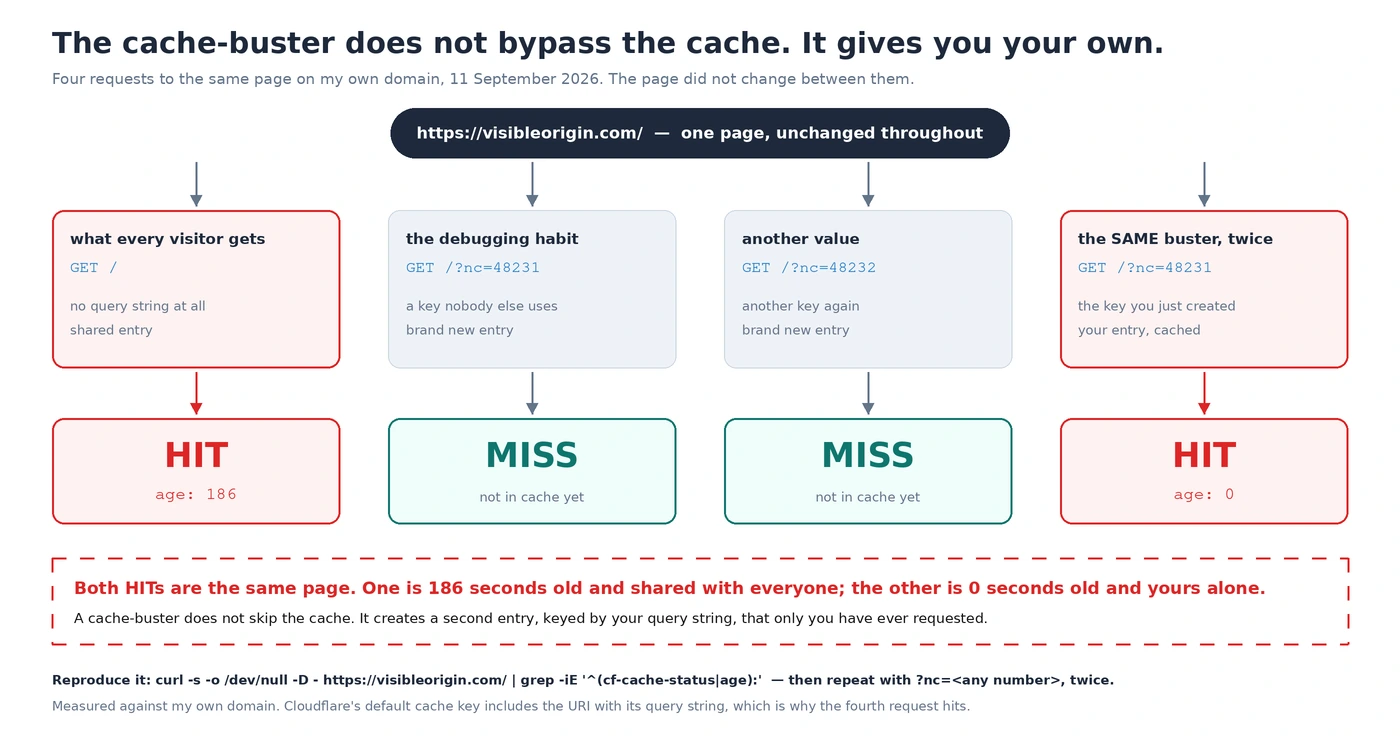
curl -s -o /dev/null -D - https://visibleorigin.com/ | grep -iE '^(cf-cache-status|age):'
  age: 186
  cf-cache-status: HIT

curl -s -o /dev/null -D - 'https://visibleorigin.com/?nc=48231' | grep -iE '^(cf-cache-status|age):'
  cf-cache-status: MISS

curl -s -o /dev/null -D - 'https://visibleorigin.com/?nc=48232' | grep -iE '^(cf-cache-status|age):'
  cf-cache-status: MISS

curl -s -o /dev/null -D - 'https://visibleorigin.com/?nc=48231' | grep -iE '^(cf-cache-status|age):'
  age: 0
  cf-cache-status: HIT
One caveat if you run these against this domain: use numbers of your own. The two values above are now cached entries here, so ?nc=48231 will answer HIT for you rather than MISS — which is the article’s point arriving a second time, from the other side. I checked that a value never used before still returns MISS, because if Cloudflare were quietly ignoring query strings the whole argument would collapse and the transcript above would look identical.
Read the first and the last together. They are the same page and they are both HIT. One is 186 seconds old and is what the internet is being handed. The other is zero seconds old and exists because I asked for it twice.
The third request is there to kill the obvious objection: that the cache-buster forces a bypass. It does not. A second, different query string produces a second, different MISS — a third entry — and that one will cache too. You are not turning the cache off. You are filling it with URLs that only you will ever request.
HIT.If you want the same reading taken on a page you have not configured yourself, the free check requests one URL of yours as five different crawlers and prints the status code each one receives, along with the commands that produced them. It stops at one page, and it needs no access to anything of yours.
The other reflex, which fails the same way
If the cache-buster is the first instinct, curl -I is the second. You only want the headers, so you ask for the headers. Here are both, against this page, moments apart:
curl -sI https://visibleorigin.com/ | grep -iE '^(cf-cache-status|age):'
  cf-cache-status: DYNAMIC

curl -s -o /dev/null -D - https://visibleorigin.com/ | grep -iE '^(cf-cache-status|age):'
  age: 1738
  cf-cache-status: HIT
Same URL. Same minute. One response says the asset was not eligible for cache and no cache lookup happened; the other says it was found in cache and the copy is twenty-nine minutes old. Both are accurate, because -I sends HEAD and not GET, and a rule here distinguishes them.
The consequence is worse than a wrong number. If you audit a zone with -I, a site that caches HTML aggressively will look like a site that caches nothing, and you will go looking for the reason your cache is not working when it is working perfectly. Cache state is measured with GET, and with the body thrown away rather than never requested.
The subdomain that served a splash screen
The measurement above is tidy because I set it up. The incident that taught me was not.
A subdomain was added to this zone and a WordPress install put behind it. It was verified with a random query string appended, and the verification was clean: HTTP 200, the correct site, 70,417 bytes. I asked for the bare hostname, with nothing after the slash, and got HTTP 200, 752 bytes, and a body whose entire content was a hosting control panel announcing that it had been installed successfully and inviting someone to upload a website.
The origin was fine the whole time. The edge was holding a copy of the placeholder page from before the install, and serving it to every request for the real address, while a cache-busted request went past it to the origin and came back correct.
Two things had to be true at once for this to happen, and both of them are ordinary.
The first: my cache rule matched by method and path, and said nothing about hostname. I wrote it for this site, months before that subdomain existed. Because rules run at zone level, it governed the new hostname the moment the DNS record was created — and the rule said the response was eligible for cache.
The second: the origin sent no Cache-Control header at all. With nothing from the origin to respect, the rule’s own Edge TTL decided how long the copy lived. Cloudflare documents that setting plainly in the cache rule settings: one of its options will “completely ignore any cache-control header on the response and instead cache the response for a duration specified in the timing dropdown”. When there is no header to ignore, there is nothing at all pushing back.
I should be precise about one number I have seen quoted for this incident. I did not measure the age header on that response myself. I captured the status, the body and the byte count; the age was reported to me by someone else looking at the same hostname. It is probably right. It is not mine, so it is not evidence here, and a note whose argument is that people publish measurements they did not take would be a poor place to do exactly that.
What is scoped by what
The confusing part is that hostname does appear in the cache key. Two hostnames never share a cached object. That is true, and it is why the mistake survives: people reason from the key to the rule, and the two are scoped differently.
| Thing | Scoped by | Consequence |
|---|---|---|
| The cached object | Scheme, host, and URI including query string | Two hostnames never serve each other’s copies. A query string creates a separate copy. |
| The rule that decides whether to cache | The zone, unless the expression names http.host | A rule written for one hostname governs every other hostname in the zone, including future ones. |
| How long a copy lives | The origin’s Cache-Control, or the rule’s Edge TTL if it is set to ignore it | An origin that sends no header hands the decision entirely to the rule. |
The first row is why people assume the second row is also per-hostname. It is not, and nothing in the dashboard warns you when a new hostname starts matching an old rule.
You can watch the zone-level reach without waiting for an incident, because most zones already have a second hostname. This one does:
curl -s -o /dev/null -D - https://www.visibleorigin.com/ | grep -iE '^(cf-cache-status|age|location):'
  location: https://visibleorigin.com/
  age: 1532
  cf-cache-status: HIT
That is a different hostname from the one I configure and think about, and its response is being held at the edge and served from there. I did not write a rule for www. I am careful about what that proves on its own — I have not read which rule produced it, and a redirect can be cached for reasons of its own — but it is the same shape: a second hostname in the zone, being cached, with nothing about it in my head when I set the zone up.
This is the same family of problem as a rule of mine storing a file I had explicitly marked no-store: in both cases the rule was correct, I had written it, and its reach was larger than the situation I pictured when I wrote it. Cache rules are not local to the page you were thinking about.
Two questions, two instruments
The fix is not to stop using cache-busters. They answer a real question. It is to notice that there are two questions and to stop using one instrument for both.
| The question | The request | What to read |
|---|---|---|
| Does the origin work? | A unique query string, different every time | cf-cache-status, to confirm you actually reached the origin and are not reading a copy of your own earlier test |
| What is the world being served? | The bare URL, exactly as a person would type it | age, which tells you how stale the copy is, and the body, which tells you what it contains |
A deployment is not verified until the second one has been run. The first one cannot fail in the way that matters, which is precisely why it feels reassuring.
Three habits follow from that, and they cost nothing.
Read cf-cache-status on every diagnostic request, not just the suspicious ones. It is the only thing that distinguishes “the origin answered” from “a cache answered on the origin’s behalf”, and without it a body that looks right proves nothing about where it came from.
Read age too. A HIT with age: 4 and a HIT with age: 86400 are very different situations and the status line does not distinguish them. The second one means the thing you fixed this morning is not what anyone has seen since.
Put http.host in every rule expression, even when it seems redundant. It is redundant right up until somebody adds a hostname to the zone, and then it is the only thing standing between your rule and a site it was never written for. This is the kind of thing I look for in the work I do for money, and it is almost always a rule somebody wrote correctly for a situation that has since changed around it.
Cache-busters and CDN caching: frequently asked questions
Does a cache-buster bypass the CDN cache?
No. It changes the cache key, which means the CDN looks for a different object, does not find it, fetches it from the origin and then caches that under the new key. Request the same busted URL twice and the second one is a HIT. The measurement in this note is exactly that: age: 0 on the repeat.
Why did my colleague and I get different results from the same URL?
Check whether one of you appended anything to it. A single character of difference in the query string is a different cached object. It is also worth checking whether one of you was logged in, since a session cookie can change what the origin sends and whether the edge caches it at all.
What is the difference between MISS and DYNAMIC?
MISS means the response is eligible for cache and was not there yet, so it will be cached now. DYNAMIC means it is not eligible and no cache lookup happened. If you are trying to confirm a URL is not being cached, DYNAMIC is the answer you want; MISS means the opposite of what it sounds like.
Do Cloudflare Cache Rules apply to subdomains?
They apply to every hostname in the zone unless the rule expression restricts them with http.host. A rule written before a subdomain existed will start matching it as soon as that hostname is proxied, with no notification.
Why would an origin send no Cache-Control header?
Plenty of default installs do not set one, and many application servers only set it on some routes. It matters more than it looks: with nothing from the origin, the caching layer’s own defaults or your rule’s Edge TTL decide how long a copy survives, and that decision is invisible from the application you think you are configuring.
Why does curl -I say DYNAMIC when the page is cached?
Because -I sends a HEAD request and your caching rules may treat it differently from GET. On this site the two are measured moments apart and disagree completely: HEAD returns DYNAMIC while GET returns HIT. Use GET and discard the body with -o /dev/null instead.
How do I check what visitors are actually being served?
Request the bare URL with no query string, read cf-cache-status and age, and look at the body rather than only the status code. A 200 with the wrong body is the failure mode that a status-code-only check will never catch, and it is what happened here: the placeholder page was a perfectly healthy 200.
The general shape of this
The tool you reach for to see past a problem is often the tool that makes the problem invisible, and the reason is usually that it changes the thing you are measuring rather than the way you are looking at it. A cache-buster does not give you an unfiltered view of the page. It gives you a page that has never been requested by anyone else, served under conditions no visitor will ever reproduce.
The version of this that costs the most is not the wrong reading. It is the confidence that follows it. A clean 200 with the right body is exactly what a successful deployment looks like, so the check gets ticked and nobody goes back. The bare URL was three seconds of work away the whole time.
Every command in this note was run against my own domain on the day it was published, and the headers quoted are the ones that came back. If you run them and get something that does not match what I have written here, that is worth an email. And if you want the same requests made against a page of yours, with the commands printed so you can repeat them without me, that is what the free check is for.