The short version. I scheduled a post for four days out. It published immediately. I diagnosed it, wrote down a three-step procedure to work around it, and then did the same thing again an hour later with a different post.
The workaround was unnecessary. WordPress has a flag for exactly this case, it has had it for years, and the comment in the source tells you what it is for in one sentence. I had read neither.
What happened, twice
The command was ordinary: update a draft, set its status to scheduled, give it a date four days ahead. What came back was a published post dated a few seconds ago, live on the site.
I reverted it, worked out a sequence that did not misfire, and wrote it into my notes. An hour later, on the next post, the sequence misfired too — for a reason my diagnosis had not covered. The second failure is the one that matters, because it proves the first diagnosis was wrong rather than incomplete.
Both posts were live for a few minutes. Both were announced to a search engine by the site’s own automation before I pulled them, which is a cost you cannot revert.
The nine lines that decide
The mechanism is in WordPress’s post functions, in a block that begins with a comment stating the intent plainly:
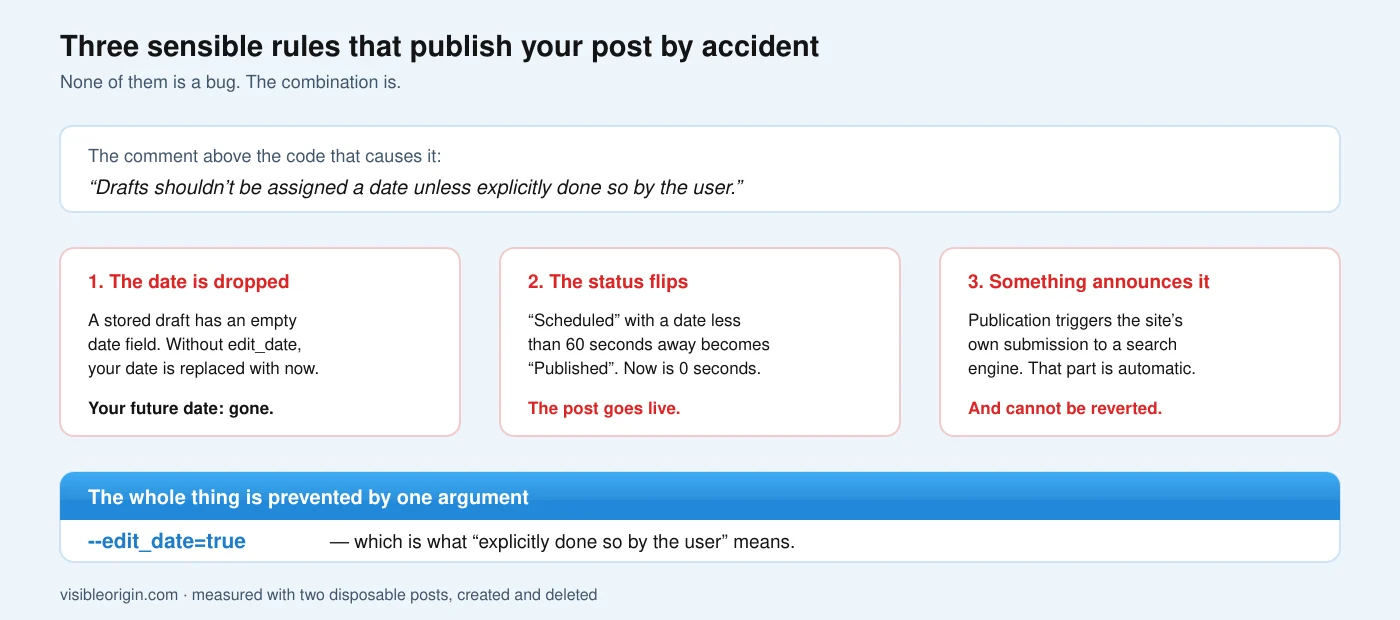
“Drafts shouldn’t be assigned a date unless explicitly done so by the user.”
The block sets an internal flag when three conditions hold together:
| Condition | True for a fresh draft? |
|---|---|
The stored post’s status is draft, pending or auto-draft | Yes |
The update does not include edit_date | Yes, unless you pass it |
The stored post_date_gmt is 0000-00-00 00:00:00 | Yes — this is how drafts are stored |
All three must hold. On a draft created moments earlier, all three do.
When the flag is set, the function merges your fields over the stored ones and then overwrites the date you just supplied with the current time. Your carefully specified future date is discarded a few lines after being accepted.
The reference for the function shows this block in its source listing. The docblock above the function says the date does not have to be set for drafts and that if you set it, it will not be overridden — which is true in the case it is describing and does not mention the case where the flag fires. It is an omission rather than a contradiction, and it is the kind of omission you only notice from the wrong side of it.
And then the status flips
The second half explains why the post did not merely get the wrong date, but went live.
Further up, the insert path adjusts the status against the date. For a post being scheduled, it compares the gap between the post’s date and now, and the threshold is one minute:
| Status you asked for | Condition | What you get |
|---|---|---|
future | Date is less than a minute away | publish |
publish | Date is a minute or more away | future |
Not “in the past” — less than sixty seconds ahead is enough. The two rules are symmetric, which is elegant and is why the failure is total rather than partial.
So the sequence is: your date is discarded and replaced with now; now is less than a minute from now; the scheduled status is therefore converted to published. Each step is reasonable. The combination publishes your post.
The flag
The comment in the source is not decorative. “Unless explicitly done so by the user” describes a mechanism, and the mechanism is the second condition in that block: edit_date. Pass it, and the flag never sets.
WP-CLI accepts it like any other field. Measured on this site with two disposable posts, created and deleted afterwards:
| Command | Resulting date | Status |
|---|---|---|
| update with status and dates | now | published |
the same, plus --edit_date=true | the date I asked for | scheduled |
One command, one extra argument. The three-step procedure I had written down was solving a problem that has a documented answer.
The command documentation lists the date fields it accepts, and the creation command even ships an example of scheduling a post. What neither spells out is which combination of stored state and supplied fields causes the date to be dropped, because that lives in the function underneath, not in the tool on top.
Scheduled content that publishes at the wrong moment, or never publishes at all, is one of the things the free check looks at when a site’s posting history has holes in it. Keeping a publishing pipeline honest — schedule, cron, cache and what the search engines are told — is part of the ongoing care.
Why my workaround appeared to work
This is the part I want to be precise about, because “it worked” is the most misleading evidence there is.
My procedure was: create the draft with the dates already supplied, then change only the status afterwards. It does produce correctly scheduled posts. But not because it is the right method — because supplying dates at creation leaves a real value in the stored date field, which makes the third condition false. The flag never sets, so nothing gets overwritten.
It works by side effect. A procedure that succeeds for a reason you have not identified is indistinguishable, from the outside, from one that succeeds because it is correct — until the day some detail changes and it stops. I have written before about a rule of mine that was backwards and never once produced a wrong result; this is the same failure with a different shape.
Status is not the same as scheduled
There is a second failure in this area worth knowing about, because it looks like success from every angle a person normally checks.
A post being in a scheduled state and a post actually being scheduled are different facts stored in different places. The status lives on the post. The thing that will publish it is a separate entry in the site’s task list, created by a hook that fires when the post transitions into that state.
Create the post in a way that skips the transition and you get a post that says “Scheduled” in the dashboard, with a date, with nothing anywhere that will ever act on it. The date passes. Nothing happens. No error is raised, because from the software’s point of view nothing went wrong: you never asked for the event.
| Where you look | A correctly scheduled post | One that will never publish |
|---|---|---|
| Post status | scheduled | scheduled |
| Post date | the future date | the future date |
| Dashboard listing | “Scheduled” | “Scheduled” |
| Publish event in the task list | present | absent |
Only the last row differs, and it is the only one nobody checks.
So the check after scheduling is not “does it say scheduled”. It is list the pending publish events and find one carrying this post’s ID. One command, and it turns a state you are hoping about into a fact you have seen. I now run it after every single scheduled post, because I have been bitten by both halves of this in the same week.
The measurement method, and where it stops being able to tell you anything, is written out in how I measure. If you have a publishing schedule with unexplained gaps in it, send me the domain.
Scheduling posts from the command line: frequently asked questions
Why did my scheduled post publish immediately?
Most likely the date you supplied was discarded and replaced with the current time, after which the scheduled status was converted to published because the date was less than a minute away. Passing edit_date prevents the first step.
What does edit_date do?
It signals that the date in this update was set deliberately. Without it, updating a stored draft whose date field is still empty causes the supplied date to be overwritten with the current time.
Does this affect the block editor too?
The editor does not hit this, because it is explicit about dates when it schedules. This is a path you meet when driving updates programmatically against a draft that has never had a date.
How far ahead does a date have to be?
More than one minute. The comparison is against a sixty-second threshold, not against the present instant, so a date a few seconds ahead still converts to published.
How do I check a post is really scheduled?
Look for its publish event in the scheduled task list, not just at its status. A post can sit in a scheduled state with no event to fire it, in which case it never publishes and nothing reports an error.
Is there a cost to a post publishing by accident?
Beyond the obvious one: if your site announces new URLs to search engines automatically, that announcement fires on publication. Reverting the post to draft does not revert the announcement, and the URL then returns 404 to whatever comes looking.
The general shape of this
Three things had to line up, and all three are individually sensible. Drafts should not carry dates nobody chose. A post dated in the present is published, not scheduled. Tools pass fields through to the function underneath without editorialising. Nothing here is a bug, and the result is that a routine command does the opposite of what it says.
What I did wrong was not the command. It was what I did after the command failed: I built a procedure around the symptom instead of reading the ten lines that produce it. The procedure worked, which removed the pressure to understand anything, and it worked for a reason that was not the reason I believed.
Scheduled posts depend on WP-Cron, which has a surprise of its own waiting in the server log: a quarter of my access log turned out to be the site calling itself.
The source comment that would have saved both accidents is one sentence long and sits directly above the code that caused them. It even names the escape hatch, in the phrase “unless explicitly done so by the user”. I read it afterwards, the way you usually do.