The short version. My log parser pulled client addresses out of an access log with the pattern \d+\.\d+\.\d+\.\d+. On one line in ten it returned an address that nobody used.
It was reading the browser version out of the user agent. Chrome freezes that version to the shape 139.0.0.0, which is four numbers separated by dots, which is exactly what I had asked for — and 139.0.0.0 is a real, routable block, so nothing looked wrong.
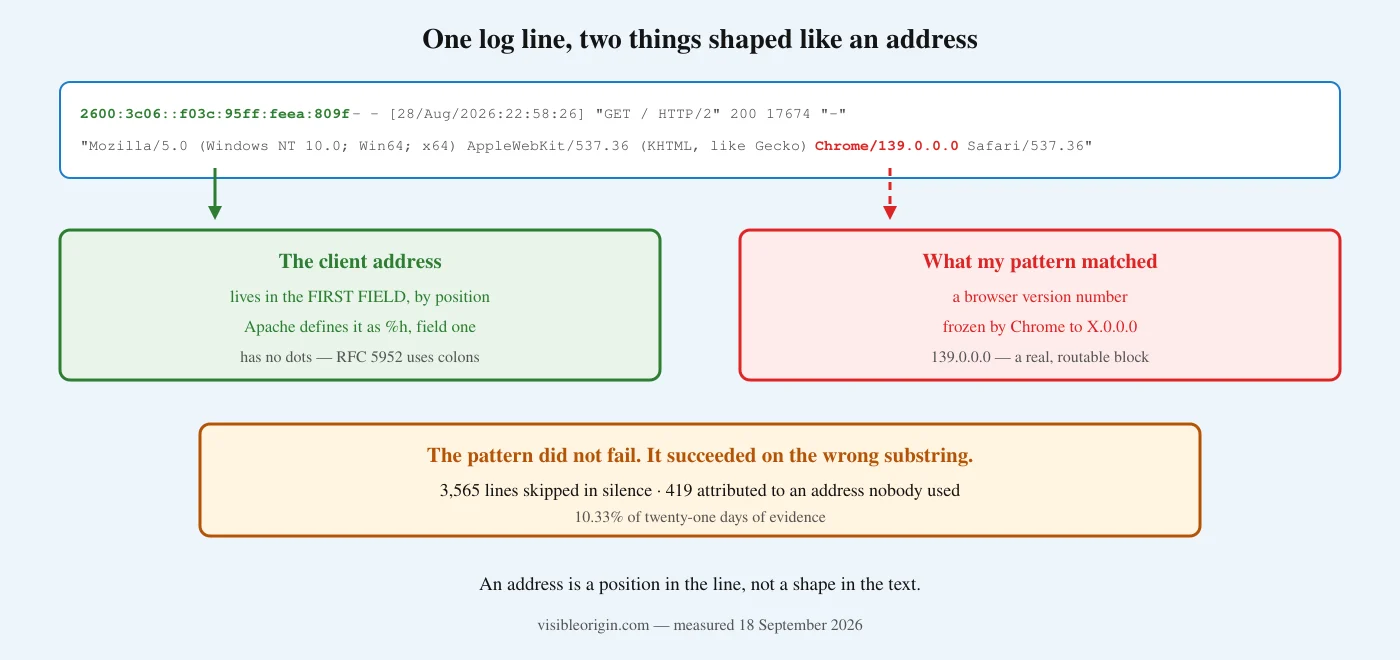
The pattern did not fail. It succeeded on the wrong substring. Of 3,565 affected lines, 3,146 vanished from every count I made and 419 were filed under an address that was never there. I found it hours after scheduling a post built on those counts.
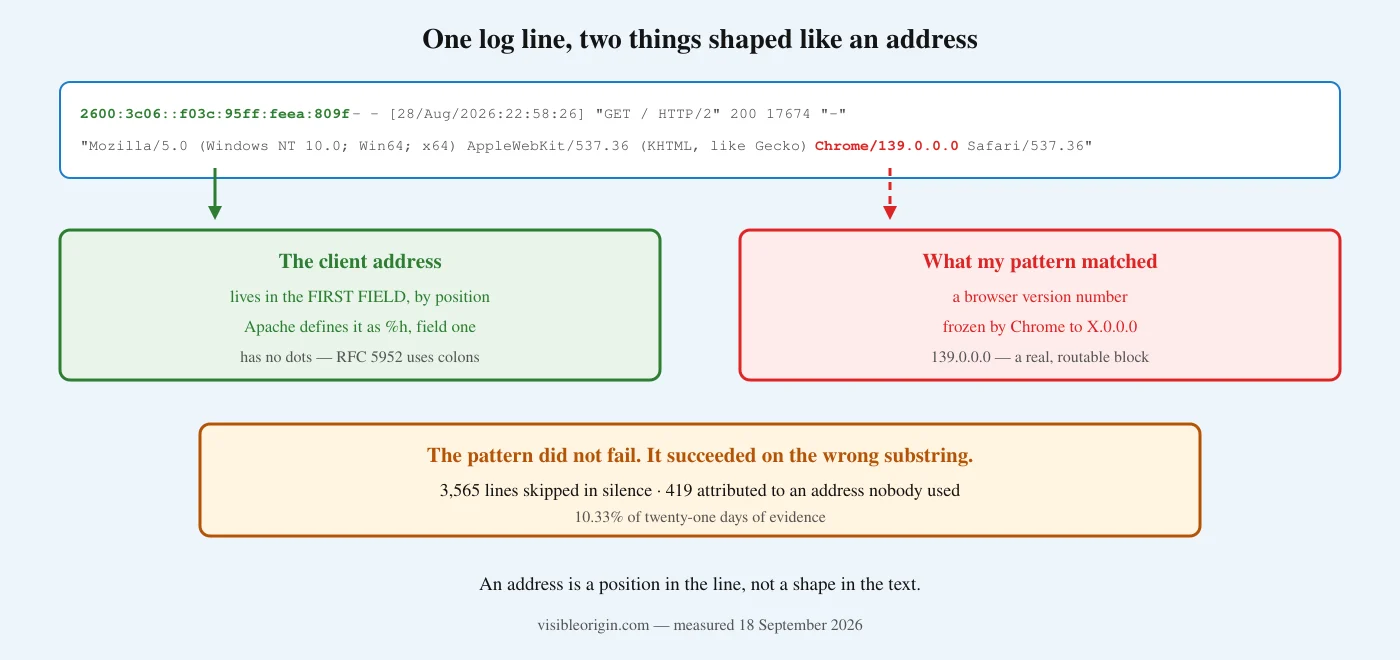
What I asked for, and what I got
The pattern was the first thing anyone writes:
ip = re.match(r'"?(\d+\.\d+\.\d+\.\d+) ', linea).group(1)It works on almost every line, which is the problem. Here is one where it does not, printed exactly as it sits in the file:
"2600:3c06::f03c:95ff:feea:809f - - [28/Aug/2026:22:58:26 +0000]
 "GET / HTTP/2" 200 17674 "-" "Mozilla/5.0 (Windows NT 10.0; Win64; x64)
 AppleWebKit/537.36 (KHTML, like Gecko) Chrome/139.0.0.0 Safari/537.36"
The client is 2600:3c06::f03c:95ff:feea:809f. My pattern skips it — correctly, in a sense, because that string contains no dots — keeps scanning to the right, and finds 139.0.0.0 inside Chrome/139.0.0.0. It returns that. An address that is well-formed, plausible, allocated to a real network, and has nothing to do with the request.
Where the client address actually lives
In a position, not in a shape. The Common Log Format is defined by Apache as "%h %l %u %t \"%r\" %>s %b", and %h — the client — is the first field, before the first space. That is the whole rule. It does not matter what the address looks like, how long it is, or which protocol it belongs to; it matters that it is field one.
A pattern asks a different question. It asks is there anything anywhere in this line shaped like an address, and a modern log line contains several things shaped like an address: browser versions, engine versions, sometimes a path, sometimes a query string. The pattern will find one of them, and it has no way to tell you it found the wrong one.
The reason the first field so often has no dots is in the specification. RFC 5952 gives the text form of an IPv6 address as hexadecimal fields separated by colons; dots appear only in the mixed notation for addresses with IPv4 embedded in the low 32 bits, “the decimal notation may be used only for the last 32 bits of the address”. Ordinary IPv6 traffic therefore never matches a dotted-quad pattern — it is not an edge case, it is the normal case for a tenth of my traffic.
The second failure is worse than the first
Missing the IPv6 lines is a hole. Filling the hole with a fabricated address is a different kind of problem, and it is the one that survives review, because the output looks like data. A log parser that drops rows is annoying; a log parser that invents them is a source of confident wrong answers.
The fabrication has a specific and documented cause. Chrome reduced its user-agent string and froze the version to a fixed shape: the browser reports a major version followed by .0.0.0. Google’s own documentation gives the example string Mozilla/5.0 (Linux; Android 10; K) AppleWebKit/537.36 (KHTML, like Gecko) Chrome/93.0.0.0 Mobile Safari/537.36. So every Chrome request carries a four-part dotted number by design, and a dotted-quad pattern will find it on any line where the real address does not match first.
| Measured over twenty-one days | Lines | Share |
|---|---|---|
| Total in the access log | 34,499 | |
| Client addresses that are IPv6 | 3,565 | 10.33% |
| Of those, silently skipped by my pattern | 3,146 | 9.12% |
| Of those, attributed to a fabricated address | 419 | 1.21% |
The fabricated addresses were 145.0.0.0 (158 times), 124.0.0.0 (116), 131.0.0.0 (40) and a dozen others — a distribution of Chrome major versions, read as a distribution of networks.
Look at that last row again. A table of the top client networks, built this way, is partly a chart of which Chrome releases visited you. Sorted by count it looks entirely ordinary.
Reading a log correctly enough to say who was actually there — before any conclusion about crawlers, bots or traffic — is the first thing the free check does, with every command written out so you can run it yourself. If your own reporting disagrees with your server and you cannot tell which is wrong, that is the technical SEO and server work.
What it cost
I found this while verifying material for a different post, which means it had already been wrong for a while. Every count I had made from this log was built on the same pattern, and the one that had reached a scheduled post was badly wrong:
| Requests to my /.well-known/ files | What I had | What is true |
|---|---|---|
| Total logged | 365 | 1,067 |
| My own traffic | 274 | 952 |
| Third-party requests | 83 | 102 |
| Distinct addresses | 34 | 44 |
The corrected figures are in the post about who asks for those files, which was rewritten before it published.
The headline of that post survived — most of the traffic to my machine-readable files is still me — but it survived by accident, not because the measurement was sound. Had the error fallen the other way, I would have published a number that flattered the product, from a parser that never failed once.
This is the third time in a week that a check of mine worked correctly and answered a question I had not asked. I counted requests at an origin that never saw them, and I looked for behaviour in plugin code when the behaviour was stored in the database. The common shape is not carelessness. It is a check that returns a clean result from the wrong place.
Patterns and positions
| If you ask | You get |
|---|---|
| “find something shaped like an address” | the first such shape anywhere in the line |
| “give me field one” | the client, whatever shape it is |
| “find a four-part dotted number” | IPv4 addresses, and every Chrome version string |
| “parse this as an address” | an error when it is not one — which is what you want |
The fourth row is the one that turns a silent wrong answer into a loud one.
How to write a log parser that cannot do this
1. Split the line, do not search it. The client address is everything before the first space. linea.split(' ')[0] is more correct than any pattern, and it is shorter.
2. Parse what you extracted. Hand it to a real address parser — ipaddress.ip_address() in Python, inet_pton elsewhere — and let it raise. A field that will not parse is a line you should look at, not a line you should skip.
3. Count what you dropped, and print it. Any parser that skips lines must report how many. Mine skipped 3,565 and said nothing, so the number never appeared next to the conclusions it was distorting.
4. Check the totals against something independent. wc -l on the file is free. If your log parser’s lines-in does not equal the file’s lines, you have a number to explain before you have a finding to publish.
5. Test against a line you know is hard. One IPv6 line with a Chrome user agent would have caught this in a second. I had 3,565 of them in the file the whole time and never fed one to the thing that was reading them.
Frequently asked questions
Is this just an IPv6 problem?
No, and that is why it is worth writing up. IPv6 is what made the pattern miss the first field, but the damage came from what it matched instead. Any line where your intended field is absent or differently shaped will hand a loose pattern something else to grab. The version string is simply the most reliably present decoy in an HTTP log.
Would a stricter pattern have fixed it?
Anchoring it to the start of the line would have stopped the fabrication, which is most of the harm. It would not have stopped the silent skipping — the IPv6 lines still would not match — so a stricter pattern converts a wrong answer into a quieter incomplete one. Splitting by field fixes both at once, which is why it is the better habit.
How much of my traffic is IPv6?
Mine was 10.33% over three weeks, which surprised me for a site with almost no human visitors. Yours will differ and the only way to know is to count, which is a one-line check: how many first fields contain a colon. If the answer is zero, confirm that your server is actually reachable over IPv6 before you believe it.
Does this mean your earlier posts are wrong?
One was, and it was corrected before publication; the correction is described above and linked. The crawler-verification work is not affected in its method, because verifying an address against a published range is a test applied to addresses you already extracted — but any count I published from this log before today should be read as a floor, for this reason and for the caching one.
Why did nothing look wrong?
Because 139.0.0.0 is a valid, allocated, routable address. A fabricated value that failed validation would have been caught immediately. The dangerous fabrications are the ones that pass every check you have, which is an argument for having a check the fabrication cannot pass — in this case, reading the field by position.
What is the general version of this?
A pattern describes what a thing looks like. A format describes where a thing is. When a format exists, use it, because appearance is a coincidence you do not control and position is a guarantee someone wrote down.
If you report on your own traffic and have never checked that your log parser reads the same number of lines the file contains, that is a two-minute check and it is the kind of thing the free check reports with the commands attached. If your analytics, your server and your CDN disagree and you need to know which one is describing something else, tell me what the three of them say.
The verdict
I lost a tenth of three weeks of evidence to eight characters of regular expression, and I did not lose it loudly. There was no exception, no warning, no gap in the output. The parser ran to completion on every line and produced a table that sorted, summed and charted like any other.
A log parser is a measuring instrument, and this one had never been tested against an input whose answer I already knew. The thing I want to remember is not the bug. It is that the bug was invisible precisely because the tool was working: the pattern found what I asked for, every time, on lines where what I asked for was not what I wanted. Nothing in that sentence describes a failure, and that is the whole difficulty.
A parser that quietly returns the wrong answer belongs to the same family as a checker that will not run at all: PHP’s own syntax check segfaults on this machine.
Sources
- Apache, mod_log_config — the Common Log Format and the definition of
%has the first field. - RFC 5952, IPv6 Address Text Representation — section 5 on when decimal notation may appear in an IPv6 address.
- Chrome, User-Agent reduction — the reduced string and its frozen
X.0.0.0version, with the example given by Google. - Measurements taken against visibleorigin.com’s access log on 18 September 2026, covering 28 August to 17 September, with the commands reproduced above.