
The short version. “Error submitting page to IndexNow.” is the whole message Rank Math shows, and it leaves out both the HTTP status code and the reason the API gave. I sent five deliberately broken requests to the IndexNow API and read every reply in full. The API explains each failure in plain English, inside a JSON body that Rank Math 1.0.280 stores and never reads. One failure also arrives late: a key that existed nowhere got 202 Accepted, which Rank Math logs as success, and the refusal came one request later.
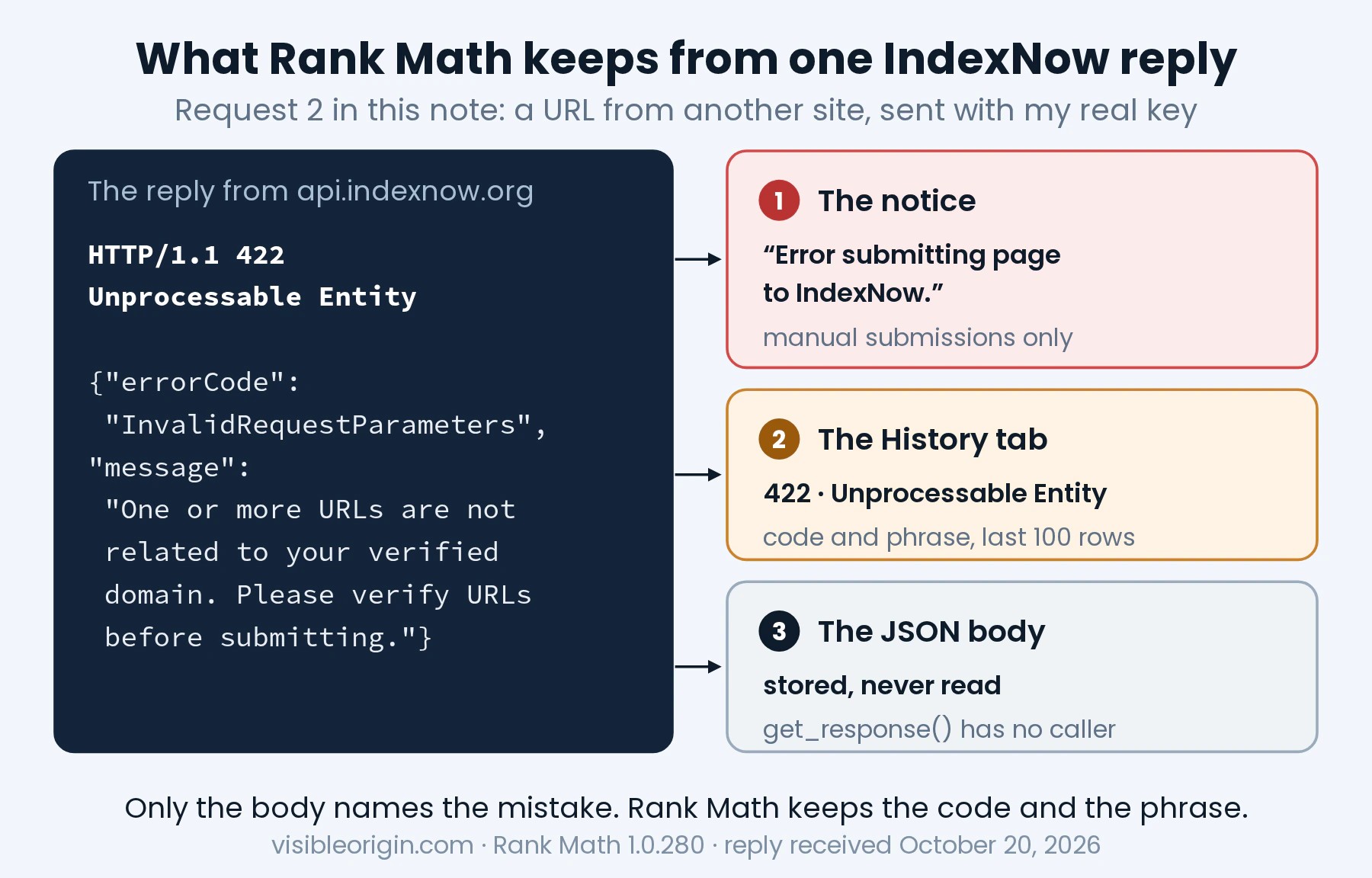
If you landed here, you probably clicked Instant Indexing: Submit Page on a post and got a red notice that says “Error submitting page to IndexNow.” and nothing else. No status code, no reason, no hint of what to change. Searching for that sentence gets you forum threads full of guesses, because the sentence carries no information. I wanted to know what the plugin knows at that moment and does not say, so I read its code, and then I broke requests on purpose, against my own site, to see every reply the API actually sends.
What follows is what I found: where the real code is kept, the five replies word for word, why one kind of failure always shows up one submission late, and four checks that find the real reason on your own site without guessing. Everything was measured on October 20, 2026, with Rank Math 1.0.280 on WordPress 7.1.3.
What Rank Math shows when IndexNow says no
Rank Math sends pages to IndexNow in two ways. The automatic way fires every time you publish or update a post whose type is ticked under Auto-Submit Post Types in the Instant Indexing settings. The manual way is the row action in the posts list, the bulk action, or the Submit URLs tab. Both end in the same function, submit() in class-api.php, which posts a small JSON document to https://api.indexnow.org/indexnow/ and then looks at one number in the reply.
That number decides everything. Line 145 treats 200, 202 and 204 as success, and anything else as failure. What you see after a failure depends on how you submitted:
- From the posts list, with the row action or the bulk action: a notice with one fixed sentence, “Error submitting page to IndexNow.” It is a translated string on line 442 of
class-instant-indexing.php, and it is the same sentence for every failure, whatever the API said. - From the Submit URLs tab: a different sentence for the same failure, “Failed to submit URLs. See details in the History tab.”
- From an automatic submission: nothing at all. Line 422 returns before any notice is added unless the submission was manual, so a failure when you publish a post is silent.
The details live in the History tab, which the plugin itself describes as “The last 100 IndexNow API requests.” Each row has the time, the URL, whether the submission was manual or automatic, and the response code with a short message. It is the first place to look. It is also where the information starts to thin out, in two ways.
The History message is the server’s phrase, not Rank Math’s
Rank Math ships its own friendly message for each code: “Invalid request.” for 400, “Invalid API key.” for 403, “Invalid URL.” for 422, “Too many requests.” for 429. Going by the code, you will rarely see them. The function that picks the message, set_error_message(), uses the reason phrase from the HTTP status line whenever there is one, and falls back to the friendly list only when the phrase is empty.
WordPress makes its outgoing requests over HTTP/1.1: its Requests library defaults to protocol version 1.1 and tells cURL to use it. Over HTTP/1.1, the IndexNow API sends a reason phrase with every status, as you will see below: “Bad Request”, “Forbidden”, “Unprocessable Entity”. So a History row for a broken key should read “403” with “Forbidden”, not “Invalid API key.”, and the two different kinds of 422 I found would produce rows that read exactly the same.
The body of the reply is stored and never read
The IndexNow API answers errors with a short JSON body that names the problem. That is what HTTP recommends: RFC 9110 says that “a server that wishes to make public why the request has been forbidden can describe that reason in the response content.” Rank Math keeps that content for a moment. Line 144 copies it into $this->last_response, and a public method, get_response() on line 181, returns it to anyone who asks.
Nobody asks. I searched the whole plugin for a caller of that method and found none. The body is never logged, never shown and never passed on. The one part of the reply that explains the failure is the part the plugin drops. None of this is a bug in the sense of something broken: the plugin reports what it was written to report. But it means that when you search for this error, you are searching with less information than the plugin had in memory one second earlier.
Five broken requests, and what the API said to each
To read the replies Rank Math discards, I sent the same kind of request it sends: a POST to https://api.indexnow.org/indexnow/ over HTTP/1.1, with a JSON body, from my own server, for my own host. I broke one thing at a time. Five requests and no more, all on October 20, 2026:
curl -sS --http1.1 -X POST 'https://api.indexnow.org/indexnow/' \
  -H 'Content-Type: application/json' \
--data-binary @request.json -D -| # | What I broke | What came back |
|---|---|---|
| 1 | The JSON itself, cut off after "key": | 400 Bad Request“Given request parameters are null or invalid” |
| 2 | A URL from another site in the list, sent with my real key | 422 Unprocessable Entity“One or more URLs are not related to your verified domain. Please verify URLs before submitting.” |
| 3 | A three-character key, abc | 422 Unprocessable Entity“Given key is not valid. Your key should have a minimum of 8 and a maximum of 128 alphanumeric characters.” It goes on to list the allowed characters. |
| 4 | An invented 32-character key, with no key file on my site | 202 AcceptedNothing: the body was empty |
| 5 | The same invented key, 110 seconds later | 403 Forbidden“User is unauthorized to access the site. Please verify the site using the key and try again” |
Sent from this site’s server at 21:24:50 UTC (1 to 4) and 21:26:40 UTC (5). The body’s errorCode field read InvalidRequestParameters for 1 to 3 and UserForbiddedToAccessSite for 5, spelled that way. Every reply arrived in about two tenths of a second or less.
Three things stand out. First, the API is specific: it says which rule you broke, and for the key it spells out the rule itself. Second, the two 422 replies are different problems behind the same status line, so a History row that says “422” and “Unprocessable Entity” cannot tell you which one you have. Third, request 4 did not fail. It was accepted.
One more detail from the replies. The endpoint is served from Microsoft’s network: api.indexnow.org is an alias of a host under bx-msedge.net, and every reply carried an X-MSEdge-Ref header. That matters for the next part, because the request that came to check my key was Bing’s.
A broken key is accepted first and refused one request later
Request 4 is the one worth slowing down for, because it is the one that turns into “Error submitting page to IndexNow” later, on a different day, for a different page. Here is what happened, taken from the API’s two replies and from my server’s access log.
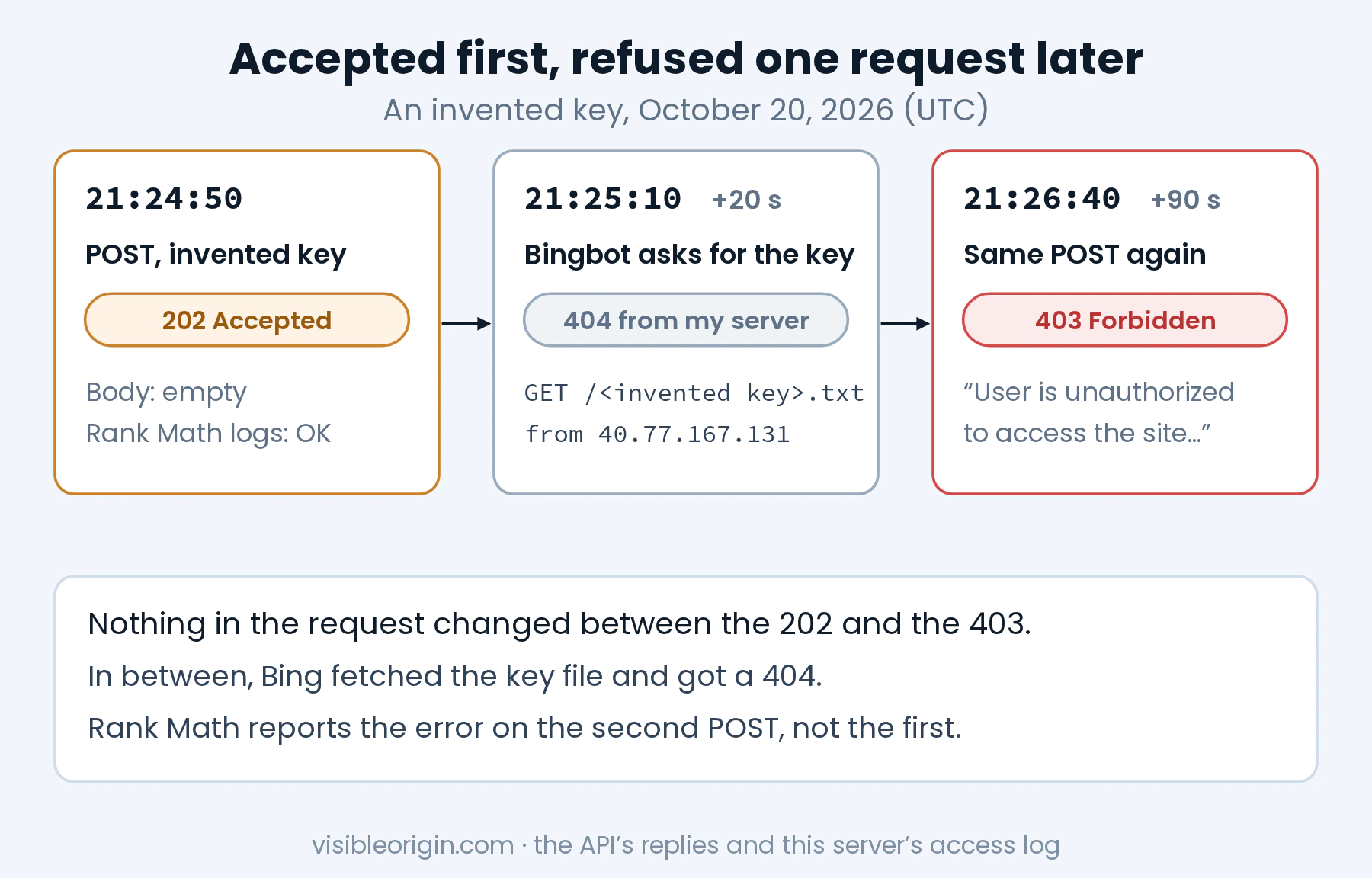
- 21:24:50 UTC. I submitted a page with a key that existed nowhere. The API answered
202 Acceptedwith an empty body. Rank Math counts 202 as success, so in its History this would have been a row that says OK. - 21:25:10 UTC, twenty seconds later. A request for
/<the invented key>.txtreached my server from40.77.167.131, with Bingbot’s user agent. My server answered 404, because no such file existed. The address belongs to Bing: its reverse DNS ismsnbot-40-77-167-131.search.msn.com, and that name resolves back to the same address. - 21:26:40 UTC. I sent the identical request again. This time the reply was
403 Forbidden, with “User is unauthorized to access the site. Please verify the site using the key and try again.”
Nothing in the request changed between the 202 and the 403. What changed was what the API knew: in between, it had tried the key file and failed. This is how HTTP says a 202 is supposed to work. RFC 9110 defines it as a request “accepted for processing, but the processing has not been completed,” warns that it “might or might not eventually be acted upon, as it might be disallowed when processing actually takes place,” and then adds the sentence that explains this whole error: “There is no facility in HTTP for re-sending a status code from an asynchronous operation.”
So the refusal that belonged to request 4 could not be delivered to request 4. It was delivered to request 5. When Rank Math shows a 403, the thing that broke happened before that submission, not during it. If the error appeared today, the useful question is what changed before the previous submission: a new key from the Change Key button, a migration to a new host, a new firewall rule, a maintenance mode, a cache placed in front of the site.
The documentation is split on this point. IndexNow’s own page lists 202 with the reason “URL received. IndexNow key validation pending.” Bing’s getting-started page, which sends you to the same kind of endpoint, lists 200, 400, 403, 422 and 429, and does not mention 202 at all. If Bing’s page is the only one you read, the first reply you get with a new key is not on its list.
A real key goes through the same waiting room. When I turned IndexNow on for this site, the first submission also got a 202, Bingbot fetched the real key thirteen seconds later, and the next submission, a day later, got 200. I wrote that up in the note on what IndexNow actually promises, and why Google is not part of it. The two stories are the same request with a different ending, and the only difference is what the key fetch found.
Every IndexNow error code: what causes it and how to fix it
The table is the short form. The sections after it explain what each code means for a WordPress site running Rank Math, which is where most people meet these errors.
| Code | What it means on WordPress | First thing to check |
|---|---|---|
400 | The request is malformed. Something changed it after the plugin built it. | Replay one request and read the body |
403 | The key could not be verified. The key URL did not return the key when the API fetched it. | The key URL from outside, and the fetch in your access log |
422 | A URL is off your host, or the key breaks the format. Permalinks on another hostname, or a key the plugin did not make. | The body: it names which of the two |
429 | Too many submissions in a short time. Repeated saves, bulk edits, other tools sending too. | The Retry-After header, then slow down |
202 | Received, key check pending. A new or changed key. | Nothing yet: the next reply is the verdict |
0 | No reply at all. The request never left the server. | The same request with curl, from the server |
The causes are my reading of Rank Math 1.0.280’s code and of the replies in this note, not a statistic. The code 0 row is how Rank Math logs a request that failed before reaching the API.
400 Bad Request: the request itself is malformed
IndexNow’s reason for a 400 is two words, “Invalid format,” and the body I got was “Given request parameters are null or invalid.” With Rank Math this one is unusual, because the plugin builds the body itself with wp_json_encode() from four fields: the host, the key, the key location and the list of URLs. Nobody types that JSON, so nobody mistypes it. If a 400 shows up anyway, look at whatever can change the request between the plugin and the API: code hooked to the plugin’s filters for the key or for the submitted URL (rank_math/instant_indexing/indexnow_key and rank_math/instant_indexing/submit_url), or an outbound proxy on your server.
403 Forbidden: the API could not verify your key
IndexNow’s documentation gives two causes for a 403: “key not found” and “file found but key not in the file.” Its FAQ adds the condition people miss: the file “must be reachable at https://yourdomain.com/{your-key}.txt without login, firewall, or IP restrictions.”
With Rank Math there is no file to upload. WordPress answers that address itself: on every request, a function called serve_api_key() compares the requested URL with the key location and, when they match, prints the key as plain text with an X-Robots-Tag: noindex header. On my site that address returns 200, text/plain, and a body that is the key and nothing else, which is what the API wants. The design has one consequence worth knowing. The key file only exists while WordPress is the one answering. Anything that answers first breaks it:
- a maintenance or coming-soon mode that serves its own page to every visitor who is not logged in;
- a web server rule that treats every
.txtrequest as a static file and returns 404 when there is none on disk, instead of passing the request to WordPress; - a cache or CDN that stored a 404 for that address, and keeps serving it;
- a firewall or bot rule that challenges or blocks Bingbot. A key file is an easy victim, because nobody ever looks at it. I once found that my own firewall rule would have blocked my own article about firewall rules, and that was a page I did look at.
Rank Math’s settings have a Check Key button, and the text next to it says it is there “to verify that the key is accessible for search engines.” What it does is open the key file in your browser. Your browser is not a search engine. It has your IP address, your cookies and usually a logged-in session, and none of the rules aimed at bots apply to it. A key that opens for you can still fail for Bingbot. The check that answers the question is the one in your access log, described further down.
Once the address serves the key again, submit one page by hand and read the code in History. I did not wait to measure how long the API remembers a failed check, so I can’t give you that number. The next reply is the only reliable signal.
422 Unprocessable Entity: two different mistakes, one code
IndexNow’s reason for a 422 covers two cases in one line: “URLs which don’t belong to the host or the key is not matching the schema in the protocol.” My requests 2 and 3 hit one each, and only the body told them apart.
A URL on another host. The body said “One or more URLs are not related to your verified domain.” Rank Math sends as the host the hostname of your Site Address, the home_url() setting in WordPress, and every URL in the list has to sit on that host. Anything that makes a permalink point to a different hostname produces this error: a staging copy whose URLs carry another host than its own Site Address, or a plugin or filter that rewrites some permalinks to a different domain. The scheme is not the problem, by the way: the documentation explicitly allows “mixing http and https URLs.”
A key that breaks the format. The body spelled out the rule: 8 to 128 characters, using lowercase and uppercase letters, digits and the dash. The documentation describes the same key as “a minimum of 8 and a maximum of 128 hexadecimal characters” and then lists that full alphabet, which is not hexadecimal; the API’s own message says “alphanumeric.” Rank Math generates its keys from a random UUID with the dashes removed, which gives 32 hexadecimal characters, so its own keys always pass. A 422 of this kind means the key came from somewhere else: typed by hand, imported from another plugin, or set through the key filter.
429 Too Many Requests: slow down, then wait
This is the one code I did not provoke, because provoking it means sending what the documentation calls “potential spam.” Here is what is published. IndexNow’s FAQ says it “does not publicly disclose exact rate limits” and that each search engine sets its own. After a 429 it says to “Check the Retry-After header” and to “Wait at least 10 minutes before resubmitting the same URL, unless it has changed significantly.” RFC 6585, which defines the 429 status, says the response “MAY include a Retry-After header indicating how long to wait before making a new request.”
Rank Math reads three things from a reply: the code, the reason phrase and the body, and as shown above it keeps only the first two. It never reads the headers. So Retry-After will not reach your History, and the wait time, if the API sends one, is in a header that only a manual request can show you. The only rate measurement I have is my own: 100 automatic submissions from this site in under six hours, every one answered with 200. That rate did not trigger a 429 here. It says nothing about where the limit is.
202 Accepted: not an error, and not a verdict
Rank Math treats 202 as success, and as request 4 showed, a key that exists nowhere gets one. Read a 202 as “received, check pending.” The verdict on the key arrives with the next reply, and if the key is broken, that is when you will see your error.
Status 0 and “WP_Error”: the request never reached IndexNow
If History shows a code of 0 and a message that starts with WP_Error:, the API never answered, because the request never got there. Rank Math logs it that way when WordPress’s wp_remote_post() fails before any reply (line 138 of class-api.php): the server could not resolve api.indexnow.org, an outbound firewall stopped it, or it timed out. Run the curl command above from the same server. If curl cannot connect, WordPress cannot either.
My own site sent the same page four times in one afternoon
Reading the History tab for this note, I found a problem of my own. On October 20 I edited every post on this site in several passes: shorter image descriptions, American spelling, two corrections. Each save of a published post triggers an automatic submission, and the History tab was full: 100 entries, the maximum, covering 11:40 to 17:21 UTC. Those 100 entries named 32 different URLs. Nineteen of them had been sent three times and nine of them four times. Every single one got 200.
IndexNow’s FAQ asks for the opposite: “Avoid submitting the same URL many times a day unless there are meaningful content changes,” and, for pages that change often, “wait at least 5 minutes between updates before resubmitting.” A spelling fix is not a meaningful content change, and that part is on me. But the plugin’s guard against repeats is much weaker than the FAQ suggests. Rank Math skips an automatic submission only when the newest entry in its log is the same URL and is less than five seconds old: line 415, with THROTTLE_LIMIT = 5. Five seconds, not five minutes, and only against the last entry.
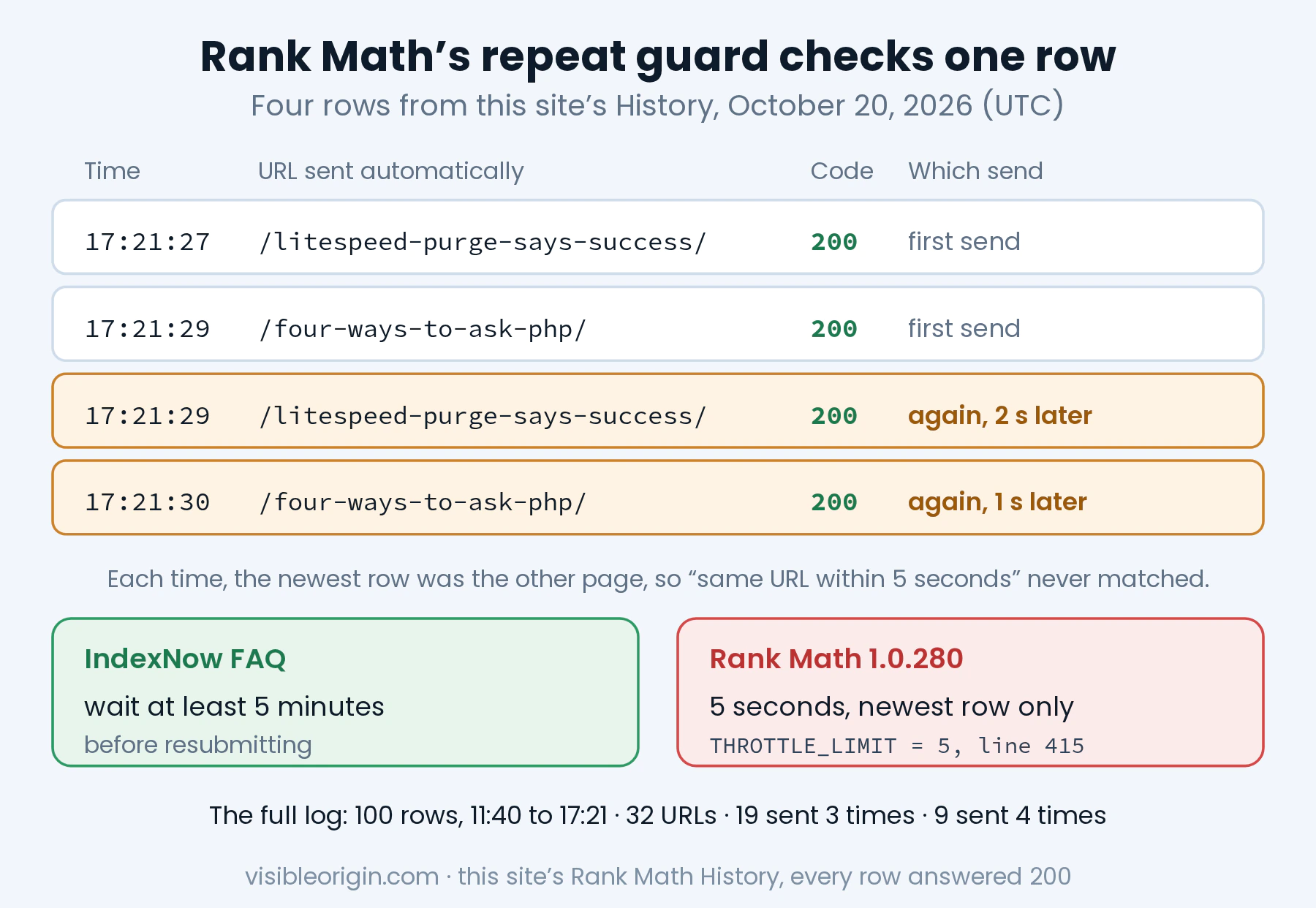
Two pages saved one after the other get past that check every time, and my log shows exactly that. At 17:21:27 it sent /litespeed-purge-says-success/. At 17:21:29 it sent /four-ways-to-ask-php/. At 17:21:29 it sent /litespeed-purge-says-success/ again, two seconds after the first time. At 17:21:30 it sent /four-ways-to-ask-php/ again, one second after its first. Each time, the newest entry was the other page, so the check never matched.
There is a second cost, and it is the one that matters for this error. History keeps 100 entries, so a bulk edit can push an old error out of the log before anyone reads it. If a 403 had been recorded at 11:00 that morning, my afternoon of edits would have erased the only record of it. Before a bulk edit, read History first. During one, you can untick the post types under Auto-Submit Post Types, which is the setting that decides what is sent automatically, and tick them again afterwards. Then submit the pages that really changed, once each, by hand.
How to find the real reason on your own site
Four checks, in this order. Each one answers a question the notice leaves open, and none of them needs anything beyond a terminal and your server’s log.
1. Read the code in History
In WordPress, open Rank Math, then Instant Indexing, then the History tab. Find the row for the page and note the code: 400, 403, 422, 429 or 0. If the row is gone, the 100-entry window has already moved past it; submit the page once by hand to get a fresh row, and look again right away.
2. Read the body with one manual request
Reproduce what the plugin sends, and read the part it drops. Your key is in Instant Indexing, Settings, API Key, and its address is in the field below it, API Key Location. This is a real submission, so send one URL that really changed:
cat > request.json <<'EOF'
{"host":"example.com","key":"YOUR-KEY",
 "keyLocation":"https://example.com/YOUR-KEY.txt",
 "urlList":["https://example.com/a-page-that-changed/"]}
EOF
curl -sS --http1.1 -X POST 'https://api.indexnow.org/indexnow/' \
  -H 'Content-Type: application/json' \
  --data-binary @request.json -D -
The status line at the top is what History shows. The JSON after the headers is what it doesn’t: read its message field. After a 429, look for Retry-After among the headers. And do not paste your key into a forum post while you ask for help. Rank Math’s own settings say you can change the key “if it becomes known to third parties,” and a public thread counts.
3. Fetch the key file from outside
curl -sS -o key.txt -w '%{http_code} %{content_type}\n' \
  'https://example.com/YOUR-KEY.txt'
cat key.txt
You want 200, a text/plain type, and a body that is your key and nothing else. A 404, a redirect to a login or maintenance page, or an HTML page all mean the API cannot verify you. Run it from a machine that is not logged in to the site: a session cookie is exactly the thing the API will not have.
4. Find the verifier’s request in your access log
grep 'YOUR-KEY.txt' /path/to/access.logThis is the check the Check Key button cannot do, because it shows what the API’s own fetch received. On my server it showed Bingbot asking for the invented key twenty seconds after the submission and getting a 404, which is the whole 202-to-403 story in one line. Look at the status code on that line: 200 is fine, and a 403, a 404, a 5xx or a redirect is your problem.
Two cautions before you trust that line. Confirm that the address really is Bing’s the way I describe in the note on checking crawlers by their IP ranges instead of their names: reverse DNS, then forward DNS back to the same address. And if your site sits behind a CDN, your origin log only sees what the CDN let through. A request blocked at the edge never reaches the server, as I found when I made 60 requests to my own site and the access log recorded 6. No line at all, after a 403, points at the edge.
If all four checks come back clean and the error persists, the cause sits between your server and the visitor: a CDN rule, a cache, a firewall. That layer is the technical SEO and server work I do, and it is where most of these failures begin.
What no IndexNow code can tell you
Even a clean 200 is a receipt, not a result. IndexNow’s FAQ is plain about it: “Submitting a URL does not guarantee immediate indexing.” The engines still decide whether and when to crawl. A 200 means the API accepted your URLs and that your key is verified. It says nothing about whether Bing fetched the page, kept it or ranked it. Bing’s guide sends you to its own tool for that: “Use Bing Webmaster Tools to verify if your URLs are received by search engines.”
Where a submission goes is also wider than Rank Math says. Its Submit URLs tab carries a note that the URLs “will be submitted to Bing and Yandex only, and not to Google.” IndexNow’s list of participating engines, the searchengines.json file on its site, named seven on October 20, 2026: Bing, Yandex, Seznam, Naver, Yep, the Internet Archive and Amazonbot. Its FAQ says a submission “will be shared across all IndexNow-enabled search engines.” The part Rank Math gets right is the part that matters most: Google is not on the list, and no IndexNow code will ever tell you anything about Google. What to use for Google is in the earlier note, under “What to do about Google instead”.
Error submitting page to IndexNow: frequently asked questions
What does “Error submitting page to IndexNow” mean in Rank Math?
It means the IndexNow API answered your manual submission with a status other than 200, 202 or 204. The notice is the same sentence for every failure. The status code is in Rank Math’s Instant Indexing History tab, and the API’s explanation is in the JSON body of the reply, which the plugin does not keep, so you need one manual request to read it.
Why did my first IndexNow submission work and the next one fail with 403?
Because the key is checked after the reply, not before it. A new or invented key gets 202 Accepted while the check is pending. In my test, Bingbot fetched the key file twenty seconds later, got a 404, and the next identical request got 403 Forbidden. Rank Math logs the 202 as success, so a broken key always shows up one submission late.
Is a 202 from IndexNow an error?
No. It means the URLs were received and the key check is pending. It is not proof that the key is valid either: a key that existed nowhere got a 202 in my test. The reply to the next submission is the verdict.
What is the difference between the two IndexNow 422 errors?
One is a URL that is not on the host you declared, and the body says “One or more URLs are not related to your verified domain.” The other is a key outside the format of 8 to 128 letters, digits and dashes, and the body says “Given key is not valid.” Both arrive as 422 Unprocessable Entity, so only the body tells them apart.
Where is the IndexNow key file in Rank Math?
There is no file on disk. WordPress serves the key itself, as plain text, at the address shown under API Key Location, usually your site’s root followed by the key and .txt. If something answers that address before WordPress does, such as a maintenance page, a cache or a firewall, verification fails even though the key setting is correct.
Does a 429 from IndexNow mean my site is banned?
No. It means too many requests in a short time. IndexNow does not publish its limits; its FAQ says to check the Retry-After header and to wait at least 10 minutes before resubmitting the same URL. Rank Math does not record that header, so read it from a manual request.
Does a successful IndexNow submission mean the page is indexed?
No. The protocol is explicit: “The HTTP 200 response code only indicates that the search engine has received your set of URLs.” A 202 says even less, as the answer above explains. Rank Math’s History records the reply to the request and nothing that happens after it. Whether the page is then crawled and indexed is each engine’s decision, so check the engine itself; for Bing that means Bing Webmaster Tools, which I measured in the note on submitting a site to Bing.
How long does IndexNow take?
The first visit can come within seconds, but it is not indexing. On this site, the first notice brought Bingbot to the key file 13 seconds later. That visit is the engine checking that the sender controls the site; the IndexNow documentation says engines “crawl the key file to verify ownership and use the key until you change the key.” After that, the protocol only promises that the URLs were received. When, or whether, the page itself is crawled and indexed is up to each search engine.
Does Google use IndexNow?
No. Google is not one of the search engines that implement IndexNow, and the protocol publishes the list of the ones that do. A submission from Rank Math notifies the engines that take part, such as Bing; it does not reach Google. I measured what that meant for this site in IndexNow does not reach Google.
The general shape of this
An API that works asynchronously cannot give you the outcome in the same reply, and HTTP has no way to send it to you later. So its success code is a receipt, and its verdict comes with the next reply or in a log. A tool that wraps such an API and keeps only the number throws away the part where the API explains itself. I have now met that shape three times on this site: a cache purge that said Success without ever looking at the cache, a 301 that did not prove the page behind it existed, and this one. The fix has been the same each time: read the whole reply once, by hand, and then find the log line that shows what really happened.
If you would rather have someone else read those replies for your site, start with the free check: it requests your homepage as Bingbot and four other crawlers, one at a time, and shows you the status code each one received, with the commands to repeat it yourself.
Sources
- IndexNow, Documentation: the response codes and their reasons, the key format and the key location rules quoted above.
- IndexNow, FAQ: resubmitting the same URL, the 5-minute and 10-minute waits, undisclosed rate limits, key file verification, and “does not guarantee immediate indexing.”
- IndexNow, participating search engines (
searchengines.json): the seven engines listed on October 20, 2026. - Bing, IndexNow: Get started: the four steps and the response code table that leaves out 202.
- Rank Math 1.0.280, class-api.php:
submit(), the success codes on line 145,set_error_message(), the 100-entry log on line 272 and the unusedget_response()on line 181. Byte for byte the same file as the one on my server. - Rank Math 1.0.280, class-instant-indexing.php: the five-second guard on line 415, the manual-only notice on lines 422 and 442, and
serve_api_key(). - RFC 9110, section 15.3.3, 202 Accepted, and section 15.5.4, 403 Forbidden.
- RFC 6585, section 4, 429 Too Many Requests: the Retry-After header.
- WordPress Requests, src/Transport/Curl.php: cURL set to HTTP/1.1 when the protocol version is 1.1, the library’s default.
- My own measurements, October 20, 2026: five requests to the IndexNow API from this site’s server, the server’s access log, and this site’s Rank Math History.